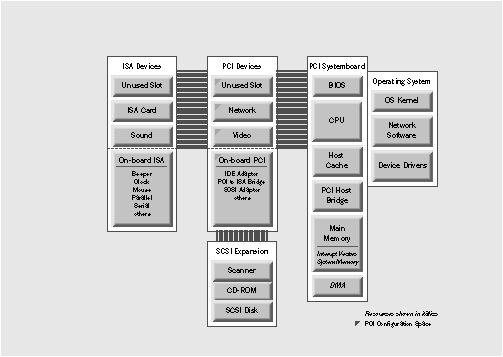
Figure 1: A simple PCI system still includes an ISA bus for compatibility
NEXTSTEP In Focus, Summer/Fall 1994 (Volume 4, Issues 3 and 4).
Copyright ©1994 by NeXT Computer, Inc. All Rights Reserved.
The Need for Speed: PCI
Dean Reece
PCI is a newer bus design that offers significant performance advantages. The specification is still in its first generation, and it's designed to accommodate expansion. It is particularly well-suited to multimedia applications.
Dream Machine
We recently heard about a happy NEXTSTEP customer who was running 90 applications simultaneously, while watching a NEXTIME video at 200 kilobytes per second with no
dropped frames and perfectly synchronized sound. All this while playing DOOM smoothly at 200 percent view.
Her computer probably sports a PCI bus.
NEXTSTEP running on a computer with a PCI bus is pretty close to the dream machine. Unlike previous buses, PCI expandability brings speed--the more you add to it, the faster things go.
Hierarchical Buses
The Peripheral Component Interconnect (PCI) bus specification is defined by the PCI Special Interest Group. The latest version of the PCI spec is "PCI Local Bus Specification, Revision 2.0," the version NEXTSTEP Release 3.3 supports.
Bus-at-a-Glance: PCI
Summary A high-speed bus that allows concurrent data transfers on isolated sub-buses and incorporation of other types of buses. Provides a fully specified resource and configuration
information scheme for automated installation and configuration. Spec as of April 30, 1993, is the "PCI Local Bus Specification, Revision 2.0."
Highlights A PCI computer must include PCI BIOS routines in its ROM BIOS, and may include multiple host bridges as well as PCI-to-PCI bridges and PCI-to-other-bus bridges (ISA, EISA, and others). A PCI Host Bridge chipset is a required interface between the CPU and the PCI bus itself.
Statistics Bus width is 32 bits, and data transfer by default is burst mode (not character-by-character) with data transfers at 132 MB/ second.
Sponsoring organization PCI Special Interest Group, M/S HF3-15A, 5200 N.E. Elam Young Pkwy, Hillsboro, OR 97124; 1-800-433-5177.
NEXTSTEP support Full support in Release 3.3 for the current version of the specification.
PCI is a whole new bus architecture for PCs. It fits in the same general paradigm as ISA, EISA, or MCA in that it's the backplane architecture for the machine: The motherboard is constructed according to the PCI spec.
PCI allows a hierarchy of buses with the benefit of local optimization on a sub-bus. With a data transfer rate of 132 megabytes per second, PCI presents a major speed win.
Its architecture is processor-independent. It simply transfers data among devices, much like an in-board network. PCI works with any CPU in any computer a manufacturer cares to design. Theoretically, a user could buy a PCI device and plug it into an Intel computer or an Apple computer or any other computer--a SPARC or ALPHA or AMD27000 type computer--as long
as the computer provides a PCI slot.
The system
The PCI system includes a CPU and its memory, a PCI bus, and a host bridge, which is a chip that connects the two. On the PCI bus, there may be PCI devices present, either soldered directly to the motherboard or connected as PCI expansion cards in PCI slots. Special code in the system's BIOS, called the PCI BIOS, configures the PCI components when you turn on the computer.
The PCI bus
The PCI bus is much like many other system buses in that it provides a data path between processors and peripherals. It has a symmetrical architecture, with every device on that PCI bus being equal. Its hierarchical architecture permits many independent PCI buses to be present in one computer. It allows other types of buses such as ISA and EISA.
The host bridge chipset
Minimally, a PCI system must have a bridge to connect its CPU and memory to the PCI bus. This chip is called a host bridge because it connects the host CPU to the PCI bus. Because the host bridge is on the PCI bus, it's considered a PCI device representing the CPU and its memory. As such, the host bridge can be addressed by any other device in the system, much as a SCSI adapter requires an ID on the SCSI bus. This means the motherboard--the CPU and its memory--is seen as a device on the PCI bus.
PCI bus bridges
Because PCI allows for multiple buses, it must also define a means for data to pass among them. The mechanism is a chip called a bus bridge. There are various kinds of bus bridges.
One of the advantages of bus bridging is that devices on other buses are electrically buffered. If a bus allowed hundreds of devices, the chips connected would have to be able to source enough current to signal all those devices at the same time (only one of which would respond), and the current flow would create problems.
A PCI-to-PCI bus bridge is a chip that resides on a primary bus and represents a lower, independent PCI bus. On that lower PCI bus there may be more PCI-to-PCI bus bridges, representing even lower PCI buses, thus implementing a hierarchical PCI bus tree. A PCI-to-PCI bridge knows three bus numbers: the number of the bus it's attached to, the number of the lowest numbered bus it represents, and the number of the highest numbered bus it represents. Within a subsidiary PCI bus, two devices can communicate directly with each other without consuming the bandwidth of other buses.
The PCI sub-bus scheme permits the inclusion of ISA without encompassing it. By contrast, the EISA scheme completely encompasses ISA. The PCI-to-ISA bridge represents a complete ISA bus as a single PCI device on the upper PCI bus.
A PCI-to-EISA bus bridge is a chip that represents a complete, subordinate EISA bus. There may be PCI-to-MCA, PCI-to-PCMCIA, and other bus bridges, all providing a means to incorporate those buses along with the primary PCI bus. A computer with all those bus bridges would support just about any expansion card made.
In practice, the PCI bus, because of its generally superior characteristics, is used as the main bus, and manufacturers incorporate additional buses with limited slots for compatibility.
PCI devices
A typical PCI computer contains PCI peripherals, such as SCSI, networking, and display devices. PCI devices on each bus are uniquely identified by two numbers: a device number from 0 to 31 and a function number from 0 to 7. Using all possible combinations allows up to 256 logical PCI devices per PCI bus. This device and function number guarantees that each device is unique, which allows automatic device-detection without fear of resource conflicts, a common problem on ISA.
A PCI computer may include PCI devices soldered onto the motherboard and PCI slots for expansion cards. The device numbers for both are hard-wired into the system (see Figure 1).
Figure 1: A simple PCI system still includes an ISA bus for compatibility
Like PCI host bridges, PCI bus bridges have unique PCI device numbers. The hierarchical bus model is possible because of PCI-to-PCI bridges. Each bridge appears as a single device on its parent bus, but provides a new, subordinate bus, which may contain additional PCI-to-PCI bridges, and so on.
A fully populated PCI system allows up to 256 buses, each with up to 256 devices, for an absolute limit of 65,536 devices; 256 of these would be bus bridges. Each PCI device also has some on-board memory dedicated to a defined configuration space.
PCI also specifies a BIOS for each expansion card that can be CPU-independent or Intel-specific. The CPU-independent on-board BIOS is a set of images of the on-board BIOS, one for each CPU the device manufacturer cares to target. A BIOS with such a set of images is called "fat"; a four-way fat BIOS might include images for Intel, Motorola, PA-RISC, and SPARC processors.
History of PCI
The PCI specification was invented by Intel as a design for a bus that would provide for fast data transfer, modern configuration features, and development of systems that are backward-compatibile with ISA and other buses.
PCI was designed with multimedia workstations in mind, live video in particular. The design goal was derived from the requirements of live teleconferencing with two other sites, running a main window with two smaller windows and three channels of full-speed audio, without choking, with enough extra bandwidth to keep the system running at the same time.
Intel formed the PCI Special Interest Group as a formal industry body to oversee further development of the PCI specification.
PCI BIOS
The PCI specification dictates PCI-specific routines in a computer's ROM BIOS. These routines, collectively called the PCI BIOS, work at startup time to inspect the computer for PCI and other buses and to allocate resources for PCI devices.
All PCI specifications are processor-neutral except those governing the PCI BIOS, because the system BIOS is necessarily processor-dependent.
At startup, the BIOS routines inquire after each PCI device on the bus and configure it, calculating resource needs and loading pertinent information into each PCI device's on-board configuration space. This allows completely device-independent configuration. The BIOS doesn't need to know each device's particular function (sound, display, or SCSI); BIOS just gets memory, IRQ, and I/O space requirements for each device from the device, cycling through device 0, device 1, device 2, and so on, up to device 31.
When the BIOS encounters a PCI-to-PCI bridge on bus 0, the BIOS recognizes the existence
of that bridge, initializes it, numbers the bus that the bridge represents (bus 1 in the first case), and queries for devices 0 through 31 on that bus. If there are more bridges representing buses below, the BIOS initializes them and numbers them sequentially as it encounters them, going down the tree, inquiring after devices for each bus, and so on. After the BIOS has exhausted the whole tree, it continues walking along bus 0 initializing other devices. If it encounters another PCI-to-PCI bridge, it investigates its devices, initializing and numbering any bridges in the same manner.
PCI operating systems
PCI operating systems can communicate with the PCI bus and provide general facilities for installable PCI device drivers to interact with devices.
The specification
The PCI bus specification provides for very high-speed data transfer, electrical power management, a physical and mechanical design that accommodates both ISA and EISA expansion cards, and an extensive configuration space and bus arbitration scheme.
PCI draws heavily from SCSI models. The bus is symmetric: All devices are essentially addresses, and any device can take control of the bus. Also, just as SCSI devices have a SCSI ID number with one or more logical unit numbers (lun), PCI devices have PCI device ID numbers with one or more logical function numbers.
PCI has three separate address spaces: memory space, I/O space, and configuration space. Memory and I/O space are similar to the ISA model. There are some kludges built into PCI to permit compatibility with AT class machines, basically treating the lowest 1 megabyte of memory specially, to allow for DOS and ISA memory.
Physical considerations
Clever mechanical conventions make sure you can plug a PCI card into a physical chassis that also allows ISA, EISA, or MCA expansion cards. The PCI specifies construction of expansion cards that mirrors construction of a typical ISA card. This means slots on a motherboard can accept either a PCI or ISA-type expansion card, because each slot location may have dual connectors on either side of the center of the slot location.
Slots and expansion cards are keyed for 3.3 volts (front) and for 5 volts (back). This allows for a "universal" slot that tries 3.3 volts first, then 5 volts, thanks to the chipsets that drive the slots; on-board circuitry detects available voltage and routes it appropriately (see Figure 2).
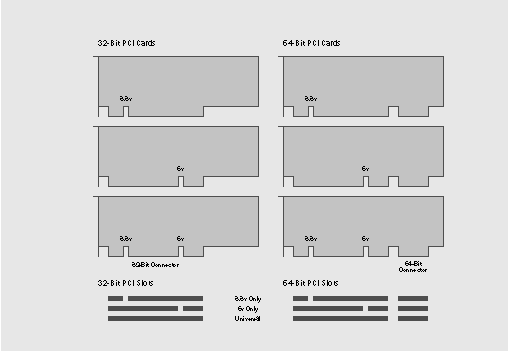
Figure 2: PCI slots are keyed for 3.3 volts and 5 volts as well as for 32-bit and 64-bit data paths
Also, PCI specifies both 32-bit and 64-bit standards. The 64-bit standard is identical to the 32-bit standard, adding a second connector for the extra bits. You can plug a 64-bit board into a 32-bit slot, leaving the extra overhanging, and the card will sense it's connected to the smaller slot
and work accordingly. You can also plug a 32-bit card into either a 32-bit or a 64-bit slot, and it will work.
Generally the mechanics prevent you from mismatching cards and slots--if the card fits,
it works.
Future Prospects for PCI
By defining the PCI specification and developing the first PCI chipsets, Intel dictated the shape of the first generation of PCI computers. Tests show that manufacturers are following the PCI specification very closely. A revision to the current specification is expected in early 1995. The second wave of computers will provide improved BIOS features, and some will support the first PCI chipsets made by Intel's competitors.
The PCI specification was designed with future expansion in mind. The standard already includes a double clock rate of 66 megahertz, a double bus width of 64 bits, and a specification for a 264 megabyte per second burst data transfer rate. Thus, the spec defines the upgrade path and heads off uncoordinated upgrade attempts.
All manufacturers are leaning toward PCI; this indicates that in the future PCI computers will be inexpensive. Also, Apple is expected to introduce a Macintosh with a PCI bus. When that happens, you'll be able to buy one card and plug it into either a PC or a Macintosh.
Bus arbitration
PCI specifies symmetric bus mastering. When a device has data, it signals its need to take control of the bus and write that data to a location. The bus is symmetrical in that there is no default device that controls--or masters--the bus; any device can request control. If another device signals at the same time, the arbitration process awards control to the device with the lowest number. (The host bridge is usually numbered bus 0, device 0, function 0.)
Data transfer
Data is transferred in bursts rather than byte by byte, spreading the overhead of arbitrating for the bus across multiple transfer instances.
A PCI bus cycle is nontrivial, working with memory, I/O, or configuration space areas, and possibly specifying cacheable data. Bus phases and transparent negotiation, going down into the electrical specs, are an elaborate mechanism that spell out phases the bus goes through from being idle to doing something. The first phase arbitrates which device wins; the next phases specify a target, then specify the transfer that will occur, then actually make the transfer.
Power management
The PCI standard embraces both 5 volt and 3.3 volt logic and includes a variable bus clock to scale between 0 and 33 megahertz, allowing power savings. Federal regulations are increasingly mandating lower power consumption, which generates less heat, but as yet there are few 3.3 volt parts. Universal parts that work with either 5 volts or 3.3 volts are also rare, and more expensive, but will provide a smooth transition to lower voltage systems.
Configuration space
PCI's configuration space provides the underpinnings for automatic configuration and for a hierarchy of buses. Data stored in configuration space is defined not to be processor-specific.
PCI configuration space addresses are in a 24-bit format. The most significant 8 bits identify a particular bus. The next 8 bits identify a device (5 bits) and a function (3 bits). The least significant 8 bits identify a register. Thus a PCI entity, or logical PCI device, exists as a particular function of a particular device on a particular bus. A device with a single function must implement that function as function 0. Devices with multiple functions must number the functions contiguously from 0 up to 7.
Each logical device (PCI entity) provides up to 256 bytes of configuration registers. The predefined fields take up 64 bytes. Within this configuration space, there's a 16-bit device ID and a 16-bit vendor ID. The PCI Special Interest Group hands out vendor IDs to manufacturers, and each manufacturer creates its own device IDs. The designers can use the balance of the 192 bytes for any purpose, generally for device-dependent information. For example, a networking device might store its Ethernet ID, its IP address, and even the phone number for a good local deli.
PCI problems
Despite all its other fine qualities, the PCI specification does not define BIOS requirements well.
Most BIOSs aren't designed to run in protected mode. Thus any BIOS calls drop into the 8086 "real mode," giving the routine access to the entire memory space. This is acceptable at boot time, when the computer hasn't yet established the operating system; it's a real danger if the operating system is running a full suite of processes in protected mode.
Also, while the PCI specification permits a PCI bus hierarchy, currently we have yet to verify a BIOS that tests for sub-buses at boot time.
The result is that the first wave of PCI computers has not been fully PCI-compliant.
How a PCI Computer Works
A PCI computer has--at minimum--a PCI-savvy BIOS and a PCI host bridge interfacing with PCI devices on the motherboard and PCI devices in PCI slots. The operating system and device drivers must also be PCI-savvy. An expanded PCI computer requires matching routines in the BIOS and operating system.
A simple PCI computer
A simple PCI computer has just a PCI bus. PCI devices may be built into the motherboard or may exist on PCI expansion cards in PCI slots. Such a design owes no allegiance to ISA or other DOS-based traditions, and may provide the basis for small, very high-speed computers including data acquisition devices and other embedded systems.
When you turn on the computer, the ROM BIOS typically inspects the computer's hardware and then begins hardware configuration. The PCI-specific routines in the ROM BIOS query the host bridge and the primary bus for devices, calculate system resource allocation, and send pertinent configuration information to each device. The BIOS queries subordinate buses until all devices on all buses have been tested and the configuration job is done.
Then the operating system comes up, and the computer is ready for work. As processes require data, PCI devices take over the bus, burst data to target device addresses at 66 megahertz or faster, and relinquish control of the bus for other activities.
Two Gotchas!
A PCI chip bug called the "write-posting" bug causes a chip to raise a flag claiming it has written data when in fact it hasn't yet; new data that comes too soon overwrites the as-yet unwritten data. To deal with this gotcha, the Intel 824X0 driver in NEXTSTEP Release 3.3 searches for chips susceptible to the write-posting bug and on detection automatically disables write-posting.
A second gotcha: Currently, the BIOS on the motherboards of PCI computers doesn't investigate PCI-to-PCI bridges. Only devices on bus 0 are recognized.
A typical PCI computer
Today's PCI computers typically include an ISA or EISA bus to allow backward compatibility with consumers' existing peripheral equipment.
Such devices as a mouse, modem, and IDE hard disk drive reside in the older bus, as there's no sense in getting expensive PCI-based adapters for such equipment. The display and network devices can reside on the primary PCI bus. A SCSI chain might reside as a subordinate bus in its own right.
In operation, the primary bus arbitrates between the display, network, and host bridge, favoring the host bridge (device 0) in the case of conflicts. Data transfers on the ISA or EISA bus go up through the primary bus to the CPU and back. SCSI activity also goes through the primary bus.
PCI vs. ISA, EISA, and VL
ISA and VL-bus are sloppy specifications with ambiguities. EISA is better defined, but still includes ambiguities. In contrast, PCI is rigidly defined electrically, logically, and mechanically.
ISA's top speed is 8 MB/sec. EISA's burst speed is 33 MB/sec, while VL-bus permits 132 MB/sec
for reading and 66 MB/sec for writing. PCI's 32 bit implementation tops out at 132 MB/sec for both reading and writing. A new VL-bus specification doubles its numbers to compete with PCI.
PCI does burst transfers by default, while EISA and VL-bus only occasionally achieve their highest speeds in burst transfers. A 64-bit PCI bus doubles the current theoretical limits, although practical data throughput currently is about one-third of that.
Both EISA and VL-bus are physically tied to the ISA bus. PCI, on the other hand, uses completely different connectors, electrically isolated from ISA slots. It doesn't share signal space with ISA either.
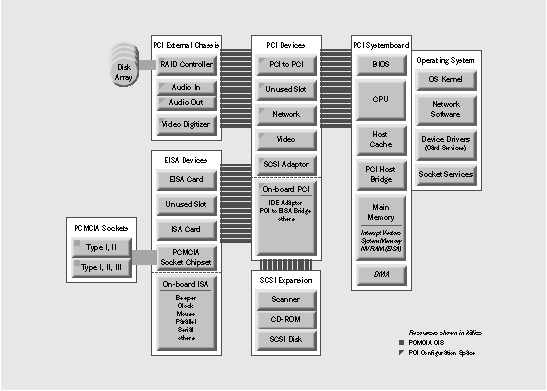
Figure 3: An elaborate PCI system may depend on an external PCI expansion chassis
An expanded PCI computer
The near-future PC hot rod will take full advantage of the PCI bus tree.
For backward compatibility, such a computer might be similar to our typical PCI system, adding PCMCIA capabilities into the ISA bus structure.
The PCI sub-bus architecture will permit multiple independent PCI buses, either in parallel to each other below the primary bus or in a tree-style hierarchy. Each subsidiary PCI bus, because of its isolation, might be dedicated to a particular kind of high-speed data transfer. For example, one sub-bus might support two sound devices, one recording and the other playing.
A RAID system (Redundant Array of Inexpensive Disk drives) provides another sub-bus example. The RAID system might consist of three or four SCSI controllers sharing a subsidiary PCI bus working with a processor that makes the conglomerate look like a single disk drive to the system above.
Another example is the Cogent EM964 four-port network expansion card. It's built around five chips, four identical, each for its own port. The fifth chip is a bridge device that represents the entire card as a single device to the bus above.
NEXTSTEP and PCI
NEXTSTEP Release 3.3 fully supports PCI Revision 2.0. (NEXTSTEP Release 3.2 does not.) All you've got to do is buy a computer that has a complete implementation of PCI in the hardware and the BIOS, preferably a computer with a BIOS that initializes secondary buses.
Performance
In its first generation, PCI is as fast as the fastest competing bus; second and third generations will get progressively faster. Any PCI computer is fast enough to run NEXTSTEP. NEXTSTEP is clearly a multimedia operating system, and NEXTIME obviously benefits.
PCI provides for more concurrency, such as direct device-to-device transfers and multiprocessors, for even better performance. Importantly, PCI provides a framework--
for NeXT as well as for other vendors--to implement concurrent features in a generic way, making for easy engineering.
Easy installation and configuration
NEXTSTEP PCI configuration services are based on the configuration services of the PCI bus. PCI's configuration capabilities are unique.
When you install NEXTSTEP, you can use Configure to add a PCI device driver, relying on its autodetect feature. When you add the driver, you see that there's no need to select resources, because the resource information is determined at boot time by the PCI BIOS.
The Release 3.3 version of Configure provides two views of device drivers. One view presents only drivers for devices it automatically detected; the other view is of all relevant device drivers in the /usr/Devices directory.
For instance, on a typical computer, Configure's autodetect feature detects one display device, one SCSI device, and one network device, and presents the device driver corresponding to each. In NEXTSTEP Release 3.2, you had to pick the correct device driver from a list of all display, all SCSI, and all network device drivers.
Just as Configure's autodetect feature selects the correct driver, PCI's device drivers can provide an autoconfiguration feature that arbitrates and allocates the resources the device needs. Note that autoconfigure depends on the BIOS in the computer detecting the PCI devices and resources correctly. In the case of a computer in which the BIOS works incorrectly, the user can usually--not always--configure resources manually.
The boot process
On Intel-compatible hardware, the PCI BIOS provides access to the configuration space. Because existing PCI BIOS implementations are not reliable, NEXTSTEP implements its own PCI support.
At startup, the booter checks to see if a PCI bus exists on the computer. If so, the booter scans the bus to look for devices, then produces a list of devices to pass to the kernel.
If the kernel receives notice that a PCI bus exists, it spawns a PCI bus object of the class bus. The PCI bus object represents the PCI bus to the entire system, working as a configuration broker and message passer.
PCI device drivers check for specific PCI devices. The engineer who writes a device driver embeds a string of PCI device ID numbers for each device the driver supports. If a device with a matching ID is found, the driver is loaded and given access to the configuration space of that particular device.
Taking Over the World
It looks like the future looks belongs to PCI. PCI is fast, and allows easy configuration. The specification is robust and anticipates future needs. In particular, data transfer rates will double soon, making PCI by far the fastest defined architecture. PCI bus trees allow electrical isolation of special activity, providing full bandwidth data transfer on multiple buses simultaneously. The required chipsets are inexpensive. Most convincingly, manufacturers are creating new PCI devices and systems first, allotting secondary efforts to upgrade existing products. The result is a fast, multimedia-ready PC that can intermix ISA, EISA, MCA, and pretty much any other buses.
Dean Reece is manager of the Drivers group at NeXT.
_________________________________________________________________________________
| Next Article | NeXTanswer #1951 One PC, More Than One OS? |
| Previous article | NeXTanswer #1957 Flexibility in a Tiny Package: PCMCIA |
| Table of contents |  http://www.next.com/HotNews/Journal/InFocus/Summer1994/ContentsSummer1994.html http://www.next.com/HotNews/Journal/InFocus/Summer1994/ContentsSummer1994.html |