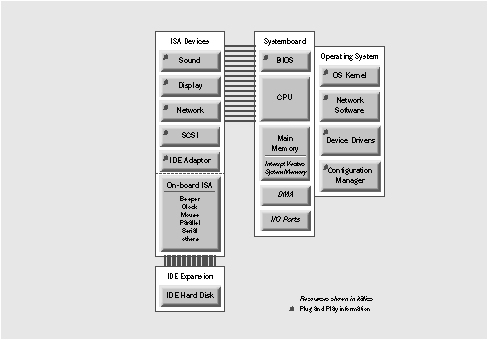
Figure 1: Marked ISA devices contain Plug and Play information
NEXTSTEP In Focus, Summer/Fall 1994 (Volume 4, Issues 3 and 4).
Copyright ©1994 by NeXT Computer, Inc. All Rights Reserved.
Simple Configuration:
Plug and Play
Matt Watson
Plug and play is both a general concept and a specification. Although it doesn't provide
much specifically for portables and other small computers, nor for high-end systems, it does
allow an easy upgrade path for ISA systems.
Configuration with Compatibility
"Everybody wants easy configuration, but nobody's going to throw away 100 million ISA computers to get it." That was the thinking in the late 1980s, as Intel and Microsoft engineers sweated over how to stave off competition from modern systems.
The general concept of "plug and play" has to do with managing resources--IRQs, DMAs, I/O ports, and various kinds of memory--in an automated way. The goal is to relieve the user from having to understand and track the complexities of installation trade-offs. In other words, no worries at install time.
Pretty sweet idea, huh?
To make that idea a reality, folks developed the Plug and Play specification. (Note the capital letters--they distinguish the general concept from the actual spec.) The specification dictates a particular configuration information storage scheme for ISA systems. Plug and Play expansion cards and particular software protocols coexist in ROM BIOS, operating systems, or both to manage the allocation of resources. Because Microsoft has announced an implementation of Plug and Play in Windows95 (code-named "Chicago"), the rest of the industry has adopted a cautious stance until that day.
Either way, plug and play promises automatic inspection of devices, arbitration and allocation of resources, as well as insertion and removal detection.
But the industry is only on the cusp of these new conveniences. Most users are still hand-cranking the engine, wishing for a key and a starter motor.
What's Plug and Play?
Plug and Play is a clever, inexpensive way of storing configuration information on a device while retaining absolute ISA compatibility. The benefit is that it frees the user from the pain and suffering of upgrading systems and installing new devices.
Today--plug and pray
If you're living in the old PC world--most of us still are--there isn't much you can do with your computer until you've configured it and all its pieces correctly.
When you want to add new devices and capabilities to your ISA bus-based PC, you have to know which resources are available and which the new devices require. That means you have to know which IRQs, DMA channels, I/O ports, and system memory areas are claimed by other devices and which are not. You have to know how to alter the expansion card, the device driver for the expansion card, and any software that communicates with the device.
For many people, it's easiest to get somebody else to do all this. Yet many wonder, "Wouldn't it be nice to plug a device into the computer and have it just work when it's turned on?"
Bus-at-a-Glance: Plug and Play
Summary Not a bus, but rather a specification of how to embed information about installation parameters in devices so that software can fully control configuration.
Highlights Requires a Plug and Play BIOS or operating system. Expansion cards store
configuration information in on-board ROM. Burst transfer rate and bus width depend on other characteristics of the bus.
Specification Stable in its first major version.
Supporting organizations Include the Plug and Play Association. On CompuServe, go plugplay; or on the Internet, send e-mail to plugplay@microsoft.com.
NEXTSTEP support Full support is planned for the near future.
Attempts to implement plug and play so far
The plug and play concept exists mostly as a hope and a design goal at this time. The underpinning is a specification for resource information on-board the expansion cards and devices in a memory area generally called the configuration space.
The PCI and PCMCIA specifications both dictate configuration space with a format for predicting resource requirements, device ID, status, and other information; however, they implement this space very differently. The specifications also describe software requirements that provide in effect an Applications Programming Interface (API) as a standard means of reading and
writing data.
However, neither spec provides plug and play benefits to ISA-bus computers.
Plug and Play History
The introduction of the PC/AT in the mid-80s was remarkable in that IBM neglected the opportunity to make significant changes to the ISA bus. Thus, the PC/AT milestone revealed that the ISA bus had already been carved in stone for all PC-compatible computers. The upside of the consistent, de facto standard was that it brought an avalanche of products, all competing in increasingly devious ways for the limited resources of the computer. Installing any new equipment required understanding potential conflicts.
The Mac II, introduced in the late 1980s, featured a bus architecture that was free of hassle. Users bought new expansion cards, plugged them in, and went to work. The contrast was notable, yet for a few more years the architecture of the ISA bus confounded design of inexpensive extensions that would allow backward compatibility yet simplify installation.
In early 1993, Intel and Microsoft proposed an ISA-specific specification for Plug and Play, thus beginning the Plug and Play Association. Compaq and Phoenix joined, bringing the improvement of a Plug and Play BIOS specification. Increasing numbers of manufacturers have begun to expand the specification beyond ISA to other buses and devices such as EISA, PCI, and PCMCIA, as well as printers and SCSI devices.
The Future--Official Plug and Play
In contrast to PCI and PCMCIA, the Plug and Play solution for PC-specific resource allocation problems targets the ISA bus. This specification is real, but there are still issues to smooth out and problems to solve. And just as important, there's the question of what Microsoft will eventually implement.
What's in the specification
The Plug and Play specification dictates Plug and Play software in the ROM BIOS as well as in the operating system of a Plug and Play computer. It also dictates that each Plug and Play device stores its configuration requirements on-board.
Guaranteed ISA compatibility
Plug and Play expansion cards differ from classical PC expansion cards in that they have on-board ROM that stores resource requirement information. At startup time, the software in the BIOS queries all Plug and Play devices, allocating resources according to the information it finds and resolving conflicts as best it can.
The Plug and Play specification guarantees compatibility with existing ISA systems. It goes so far as to consider the claims of non-Plug and Play expansion cards as a higher priority, allocating the remaining resources to Plug and Play devices from what's left over. This spares users from reconfiguring devices they've already installed.
Thus, from the manufacturers' view, Plug and Play capability is an inexpensive addition--simply upgrade the BIOS, license a Plug and Play operating system, add a little ROM to an existing expansion card design, and voilá: Plug and Play on ISA.
Other features of the specification
The spec includes a number of other goodies intended to improve life in the PC world. For example, it specified that the operating system must include a configuration manager to help device drivers talk to the cards. It also requires that each bus in a multiple-bus system have its own bus enumerator driver to report resource allocation information to the configuration manager. And it requires resource arbitration software to help in allocation, doling out resources according to established algorithms that account for various device requirements.
There is also a specification for a "best configuration." If a card can work with more than one configuration and the vendor knows that a particular combination of resources performs better than others, the vendor can list preferred combinations.
What's more, Plug and Play also specifies international localization in the hardware in the form of Unicode strings. For instance, a manufacturer's identification string can be specified as Unicode.
Finally, the spec describes a file format called the ESCD (Extended System Configuration Data) that allows data files to be used by non-Plug and Play hardware in an operating system that's Plug and Play aware. This is analogous to the NEXTSTEP system configuration file, which saves some of the system configuration data used at startup time to disk, instead of in the BIOS.
Floor wax or dessert topping?
Yet, along with all the great aspects to the Plug and Play specification, there are some seemingly topsy-turvy elements.
Plug and Play assumes Plug and Play features in the BIOS and the operating system. The idea is that ideally a system would run a Plug and Play operating system on a computer with a Plug and Play BIOS, but if one were missing the other could do some or all of the job. For example, if your system has a Plug and Play BIOS, at startup time the BIOS should query devices and allocate resources. When the operating system loads, if it's Plug and Play, it should check to see if the BIOS is also Plug and Play. If it's an OS of another type, the operating system does the job of querying devices and allocating Plug and Play. Sounds confusing, but it works.
Another oddity: While Plug and Play is intended to resolve the chaos of ISA-based systems, its features can be implemented in a variety of devices on any bus. Indeed, various groups are busy specifying ways in which the Plug and Play protocol can be implemented on EISA, PCI, PCMCIA, SCSI, and other buses.
Furthermore, Plug and Play tries to cover other areas besides expansion cards. For example,
it includes a means for dynamically deciding SCSI IDs at startup time. There's also a
specification for a set of printer commands to detect your printer's capabilities on-the-fly.
Perhaps more interestingly, there's no geography associated with a given Plug and Play card. Slot numbers don't exist on the ISA bus, and to retain absolute ISA compatibility, the specification doesn't mention slot numbers.
And last but not least, EISA has its own specifications for detecting cards and allocating resources. In the case of an EISA system supporting Plug and Play, it's not clear which protocol should control arbitration.
Figure 1 shows some devices and other system elements marked with a small plug to denote
a Plug and Play feature. For example devices sport Plug and Play information in special registers. BIOS has Plug and Play detection software. The Operating System includes various Plug and Play features, including a special Configuration Manager.
Figure 1: Marked ISA devices contain Plug and Play information
NEXTSTEP's Plug and Play Plans
What part of this does NEXTSTEP provide? NEXTSTEP Release 3.3 handles some degree of plug and play functionality. (Note the lowercase.)
For further information, see the articles in this issue on PCI and PCMCIA.
When you start up a computer running NEXTSTEP Release 3.3, the booter queries the hardware for device information and then passes that information to the kernel. Applications can later use this information to match device drivers to hardware.
Also, because most new ISA expansion cards will have Plug and Play support (note uppercase), there are "hooks" in the NEXTSTEP kernel to allow device driver developers to implement Plug and Play support.
Plug and Play support in device drivers
Support within NeXT's Driver Kit is limited to detecting the cards. This will be extended in later releases of NEXTSTEP and in subsequent releases of drivers, as new releases of the Plug and Play specification evolve.
Play and Play in Configure
The Configure application supports Plug and Play in NEXTSTEP Release 3.3 to the extent that when you add a Plug and Play card, Configure can detect it automatically and try to match drivers in the /usr/Devices directory. You can even allocate resources. This autoconfiguration feature works on a Plug and Play, PCI, EISA, or ISA system, whether or not the BIOS handles the Plug and Play specification.
Future releases of NEXTSTEP will support other parts of the Plug and Play specification, including SCSI, printing, and so on.
Future of Plug and Play
In the future, Plug and Play will likely be everywhere. Because the functionality is inexpensive to add and greatly improves convenience, manufacturers are adding Plug and Play to their products.
Microsoft has planted a large Plug and Play stake in Windows95. To some extent the industry seems to be waiting to see how that operating system will really implement Plug and Play support.
Nonetheless, a variety of Plug and Play expansion cards are available today, and some manufacturers are shipping computers with Plug and Play implemented in the BIOS. For example, IBM has announced Plug and Play support in OS/2 Warp. And Plug and Play Association members have developed plans to implement Plug and Play in EISA, PCI, SCSI, PCMCIA, and other buses.
By 1996 few non-Plug and Play computers may be available. Similarly, most expansion cards will be Plug and Play compatible. Plug and Play will also be available on older computers that run new operating systems; these new OSs will implement the entire Plug and Play feature set missing from the BIOS on the older computer.
Looking Ahead
Plug and Play makes sense as an upgrade for many still-serviceable ISA systems, at least for most uses of PCs. The problem is that ISA doesn't make sense for either portables or multimedia systems--portables need a solution that's physically compact, while multimedia systems need high performance. The decreasing size of portable computers is the target of the PCMCIA solution. NEXTSTEP multimedia, networking, and active database work are the target of the PCI solution.
Matt Watson is a software engineer specializing in configuration and installation tools for NEXTSTEP. You can reach him by e-mail at Matt_Watson@next.com.
_________________________________________________________________________________
| Next Article | NeXTanswer #1957 Flexibility in a Tiny Package: PCMCIA |
| Previous article | NeXTanswer #1949 Bus Terminology |
| Table of contents |  http://www.next.com/HotNews/Journal/InFocus/Summer1994/ContentsSummer1994.html http://www.next.com/HotNews/Journal/InFocus/Summer1994/ContentsSummer1994.html |