
NEXTSTEP In Focus, Summer/Fall 1994 (Volume 4, Issues 3 and 4).
Copyright ©1994 by NeXT Computer, Inc. All Rights Reserved.
TIPS & TECHNIQUES
Have Modem, Will Download
It's what you asked for: Fast access to up-to-date NEXTSTEP technical information through the NeXTanswers bulletin board service (BBS). NeXTanswers is an automated information retrieval system, containing information on system configuration, answers to common questions, past articles from NEXTSTEP In Focus, and much more. The new BBS allows you to download
NeXTanswers quickly and easily.
How to use the BBS
To use the BBS, you need a modem that fits these specifications:
|
Speed 300-14400 bps (v32.bis) and ZyXEL 19200 |
|
Compression MNP5 and v42.bis |
|
Transfer protocol X, Y, or Z modem |
To download a NeXTanswer from the BBS, follow these steps:
| 1 | Call the BBS at +1 (415) 780-2965. |
| 2 | At the prompt, log in as the user guest. You don't need to enter a password: |
 Enter login, "guest" to download files, ? for help: guest
| 3 | After the BBS greets you, it asks for your name and your company's name. We use this information to track usage of NeXTanswers. |
| 4 | The BBS displays a menu of options. To download NeXTanswers documents, type Files and follow the instructions. |
| 5 | In addition to downloading files, you can search NeXTanswers for keywords you select, and perform other operations. Type Help or ? to get information. |
| 6 | When you've finished using the BBS, type Bye to exit. |
If your company has a support contract with NeXT and you are a registered contact person, you can open an account in the NeXTanswers BBS. This account lets you exchange e-mail with NeXT's Support group. To open an account, log in as guest and select the Apply command from the main menu. If your account is approved, it will be opened in a few days.
Other ways to get NeXTanswers
In addition to using the BBS, you can still get NeXTanswers through e-mail, anonymous ftp, and automatic fax.
|
E-mail: NeXTanswers@next.com |
|
ftp: ftp.next.com |
|
Fax: (415) 780-3990 (U.S. only) |
If you have trouble, please send e-mail to NeXTanswers-request@next.com.
Compressing Files You Plan to Mail
When you're sending a file via e-mail, don't compress it first. Ironically, compressing the file makes the message that is transmitted larger. The reason is that e-mail automatically compresses messages before transmitting them--compressing an already-compressed file makes it larger.
Displaying Hidden UNIX Files
Hidden backups of files can take significant space without anyone knowing.
Many applications can automatically generate backups of files. This is useful because you can use these backups to retrieve the previous version of the file if you accidentally destroy something in the current version. Most applications use the convention of appending a tilde (~) to the file name to create the backup file. Most only keep the most recent backup, overwriting it each successive time you save.
As useful as these backup files are, though, if users don't know they're there--and therefore don't delete the files when they're no longer needed--the backups can take up a significant amount of disk space unnecessarily.
In particular, files with ~ at the end of their names don't show up in the File Viewer or in the Save and Open panels when the Workspace's UNIX Expert preference is turned off . Figure 4 shows the effect of turning on this preference. (Other UNIX files become visible as well, particularly in one's home directory.) So, users who have turned off the preference don't see the ~ backups.
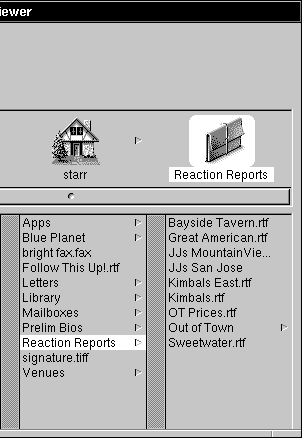
When the UNIX Expert preference is turned off, only the most
current version of a file is visible in the File Viewer.
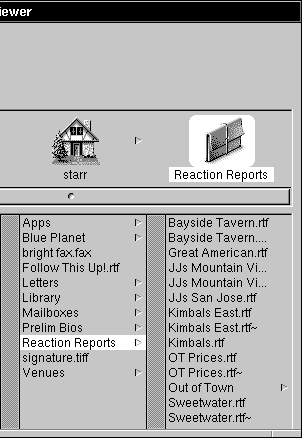
When the UNIX Expert preference is turned on, ~files are visible.
Figure 4: Backup files could be hidden from some users
Many users may not want to have this expert preference turned on all the time. However, you might want to recommend that they turn it on temporarily now and then to clear out extra backup files that could be taking up valuable disk space. And if those users aren't aware that backup files are being saved, they might be happy to learn how to get at those backups!
SoftPC Correction
In our article about SoftPC in the Winter 1994 issue, we made an error regarding TCP/IP support. Insignia's SoftPC doesn't support TCP/IP via the ODI interface. Instead, it uses a TSR program that implements the Novell LAN Workplace API. As a result, SoftPC supports only applications that adhere to the LAN Workplace API, and not PCTCP or PCNFS applications.
Sorry for the error.
_________________________________________________________________________________
| Next Article | http://www.next.com/HotNews/Journal/InFocus/Summer1994/SummerLegal1994.html CREDITS AND LEGAL MATTER |
| Previous article | NeXTanswer #1959 Focal Point |
| Table of contents | http://www.next.com/HotNews/Journal/InFocus/Summer1994/ContentsSummer1994.html |