new product highlights
| support bulletin | volume 2, issue 3 | fall 1992 |
integrating the new display and keyboard
by Ken Jochims
In early September, NeXT introduced its new MegaPixel 17-inch Color Display based on Sony Trinitron technology and a redesigned ADBTM (Apple Desktop BusTM) keyboard and mouse. First out the door are color displays and ADB keyboards that work with the NeXTstation Color Turbo system. These new displays and keyboards also work with NeXTcube Turbos configured as NeXTdimensions. Plans call for shipping the ADB keyboards with the NeXTstation and NeXTstation Turbo (monochrome) products early in 1993. So, you ask, exactly how do these new products fit into the NeXT product line?
For the salient details on the new display, keyboard, and mouse: how to integrate them with your existing equipment; and answers to common questions, read on.
new product highlights
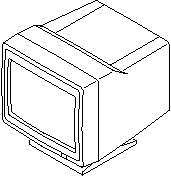
NeXT added the new MegaPixel 17-inch Color Display in response to lively customer demand for the Sony Trinitron quality. The new display features:
 |
Higher contrast |
|
Flatter display |
|
Better focus and convergence |
|
72 Hz for a rock-solid image |
|
Full compliance with MPR-2 regulations for ELF and ELM emissions |
|
Universal power supply |
With the new display, you need the new NeXT Sound BoxTM 2-designed to work with the new ADB keyboard and mouse-and the Starting Point KitTM (SPK) 3.0A, which contains the new keyboard, mouse, and NeXTSTEP Release 3 documentation.
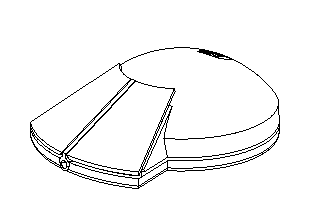
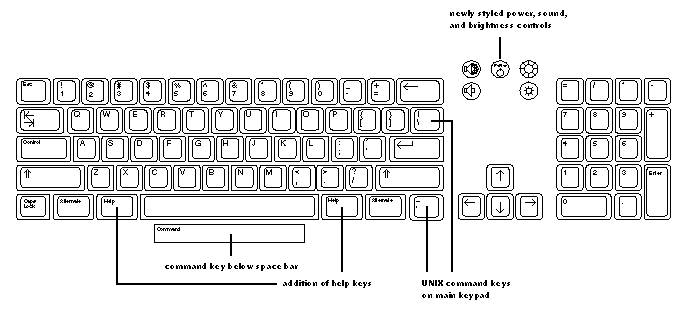
The new keyboard features a flexible four-position tilt mechanism and mouse interface on both sides. Other ergonomic and functional improvements in the keyboard, which is compatible with the ADB standard, are shown in figure 1. The new mouse is 30 percent lighter than the old one and has double the on-screen tracking resolution.
figure 1: NeXT's ADB keyboard
what to order with what
With these new options available, the type of keyboard shipped with a product will be determined by what monitor you order-the 17-inch Fimi, the new 17-inch Trinitron, or the 21-inch Hitachi Color Display. It's essential to order the appropriate Starting Point Kit, as shown in table1, for the display you choose.
The new display is not currently recommended for use with the 25 MHz NeXTstation Color (16/105) or NeXTdimension. When these systems, which are capable of supporting only a 68 Hz refresh rate, are connected to a 72 Hz monitor, the display image shrinks and becomes distorted. The image also shifts to the right by 1/4 inch.
table 1: configuration and ordering information
| display | NeXT part no.* | Starting Point | NeXT Sound Box |
| 17" Fimi | N4001 | SPK 3.0 | Sound Box (standard) |
| (standard keyboard) | |||
| 17" Trinitron | N4006 | SPK 3.0A | Sound Box 2 (ADB) |
| (ADB keyboard) | |||
| 21" Hitachi | N4005 | SPK 3.0 or 3.0A | Sound Box or Sound Box 2 (ADB) |
compatibility caveats
The new display and ADB keyboard are not yet fully compatible with some third-party software, specifically packages such as X Window emulators and SoftPCTM. All third-party software applications that communicate directly to the keyboard, such as software emulators, will have problems working with the new keyboard.
NeXT's Developer Partnerships team is currently working to alleviate this problem. SoftPC is working on a patch for the short term and on an added feature for their upcoming release of SoftPC 3.0 (targeted for Q4 1992). In general, all emulation software packages will need to be updated to port to NeXTSTEP 486 to solve compatibility issues when working with generic 486 hardware.
Although NeXT's ADB keyboard interface doesn't yet support the full range of ADB peripherals available in the market, ADB keyboards from Apple Computer and various ADB trackballs are compatible. However, if any software is required for an input device to run on a Macintosh, it will probably not be compatible on the NeXT system.
discontinued product configurations
Because of low customer demand, NeXT is discontinuing the product configurations listed here. All NeXT computers still support parity memory, but this option will no longer be available in configured systems. To configure a system with parity memory, all on-board nonparity RAM must be replaced with parity RAM SIMMs.
| configured nonparity memory systems | part no. | German part no. |
| NeXTstation Turbo 32/250 | N1100-4488 | N1100-4503 |
| NeXTstation Turbo 32/400 | N1100-4491 | N100-4505 |
| NeXTcube Turbo 16/400 | N1000A-4760 | N1000A-4956 |
| NeXTcube Turbo16/1/4 | N1000A-4762 | N1000A-4957 |
| NeXTcube Turbo 32/2.8 | N1000A-4765 | N1000A-5048 |
| configured parity memory systems | part no. | |
| NeXTstation Turbo 16/250 | N1100-4510 | |
| NeXTstation Turbo 16/400 | N1100-4511 | |
| NeXTstation Turbo Color 16/250 | N1200-4512 | |
| NeXTstation Turbo Color 16/400 | N1200 4513 4513 |
|
| NeXTcube Turbo 16/400 | N1000A-4767 | |
| NeXTcube Turbo 32/1.4 | N1000A-4768 | |
| NeXTcube Turbo 32/2.8 | N1000A-4769 |
new product Q & A
Why is NeXT introducing a newly designed keyboard and display?
For a computer to be used anywhere in the world, its display must be able to run at 72 Hz to meet international product standards. The Trinitron display is the first to have this capability. NeXT is standardizing on ADB input devices to allow our customers more options, such as extended keyboards and trackballs. Eventually all NeXT displays and keyboards will adhere to these standards.
Why do I care if the display is spec'd at 68 Hz or 72 Hz?
There are no noticeable differences. The change in refresh rates has to do with meeting worldwide standards.
When will monochrome systems get the new keyboard and mouse?
NeXT plans to ship a 72 Hz, ADB-compatible MegaPixel Display for all monochrome systems early in 1993.
Will the 25 MHz color systems be able to use the new keyboard and mouse?
There are no plans to support ADB keyboards for non-Turbo color systems until sometime next year.
Will the 21-inch Color Display work with the ADB keyboard?
Because it can run at 68 or 72 Hz, the 21-inch Color Display will work with either the ADB or the standard keyboard.
If I already have a NeXTcube and want to buy a NeXTdimension upgrade, what monitor and keyboard should I buy?
The SPK 3.0, NeXT Sound Box, and MegaPixel Color Display (17-inch Fimi or 21-inch).
If I want to buy a new NeXTcube Turbo system and a NeXTdimension board, what monitor and keyboard should I buy?
The SPK 3.0A, NeXT Sound Box 2, and 21-inch MegaPixel Color Display.
Can I upgrade my current machine to use the new keyboard and mouse?
Only new NeXTstation Color Turbo systems with serial numbers above ABC-0016000 and NeXTcube Turbo systems with serial numbers above ABA-6000 can be upgraded to use the ADB keyboard, mouse, and NeXT Sound Box 2.
What are the major differences between the old and new keyboards and mice?
The functionality remains the same. Taking advantage of new ergonomic research conducted since the introduction of NeXT's first keyboard and mouse, the new products represent an evolution in form and usability.
Do I lose any features with the new keyboard and mouse?
Some third-party emulation software (SoftPC, X emulators, and so forth) will not work until updates or rewrites are done.
Why is NeXT selling both the Trinitron and Fimi 17-inch Color Displays?
Some customers will prefer the lower price, want to maintain unbroken compatibility with emulation software packages, or just want similar products in their installations. NeXT has decided to retain the Fimi display for consistency and offer new capability in the Trinitron for those who want it.
Can I swap keyboards?
No. The new ADB keyboard will not plug into the old NeXT Sound Box. The standard keyboard will not work with Sound Box 2.
What happens if I plug a Fimi 17-inch Color Display into a NeXTstation Color Turbo with an ADB keyboard?
You will notice some changes in screen centering, loss of display resolution, and/or a bowing of the on-screen image.
What happens if I plug a Trinitron 17-inch Color Display into a NeXTstation Color with a standard keyboard?
You will notice that the display image becomes distorted. The image also shifts to the right by 1/4 inch.
If I don't like where the command bar is on the new keyboard, can I use the old keyboard with my new color system?
No, but if you prefer the conventional Command key position, you can switch the functions of the Help key and the Command bar in the Preferences application. This option appears in the Keyboard Preferences panel only if you have a new keyboard attached. The keys are switched immediately.
Why do the displays on my dual-headed NeXTdimension system appear to ripple?
You're seeing an interference pattern caused by the difference in frequencies of the two displays (72 Hz versus 68 Hz). To eliminate the problem, increase the distance between displays.
When I unplug my ADB keyboard and plug it back in, why isn't the keyboard recognized?
The ADB interface standard recommends not removing a keyboard while a system is running. You will need to restart your system for it to recognize the keyboard again.
Will there be international versions of the ADB keyboard?
Yes. Between now and the end of the year, NeXT will release ADB ISO keyboards for the UK, France, Germany, and Italy, as well as two versions for Switzerland. For the Japanese market, NeXT will release a Kanji ADB keyboard as well.