taking the wraps off Release 3
by Dave Cottle
You've been hearing about NeXTSTEP Release 3 for a while. Maybe you caught Steve's keynote at NeXTWORLD ExPOsm or saw the Release 3 data sheet. Maybe (surely) you read "a preview of Release 3 and more" in the last support bulletin. Or maybe you've just been listening to rumors. In any event, with the imminent arrival of Release 3, you've got one burning question: "How is Release 3 going to change my life?" Well, it's not going to make you a rock star, but some features will definitely affect how you support your users. Here, then, is an overview of the Release 3 components that have the greatest significance for support providers.
what's new for users
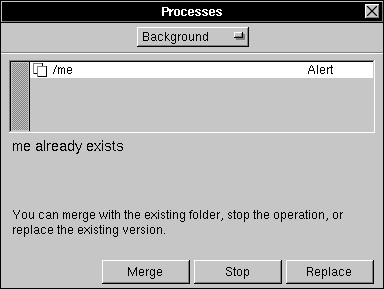
Many features in Release 3 will have an impact on both you and your users. For example, the Finder has been updated to include searching by file content as well as by name, which helps users track down an elusive document when they can't remember what they called it. The Workspace ManagerTM now allows you to merge files onto an existing backup. When you copy files from one location to another (such as from a hard disk onto a floppy disk), and the target location includes one or more of the files being copied, you're given the option of replacing the target files or performing a merge, as shown in figure 1.
figure 1: merging files
When you choose the merge option, the only files copied are those that have been changed more recently than the versions in the target directory or that don't exist in the target. You've now got a simple, incremental backup scheme that requires only dragging a folder icon. Add file compression available directly from the Workspace Manager and the ability to copy large amounts of data across multiple volumes, and users can not only create simple backups but can also archive large amounts of data or use fewer disks to transfer files to another computer.
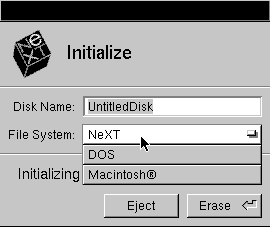
Release 3 gives you more options with disks, too. You can still format floppy disks with a NeXT (UNIX) or DOS file system, but now you have the added choice of reading or formatting a disk with a Macintosh file system. All formats support 1.4 MB disks, and the NeXT file system supports 2.8 MB disks. Inserting an unformatted disk brings up a panel that asks you to pick one of the three choices, as shown in figure 2. Macintosh CDs are now supported, and you can even access a SCSI hard disk that contains a Macintosh file system.
figure 2: formatting a NeXT, DOS, or Macintosh Disk
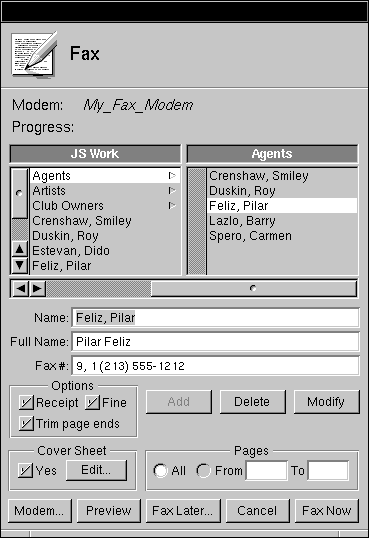
Release 3 adds some enhancements that make fax administration more flexible. A user sending faxes can now schedule them to be sent at a later time and can set up address books (much like mail aliases) that send the fax to multiple addresses at once, as shown in figure 3.
figure 3: faxing to multiple addresses
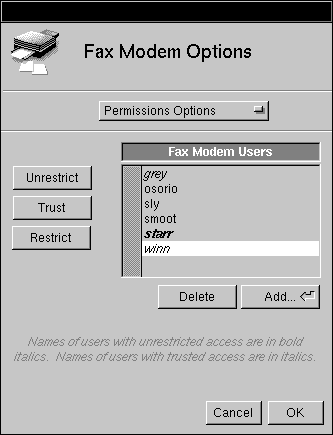
The FaxReader application lets you assign incoming faxes to specific users, save them to disk, or forward them via NeXTmail. When you configure a fax modem with PrintManager, you can identify a list of users who can read faxes received over that modem. As shown in
figure 4, you can also assign access levels that determine whether users can see all incoming faxes or just faxes assigned to them. Unrestricted users will be notified by mail when faxes arrive.
figure 4: designating fax users
Release 3 offers many other user features you'll probably want to check out. Several new printers, including some dot-matrix models, are supported in PrintManager. An integrated on-line help system provides context-sensitive, hypertext-based information (maybe this will cut down on user questions?). On-line help is available for Mail, Preferences, Edit, FaxReader, and the Workspace Manager. See table 1 for a complete list of user features.
more tools for system administrators
System administration tools haven't been ignored in Release 3. The biggest news is the arrival of SimpleNetworkStarter, an application that allows you to configure a complete NetInfo network-including network time service, mail service, home directory service, and general file service-all at once. Although its primary function is to configure small NetInfo networks (about 20 or fewer computers), it can also come in handy for configuring networks of any size.
table 1: Release 3 features for users
| feature | highlights |
| Color | PANTONE MATCHING SYSTEM® Color calibration Color printer support |
| Disks | Formats for CD-ROM, DOS, and Macintosh files systems |
| Faxing | Ability to schedule faxes for later delivery Group addresses for multiple delivery |
| FaxReader | Archive incoming faxes Log incoming faxes Notify multiple users of incoming faxes Reassign, forward, or save faxes to disk |
| Localization | Available in English, French, German, Italian, Japanese, Spanish, and Swedish |
| On-line Help | Context-sensitive, hypertext-based, consistent across applications Available to developers for inclusion in new applications |
| PostScript® Level 2 | Display PostScript® support for PostScript Level 2 |
| Printing | New printer support, including dot-matrix models PostScript Printer Definition files included |
| Workspace Manager | Expanded use of color in icons Find panel searches by file name or contents Menu command for file compression Copy merge option and multivolume copy |
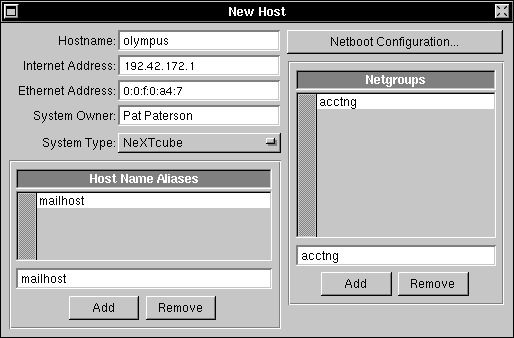
NetManager has gone away, and many of its tasks have been taken over by the new HostManager application. With HostManager, you can modify the network features configured with SimpleNetworkStarter, including automatic host addition and network time service. As its name implies, HostManager can also be used to add, delete, and modify host entries. In addition to the traditional host entry information, HostManager lets you designate the owner and system type of a computer and even create host name aliases and netgroups, as shown in figure 5.
figure 5: designating host aliases and netgroups
The three functions the MailManager application used to provide have been assumed by SimpleNetworkStarter, NetInfo, and the UNIX command mailDBupdate. SimpleNetworkStarter sets up a computer to serve the mail spool and aliases directories. To determine which sendmail configuration file to use, the system now looks in NetInfo, rather than /etc/sendmail. The necessary information is stored in NetInfo when you use SimpleNetworkStarter to set up the mail server. Finally, mailDBupdate is used to update mail pictures and aliases.
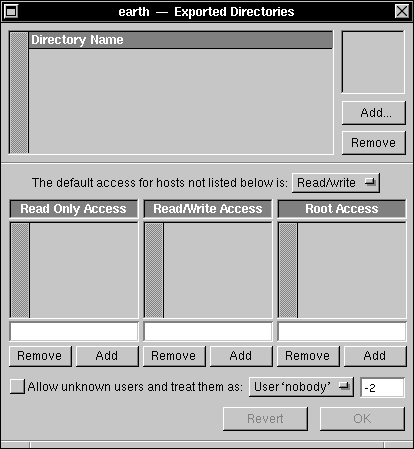
Another new application, NFSManager, lets you export and import (mount) NFS directories. All the significant options can be set here, including limiting exported directories to specific computers and allowing root access to remote directories (see figure 6). With NFSManager you no longer need to edit /etc/exports for exporting information.
figure 6: exporting NFS directories
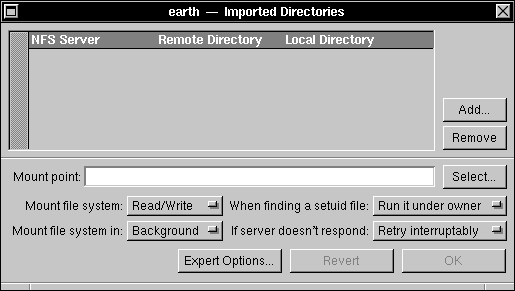
In the Imported Directories window, as shown in figure 7, you can set all the normal mount options, including mounting read only or mounting in background. With NFSManager you no longer need to edit the NetInfo database directly.
figure 7: importing NFS directories
The Release 3 NetInfoManager has its own set of enhancements. In addition to manipulating existing NetInfo domains, you can now create new ones. This makes setting up a multilevel NetInfo domain hierarchy much easier than in the past. The new Security menu provides commands that let you change any domain's root password, and enable or disable modifications of the database.
As you examine a domain with NetInfo, you'll notice some new directories. Information about exported NFS directories is now kept in the /exports NetInfo directory rather than in the exports file. The /localconfig directory stores information about Integrated Services Digital Network (ISDN), NetWare, and AppleTalk configuration; language and keyboard choice; and installation of multiple monitors. New subdirectories in /locations store the location of the appropriate sendmail configuration file and identify mail servers, application servers, and home directory servers.
Other new system administration features include a pop-up list in UserManager that lets you set the default language for a user. Another lets you select the home directory from a list that includes all the computers that have been configured as home directory servers with SimpleNetworkStarter. BuildDisk can set up a small disk as a swap disk and will install either the base release or the Extended release on larger disks, depending on available space. Connecting with Novell NetWare or AppleTalk networks is now supported with client software for each.
For a complete list of system administration features, see table 2. For details about any of these applications, see the NeXTSTEP Network and System Administration manual, which is included on the CD-ROM with each new system and available through Addison-Wesley.
table 2: Release 3 features for system administrators
| feature | highlights |
| AppleTalk | Client support for AppleTalk printers and AppleShare® file servers |
| HostManager | Add, delete, and modify host entries Create host aliases and netgroups Modify network configuration |
| NetInfo | Storage of export information New localconfig directory for configuration information specific to local computer Storage of location of sendmail configuration file New printer subdirectories |
| NetInfoManager | Secure access to domains Change root password Create new domain |
| NetWareManager | Log into or out of NetWare servers Set up access to printers on NetWare network |
| NFSManager | Manage import and export of remote NFS directories |
| PhoneConnector | Make connection via ISDN |
| PhoneManager | Configure ISDN networking |
| SimpleNetworkStarter | Basic network configuration, including time service, mail service, home directory service, and general file service |
| SNMP | Allows NeXT computers to share network statistics with other computers running Simple Network Management Protocol |
| UserManager | Pop-up lists for home directory and language |
new features for developers
NeXTSTEP is famous for its development environment, and Release 3 continues the tradition. New object kits have been added, including the Database KitTM (DBKit), the 3D Graphics KitTM (3DKit), and the Phone KitTM. The eagerly awaited DBKit provides developers with the means to manage database transactions independently of the database used. A palette for Interface BuilderTM is included to provide access to the objects that make up the DBKit. A small layer of database-dependent information, called an adaptor, is required for each vendor's database. Release 3 includes adaptors for SYBASE® and ORACLE®. Other database vendors will be making their adaptors available in the future. 3DKit, based on Pixar's RenderManTM standard, lets programmers create applications that render three-dimensional images-interactively to the screen or photorealistically to the printer. The Phone Kit provides access to ISDN telephone functions. With this kit, developers can create applications like a speed dialer or an answering machine.
Another new feature is support for Distributed Objects. With Distributed Objects, programmers can have objects send messages to each other whether they're running on the same computer or on different computers connected to a network.

Some existing developer applications have been modified as well. Interface Builder still builds user interfaces and now includes support for the new on-line help system that allows any developer to include a help system consistent with other NeXTSTEP applications. The Tools menu includes the Help Inspector command, which allows you to examine help information attached to a specific object, and the Help Builder command, which allows you to create your own help data. Interface Builder also includes a new Connections Inspector that provides a panel summarizing object connections and classes. Like all the developer applications, Interface Builder is part of the Extended release.

Project management tasks, formerly provided by Interface Builder, have been taken over by the new ProjectBuilder application. With ProjectBuilder, you build new projects, set up make files, incorporate help files, and compile and test your application, as shown in figure 8. ProjectBuilder allows you to drag in component files of your application from the File Viewer and is smart enough to recognize how various file types (header files, for example) should be treated. Localization support means you can include different versions of the help files and maintain multiple .nib files. With a separate .nib file for each language version, you can make sure the user interface is appropriate regardless of the language. (One language might need wider menu items than another, for example.) Because ProjectBuilder is strictly a project management tool, you can maintain applications that don't use the NeXTSTEP user interface and therefore don't have any .nib files.
figure 8: compiling an application with ProjectBuilder
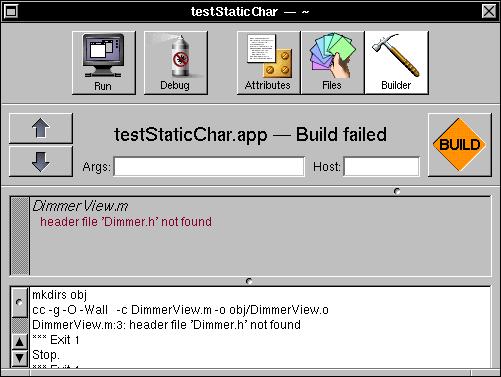

Edit can now be run in either developer or user mode. In developer mode, the commands specific to programming are available. Programmers will probably find the way Edit interacts with ProjectBuilder and the GNU Debugger (GDB) version 4.0 most useful. In ProjectBuilder, you can compile an application and run it with the debugger. This opens the source file in Edit and allows you to open a View panel to set break points. You're also provided with a graphical object instance browser. If the compile uncovers any errors, you don't even have to know line numbers-selecting the error in ProjectBuilder places you in the source file at the line that triggered the error.
With the close integration of Edit, Interface Builder, ProjectBuilder, and the GNU Debugger, the development tools are now truly "compile and go." A programmer can create, compile, test, and debug an application without ever having to access the UNIX command line.
Other developer improvements include IconBuilder, a pixel-based graphics editor for creating (surprise) icons; support for precompiled headers, which reduces compile time by eliminating redundant work; and MIDI Time Code (MTC) synchronization, which allows sound, music, or graphics events to be generated in sync with external devices, such as VCRs. For a complete list of developer features, see table 3.
table 3: Release 3 features for developers
| feature | highlights |
| 3D Graphics Kit | 3D graphics rendering based on RenderMan |
| Database Kit | Objects to support database manipulations Database-independent |
| DBModeler | Builds database models for use with DBKit |
| Demonstration applications | RenderManager ScreenScape 3View |
| Dragging | Flexibility for any view to be source or destination for image Copy, link, move as appropriate Arbitrary animation of images from point to point Supported by all AppKit objects |
| Edit | Developer and user modes Definitive example of NeXTSTEP user interface |
| GNU Debugger 4.0 | Latest version |
| IconBuilder | Pixel-based graphics editor for icons |
| Interface Builder | Support for on-line help Connections Inspector |
| MTC synchronization | Synchronization of events with MIDI devices |
| Object links | Provides link between text objects so copies are updated as the original changes |
| Phone Kit | ISDN telephone functions |
| Precompiled headers | Reduction of compile time |
| ProjectBuilder | Tool for managing development projects Integrated with Edit and GDB Interpreted UNIX shell output Localization of help and .nib files |
| Protocols | Ability to share interface across classes |
| Distributed Objects | Interprocess communication across networks |
| Sound Kit | Largely DSP-independent Multiple applications can access sound chip simultaneously |
| Text object | Drag and drop of objects Direct support for rtfd file format Color text |
make way for the new demos
Yes, it's true-Stealth is nowhere to be found in Release 3. Poker, Date, BreakApp, and several others are also among the missing (for a complete list, see "among the missing" below). Now, before you get upset, take a deep breath and we'll tell you why. What was the purpose of these demos? Besides being entertaining, each was designed to demonstrate features of NeXTSTEP (that's why they're called demos) and to help developers come up with their own dynamite applications.
Some of the older demos have found a new life. For example, Break-App has become an example application in Release 3, and BoinkOut-a spiffier, much more challenging variation-has taken its place in the Demos directory. Grab has graduated to the /NextApps directory and is even available as a service, so you can take screen shots from any application. Icon has evolved into the fully supported application IconBuilder (part of the Extended release). Other demos have served their purpose well by inspiring developers to create their own versions. Several calendar and game programs, for example, are available commercially, as shareware, or in the public domain.
Release 3 includes some great new demos to show off its new features. ScreenScape sends a piece of your screen that follows your cursor to the video output of a NeXTdimensionTM board, 3View previews RenderMan files, and RenderManager sets up a server process for photorealistic rendering.
You've probably noticed that not everything on the missing list is a demo. WriteNow® was unbundled in Release 2.1 and is now available through Appsoft, Inc.
among the missing
The following software is no longer available in Release 3:
Automata
Balancer
BreakApp*
CircuitBuilder
Crop
Date
DSP Tools¦
FractalTrees
Gourmet
GuidedTour
Icon
ImprovDemo
Music KitTM¦
PendulumLab
Poker
RealTimeAlgebra
Saturn
Scene
ShowAndTell
StatLab
Stealth
Topology Lab
WriteNow¦
*Available elsewhere in Release 3.
¦Should be available from CCRMA.
¦Available from Appsoft, Inc., 255 Shoreline Drive, Suite 520, Redwood City, CA 94065, phone 415-802-2900.
I want my Release 3
Now that you're suitably impressed, you'll want to know how to get your hands on Release 3. The most obvious way is to buy a new NeXT computer. NeXTSTEP Release 3 will be preinstalled on the hard disk, along with the complete Extended release on CD-ROM (the Extended release is automatically installed on 400 MB-class hard disks).
If you want to upgrade your existing NeXT computers, you can obtain the CD-ROM Upgrade (N5527), the Right-to-Use License (N5531), or the Floppy Disk Installation Set (N5528) by calling 1-800-848-NeXT or contacting your local NeXT Authorized Reseller in the United States, Canada, and Mexico. In Europe, contact your local reseller to arrange for an upgrade. With the CD-ROM product, you can use the Upgrade 3.0 application, which allows you to upgrade while preserving existing user and configuration files. Note that the floppy disk set doesn't include the Extension software.