| support bulletin | volume 3, issue 1 | winter 1993 |
prowling about in syslog
by Dave Cottle
If you've ever done any exploring through your NeXT system, you've probably encountered system messages. Maybe you've run across boot messages in /usr/adm/messages or application messages in the Console window of the Workspace Manager. As you may have already guessed, not all messages come from the same place or get delivered in the same way. Have you ever wondered why some messages end up in files while others show up in your Console window? Ever wanted to find a message but weren't sure where to look? Ever had the urge to log some of your own messages? In this article, we'll take a look at how the message logging system works and explore a few ways you can customize it for your own uses.
how the logging system works
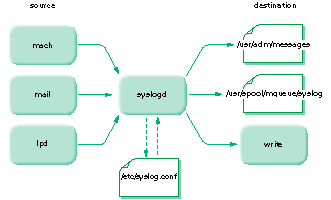
A message generated by a running program is sent to the daemon process syslogd, which then determines what to do with the message. The message might be written to a file, sent on to another computer, displayed on a user's screen, or even ignored. Figure 1 shows messages generated by several processes directed to their appropriate destinations by syslogd.
figure 1: message logging with syslogd
The configuration file /etc/syslog.conf contains the instructions telling syslogd what to do with system messages. Here's a sample entry from this file:
*.err;kern.debug;auth.notice /dev/console
Each entry in this file is made up of two parts: a list of the messages to be logged, called the selector, and the destination for the indicated messages, called the action.
the selector
The selector is a list of components, called priority specifiers, separated by semicolons. Each specifier within the selector identifies which messages will be logged from a specific system facility. Messages are assigned a priority level, and the specifier identifies the level of messages to be logged. Specifiers take the form facility.level. All messages from the named facility at the indicated level or higher will be logged.
facilities
The facility portion of a priority specifier identifies a component of the system. The facility portion must be one of the following:
 |
kern--kernel |
|
user--user processes |
|
mail--mail system |
|
daemon--system daemons |
|
auth--authorization system (login, su, and so forth) |
|
lpr--printing system (lpr, lpc, lpd, and so forth) |
|
mark--time stamp |
|
local0 through local7--local use |
|
syslog--messages from syslogd itself |
|
*--all facilities except mark |
levels
The level portion of a specifier identifies a priority level. The following is a list of the priority levels, in descending order:
|
emerg or panic--panic condition |
|
alert--condition that needs immediate attention |
|
crit--critical condition |
|
err or error--error |
|
warning or warn--warning |
|
notice--condition that isn't an error but needs special handling |
|
info--general information |
|
debug--information for debugging purposes |
examples of priority specifiers
Armed with the possible values for the facility and level portions of a specifier, we can take a look at how they are combined. The following specifier will log all messages from the kernel with a priority level of err or higher (err, crit, alert, and emerg):
 kern.err
The next example logs messages from the printing system with a priority level of debug or higher (all levels):
lpr.debug
You can combine facilities in a single specifier by separating them with commas. The next example logs all messages from both system daemons and the authorization system with a priority level of notice orhigher:
daemon,auth.notice
To indicate all facilities except mark, use an asterisk. The following specifier logs all messages of priority level alert or higher, regardless of the facility that generates the message:
*.alert
Messages from the mark facility are always at priority level info and are generated every 20 minutes by default. This facility can be used as a time stamp and must be indicated explicitly, because an asterisk includes every facility except mark:
mark.info
To turn off messages from a facility, use none. This is a special keyword that isn't part of the regular priority hierarchy. The following example specifies that no messages will be logged from the mail system:
mail.none
the action
The second part of each entry in the configuration file, the action field, dictates how the messages will be delivered. An action can take one of three forms:
|
/usr/adm/messages--Messages will be written to the file indicated by the |
| fully qualified pathname (beginning with "/"). The file name can be a device | |
| file, as in /dev/console, in which case the message will be written to the | |
| device. Typically, messages that don't require immediate attention are | |
| written to a file. | |
|
@jupiter--Messages will be passed to the syslogd process on the indicated |
| host. You might, for example, want to forward messages to a computer on | |
| the network that is monitored by an operator. | |
|
operator,adrienne,ricardo--Messages will be written (not mailed) to the |
| indicated users if they are logged in (names are separated by commas). This | |
| method is useful for messages that may require immediate attention. If the | |
| action field contains an asterisk(*), the message is written to all logged-in | |
| users. |
example entries
We can now examine the contents of /etc/syslog.conf and decipher what each of the entries does. Here's the default syslog.conf file shipped with NeXTSTEP Release 3:
*.err;kern.debug;auth.notice /dev/console
kern.debug;daemon,auth.notice;*.err;mail.crit /usr/adm/messages
lpr.debug /usr/adm/lpd-errs
mail.info /usr/spool/mqueue/syslog
*.alert;kern.err;daemon.err operator
*.alert root
*.emerg *
What follows is a breakdown of each entry in the default file:
The first entry in the default file specifies that messages from all facilities with a priority level of err or higher, messages from the kernel of priority debug or higher (all levels), and messages from the authorization facility of notice level or higher will be written to the console (usually, the Workspace Manager Console window).
The second entry indicates that all messages from the kernel, along with all messages of priority notice or higher from the authorization system and daemon processes, all messages of err level or higher from all facilities except mark, and messages from the mail system of priority crit or higher will be written to /usr/adm/messages.
The third line sends all messages from the printing facility to the file /usr/adm/lpd-errs.
The fourth entry logs messages from the mail facility with a priority level of info or higher to the file /usr/spool/mqueue/syslog.
The fifth entry writes all messages with a priority level of alert or higher, messages from the kernel with a level of err or higher, and messages from the daemon processes of err or higher to the user operator, assuming that user is logged in. Note that the selector in thisline could have been written as:
*.alert;kern,daemon.err
The sixth entry writes all messages with a priority level of alert or higher to root, assuming root is logged in.
The last entry indicates that all emerg messages will be written to all logged-in users.
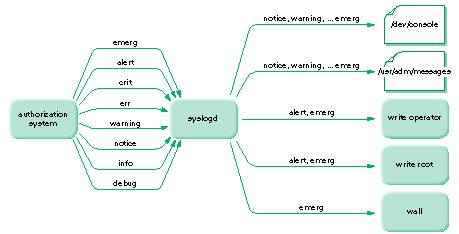
Figure 2 shows how messages from the authorization system are handled according to the instructions in the default configuration file.
Figure 2: distributing messages from a facility
how to make modifications
Now you know how the configuration file controls message logging. When would you want to make changes? Possibly never. Then again, you might want to turn on time stamping, you might want to use the system log to include your own administrative messages, or you might want applications developed at your site to log messages.
turning on local facilities
As noted earlier, eight facilities are reserved for local use: local0 through local7. These can be used within locally developed applications to register their own messages (see the UNIX manual page for syslog), or you can use them from the command line to register administrative messages (see "using logger" later in this article). If you do implement local facilities at your site, make sure that your syslog.conf file directs the messages appropriately. The default configuration file used as an example in this article will ignore any messages from a local facility with a priority level lower than err.
modifying syslog.conf
If you make modifications to syslog.conf, perhaps to implement a local facility or to turn on the mark messages, the changes will be implemented the next time syslogd is started-the next time you reboot the computer. If you send syslogd a hangup signal, it will read the configuration file immediately and implement any changes:
kill -HUP pid
In this command, pid should be replaced by the process ID of syslogd, which can be obtained by examining the output of the ps command. To avoid a step, you can take advantage of the file /etc/syslog.pid. This file is created whenever syslogd starts, containing its process ID. Use command substitution in the kill command:
kill -HUP `cat /etc/syslog.pid`
The command enclosed in back quotes is executed first, and the output placed in the command line. This will tell syslogd to read the configuration file, and you don't need to use ps.
using syslogd options
You can use a couple of options to modify the operation of syslogd. The first is -f, used to specify a configuration file other than /etc/syslog.conf. The second is -m, used to specify the interval, in minutes, between mark messages (the default is 20). If you want to use either of these options, edit the line that starts up syslogd in the script /etc/rc:
/usr/etc/syslogd && (echo -n ' syslogd') >/dev/console
using logger
Sometimes you may want to log a message of your own, perhaps to keep track of administrative events like software installations. You use the logger command to do this:
/usr/ucb/logger -p local2.info System rebooted
This command logs the message "System rebooted" at priority level info from the facility local2. What is actually done with this message isdictated by the contents of syslog.conf. Remember, you need to modify the default syslog.conf if you want to log messages from a localfacility.
so now you know
Now you don't have to be curious any more: syslogd handles system messages according to the instructions in /etc/syslog.conf. With your new knowledge you can track down that elusive lpr message, add a time stamp to your message files, or even log some of your own messages. If your curiosity isn't completely satisfied, take a look at the UNIX manual pages for logger, syslog, and syslogd.