| support bulletin | volume 3, issue 1 | winter 1993 |
fsck to the rescue
by Dave Cottle
What makes a file system vulnerable to corruption? Is it greed? Cosmic rays? Gremlins (a favorite scapegoat)? Actually, it's none of these-the block I/O buffer cache puts file systems at risk. This isn't a risk to lose sleep over, but you might like to understand what's involved and what, if anything, you can do. Here, then, is an explanation of what the block I/O buffer cache is, how file systems are corrupted, and how the cache relates to the fsck command.
the block I/O buffer cache
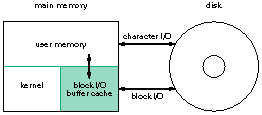
A file system can be accessed using either the block device file or character device file associated with the disk partition. Access through the block device file is performed one block at a time, while access through the character device file is performed without any buffering. When you mount a file system, you always use the block device file. Block input and output (I/O) is performed through an intermediate area of memory called the block I/O buffer cache, as shown in figure 1.
figure 1: a view of the buffer cache
improved performance
Although at first it might not seem intuitive, this intermediate step actually improves general system performance. The slowest components of a computer involve mechanical operations, such as movements of the read/write head on a hard disk. Moving data around in memory is much faster than reading from or writing to a hard disk. Reading and writing data through the block I/O buffer cache reduces the amount of time spent moving the read/write head, thereby improving overall system performance.
reads and writes
When a process needs to read a block of data, the cache is searched first. If the block isn't found there, it's retrieved from disk. Similarly, when a process writes a block of data, the block is written to the cache but not to disk. Obviously, something must happen to get the data from the cache onto the disk, or files would never change.
Three events write data blocks to disk:
 |
When the system closes a file, all modified, or "dirty," blocks associated with the file are written to disk. |
|
If the system attempts to read a block into the block I/O buffer cache when the cache is full, some of the dirty blocks are written to disk to make room. |
|
Executing the command sync flushes the buffers, and all dirty blocks are written to disk. The daemon process update executes sync every 30 seconds. |
corruption
Imagine, if you will, that your computer is halted unexpectedly-by a power failure, perhaps. If there are dirty data blocks in the cache when this happens, you might be left with a corrupted, or inconsistent, file system. This is where fsck comes in, to check and repair file systems.
the fsck utility
Because file system corruption occurs only when the computer is brought down ungracefully, fsck is run automatically from the rc scripts during system boot. As you may have experienced, running fsck on a file system can take several minutes. To prevent fsck from checking a file system unnecessarily, each file system is marked as clean when it's unmounted. You've probably seen the message "file system clean: skipping check" during the boot process. Only when the file system isn't marked as clean-the system wasn't brought down gracefully-is it checked.
When fsck checks a file system, it uses redundant information stored in the file system to determine if it's been corrupted and, if so, what actions to take. Minor repairs are made automatically without any response required from you. If you ever do need to run fsck by hand (from the command line), remember to run it on an unmounted file system or while in single-user mode. You can see why-you don't want the file system changing while you're making repairs.
For more information, see the UNIX manual page for fsck.
there you have it
File system reads and writes are done through the block I/O buffer cache to improve system performance. Because actual writes to disk are delayed, you can end up with a corrupted file system if your computer is brought down ungracefully. That's when fsck comes to the rescue.