NXApp, Spring 1994 (Volume 1, Issue 2). Copyright ©1994 by NeXT Computer, Inc. All Rights Reserved.
Discovering the DBTableView Object
written by Mai Nguyen
| Even though DBTableView is part of the Database KitTM palette, it can be used separately from the rest of the Database Kit to display tabular data with more flexibility than the Matrix object offers. This article explores how to use DBTableView independently from the Database Kit, and gives tips on avoiding problems with this object. |
VIEWING NON-RDBMS DATA
Suppose you want to display a list of records in tabular columns, and you want to be able to resize the columns and rows automatically like you can in a spreadsheet. For example, your data source might be a list of records built with a flat-file database system such as the Indexing KitTM. Or, even simpler, the data source could be a list of Objective C objects that's handed to you by another programmer on your team. The DBTableView object seems to be the ideal class for this usage--however, most of the examples and documentation available discuss how to use it only in conjunction with Database Kit.
In fact, you can use DBTableView without using Database Kit. In this article, we show how to set up a DBTableView and use it with a data source that doesn't rely on an underlying RDBMS. The article focuses on the "glue" needed to handle the display with the DBTableView once you've set up the data source.
THE FLEXIBILITY OF AN EXTERNAL DATA SOURCE
The DBTableView is primarily a user interface object, like any other Interface Builder widget. It has several initialization methods you use to set it up according to your needs, such as vertical
and horizontal scrollers, adjustable width, and so on. However, this class' power lies in its ability to access an external data source, which acts like a data feed, to display or update its data. The data source is responsible for getting and setting the values of the data objects.
The protocol for the DBTableView data source is given below.
@interface Object(DBTableDataSources)
- (unsigned int) rowCount;
- (unsigned int) columnCount;
- getValueFor:identifier at:(unsigned int) aPosition into:aValue;
- setValueFor:identifier at:(unsigned int) aPosition from:aValue;
- getValueFor:rowIdentifier :columnIdentifier into:aValue;
- setValueFor:rowIdentifier :columnIdentifier from:aValue;
@end
The data source must conform to this protocol. In addition, you can implement extra methods to customize the data source's behavior; these methods might initialize the data source, fetch data, and so on. The examples in this article include some such additional methods.
This protocol is defined in dbkit/tableProtocols.h.
A BASIC EXAMPLE: RANDOMTABLEVIEW
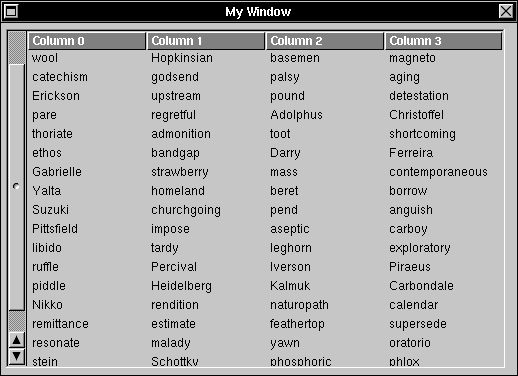
The simplest example of how to use DBTableView is RandomTableView from the StaticRowsTV MiniExample. It's shown in Figure 7.
For convenience, the StaticRowsTV MiniExample is included with this article.
Figure 7: Rows and columns in RandomTableView
RandomTableView uses as its data source a List that contains objects with one instance variable, a character string. The strings are randomly generated and the list of objects is initialized in the RandomDataSource loadData method. While the DBTableView in this simple example can accept any number of rows, its data source, initialized by the setDataSource method, has a predefined number of rows and columns.
In RandomTableView, we also need to manipulate the contents of the data source. Some additional methods properly initialize the DBTableView and load the data source itself.
@interface Object(DBTableDataSources)
- empty; /* empty the data source before a new load of data */
- loadData; /* fill the data source with meaningful data */
- setColumns:(unsigned int) columns; /* initialize data source with n columns */
- setRows:(unsigned int) rows; /* initialize the data source with n rows */
@end
In the context of Database Kit, each column of a DBTableView is a DBTableVector whose
identifier matches a property of the DBRecordList. In the simple RandomTableView example, however, the identifier is just an arbitrary object id.
To retrieve or set data, you need to implement the methods getValueFor:at:into: and set
ValueFor:at:from:. The second set of methods, getValueFor::into: and setValueFor::from:, is more appropriate for a data source used with Database Kit.
A MORE ADVANCED EXAMPLE: LEDGER
In RandomTableView, the data source relies on a simple List object that doesn't handle the update, save, and insert operations that a DBRecordList would. The Ledger example is more sophisticated--it uses the Indexing Kit's IXRecordManager to insert a new record or to modify and save a record permanently with a commit operation. Figure 8 shows what its interface is like.
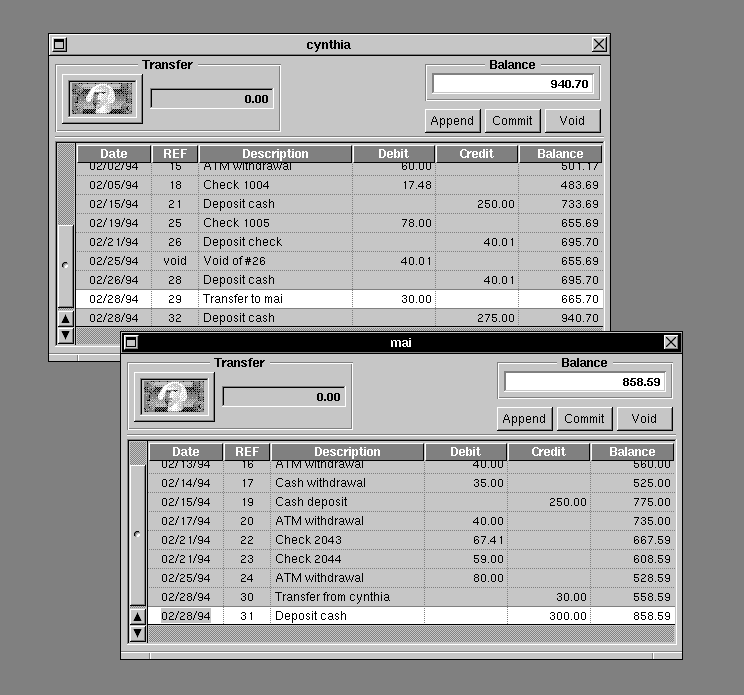
Figure 8: Ledgers for tho customers' accounts
Ledger uses a more complex data source for the DBTableView and binds the instance variables of a user-defined data object to the DBTableView's columns. For example, Date, REF, Description, Debit, Credit, and Balance all correspond to instance variables of the Transaction object. The Transaction object is a record built with an IXRecordManager. At runtime, the connections from the attributes to the DBTableView's columns are established programmatically.
Please refer to the README.rtfd file of the Ledger example for a description of the major classes in the program. Ledger is included in NEXTSTEP Releases 3.1 and 3.2.
Reusable classes
In particular, three classes from Ledger that you might want to reuse are JFTableViewLoader, JFTableVectorConfiguration, and KAYEditableFormatter.
The JFTableViewLoader functions as the data source for the DBTableView. This data source implements the DBTableSources methods rowCount, getValueFor:at:into:, and setValueFor:at:from:. (rowCount is implemented instead of columnCount because this table view has dynamic rows and static columns.) The JFTableViewLoader performs two main tasks: It configures the DBTableView with a configuration list, and it coordinates the data transfer from the data-bearing objects to the DBTableView with a data list.
JFTableViewLoader's configuration list is a list of JFTableVectorConfigurations. JFTableViewLoader's data list is a list of the class IXPostingList. It contains a list of Transaction objects sorted in ascending serial numbers.
The JFTableVectorConfiguration maps the title and instance variable of the Transaction object with each table view column. In the context of Database Kit, each table view column corresponds to a DBTableVector whose identifier is a property in the DBRecordList. Similarly, in this example, each table view column corresponds to a DBTableVector that is an instance variable of the Transaction object. For more details, see the setConfigurationList: method in the file JFTableViewLoader.m and buildConfigurationList method in the file LedgerController.m.
Similarly to getValueFor:at:into: and setValueFor:at:from: in JFTableViewLoader, JFTableVectorConfiguration implements the methods getValueFromObject:into: and setValueForObject:from:. The methods extract the data from the transaction records into a temporary DBValue. They also place the values edited in the DBTableView via DBValue back into the transaction records.
KAYEditableFormatter is a subclass of DBEditableFormatter. Its purpose is to intercept NX_TAB or NX_RETURN at the very last column in the DBTableView and prompt for a panel before doing a commit operation.
Pasteboard dragging protocol
In addition, the Ledger example implements the Pasteboard dragging protocol to automatically create a transfer transaction record when you drag the money well from one account to the other. Since the protocol is beyond the scope of this article, we leave this as an exercise for the reader. The code is pretty self-explanatory.
TIPS FOR USING THE DBTABLEVIEW WITH DATABASE KIT
The following is a bag of tricks for solving problems with DBTableView.
Building a horizontal DBTableView
The DBTableView provided in Interface Builder has dynamic rows and static columns; this is a vertical DBTableView. Sometimes you might want the number of rows to be static and the number of columns to be dynamic--a horizontal DBTableView. Figure 9 shows what one looks like.
To create a horizontal DBTableView, you must write additional code and create the DBTableView at runtime. Follow these steps:
| 1 | Make the row headings visible. Use the method setRowHeadingVisible:, like this: [dbTableView setRowHeadingVisible:YES] |
| 2 | Turn off the display of the column headings with the method setColumnHeadingVisible:. For instance: |
 [dbTableView setColumnHeadingVisible:NO]
| Otherwise the column headings are visible by default. |
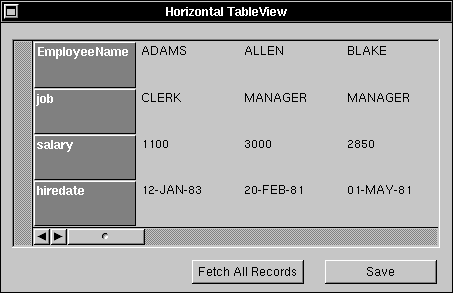
Figure 9: StaticRowsTV
| 3 | Build the static rows from the property list of the root entity with the DBTableView method addRow:withTitle:. |
| 4 | Initialize the DBTableView's data source with the method setDataSource:. Note that you shouldn't use the DBFetchGroup method makeAssociationFrom:To:, because it will assign an internal association object to be your DBTableView's data source instead of using your custom object. |
| 5 | Make sure your custom object implements the following DBTableSource protocol methods: /* Number of columns created dynamically depends on number of records fetched * from the DBRecordList */ - (unsigned)columnCount { return [[dbFetchGroup recordList] count]; } |
/* This method displays the DBRecordList data onto the DBTableView */
- getValueFor:aProperty at:(unsigned)index into:(DBValue*)aValue
{
return [[dbFetchGroup recordList] getValue:aValue
forProperty:aProperty at:index];
}
/* This method updates the recordlist after changes are made in the DBTableView */
- setValueFor:aProperty at:(unsigned)index from:(DBValue*)aValue
{
[[dbFetchGroup recordList] setValue:aValue forProperty:aProperty at:index];
return self;
}
Using an independent DBFetchGroup
To associate an independent DBFetchGroup with the DBTableView, use the DBFetchGroup method makeAssociationFrom:To:. The destination object is the DBTableView itself, while the source object can just be nil. The method makeAssociationFrom:To: creates an internal association object that's the data source of the DBTableView.
Note that this applies only to a vertical DBTableView, a table view with static columns and dynamic rows. See the /NextDeveloper/Examples/DatabaseKit/TableView example for further details.
Fancy printing
The DBTableView printPSCode: method doesn't print the column headings--it prints only
the contents of the DBTableView. To experiment with more printing capabilities, take a look at the TablePrinter Palette MiniExample available through NeXTanswers, document #1453.
CONCLUSION
We hope that the examples and tips in this article will make your exploration of the DBTableView more fruitful. Remember to upgrade to Release 3.2, especially if you plan to use the Indexing
Kit in conjunction with DBTableView--many enhancements to the kit have been made since Release 3.0.
Mai Nguyen, a member of the Developer Support Team, specializes in databases. You can reach her by e-mail at Mai_Nguyen@next.com.
DBTABLEVIEW ANOMALIES TO WATCH
| · | To size the columns of the DBTableView, use setMinSize: instead of sizeTo:. The method sizeTo: |
| doesn't actually resize the table columns. If you enable vector resizing with the DBTableView method | |
| allowVectorResizing:, the size can also be changed at runtime. | |
| · | If you have a single record in the DBTableView, sending the message selectAll: to the DBTableView |
| increments the count of selected rows by two. The count can then become arbitrarily high every time a | |
| selectAll: message is sent. This is a known bug that you should be aware of if you use the method | |
| selectedRowCount. Note that this bug is evident only with the boundary case of a single record. It will | |
| be fixed in a future release. | |
| · | The DBTableView setRowHeading: and setColumnHeading: methods are not usable, because |
| DBHeadingView is a private Database Kit object. | |
| · | In Release 3.2, the last record in the DBTableView can't be deleted with the DBModule deleteRecord: |
| method-the method just generates the SQL statement BEGIN TRANSACTION /COMMIT TRANSACTION. | |
| To work around this problem, send a saveModifications: message to the DBRecordList that matches | |
| your DBModule to save the deletion to the database. For example, you can use the following code | |
| snippet as a wrapper around your delete method: |
delete:sender
{
[dbModule deleteRecord:sender];
#ifdef BUG_WORKAROUND
[[[dbModule rootFetchGroup] recordList] saveModifications];
#endif
return self;
}
| This bug will be fixed in a future release, so you should put an #ifdef around the workaround. Also, the same code snippet can run on Release 3.1 without any effect.-MN |
__________________________________________________________________________________
| Next Article | NeXTanswer #1642 Improving NeXT's Developer Documentation |
| Previous article | NeXTanswer #1638 | Creating Advanced Interface Builder(TM) Palettes |
| Table of contents | http://www.next.com/HotNews/Journal/NXapp/Spring1994/ContentsSpring1994.html |