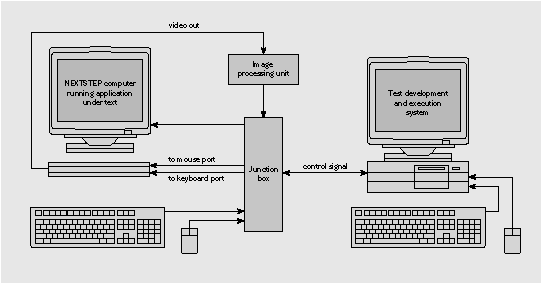
Figure 1: A typical hardware-based test system
NXApp, Winter 1993 (Volume 1, Issue 1).
Copyright ©1993 by NeXT Computer, Inc. All Rights Reserved.
Automated Testing of NEXTSTEP Applications
written by Jim Walsh and Nicholas Popp
| For a graphically oriented client/server operating system like NEXTSTEP, special tools and techniques are needed to make effective use of automated testing. Because user interfaces can change rapidly, special scripting techniques are necessary so that an evolving user interface won't invalidate test suites. In a client/server environment, test synchronization is also important because system response times depend on network loads. In this article we discuss why automated test tools are important, and we explore some of the features this class of product offers. |
Testing an application through its user interface is one of the most important aspects of software quality assurance. Ideally, such system- or user-level testing is only one aspect of a comprehensive development methodology, which also includes requirement and specification reviews; code walk-throughs; unit, class, subsystem, and integration testing; and usability, beta, and other high- and low-level test and inspection processes. Whether or not such a comprehensive test strategy is employed, testing that simulates as nearly as possible the actual use of the product by a customer is very important because it tends to find bugs that users would otherwise find. Because user-level testing is the basic type of test coverage a finished product should receive, it's a good place to start a comprehensive test program in an environment with already-shipping products.
This is the first of two articles on the automated testing of NEXTSTEP applications.
HARDER THAN IT SEEMS
Thoroughly testing an application through its user interface can be exceedingly time-consuming because most applications have a vast number of states that must be visited. Simply exercising every menu option, visiting every panel, and entering meaningful data into every field can be a daunting task. In addition, the number of test cases that result when you combine these operations is enormous.
One frequently quoted rule of thumb is that for every ten lines of code in an application there should be one test case. While the large degree of re-use inherent in the NEXTSTEP development environment drastically reduces the number of lines of code written to produce an application--sometimes even to zero--it's clear that even a modest-sized application can present a significant testing challenge.
Repeat performances
In fact, the situation is even worse than the above remarks suggest. It's highly unlikely that a given application would need to be tested only once. Typically, the first run through the test suite exposes some bugs that require fixes. Good process requires that the entire test suite then be re-run against the modified software to look for secondary bugs introduced by the earlier repairs.
Fortunately, a good object-oriented software architecture can minimize the incidence of secondary bugs--but they still can and do occur, especially if data encapsulation is violated in some way. Often the test-fix-retest process repeats several times, either because secondary bugs are introduced or because, as product quality improves, additional defects that were previously "masked" by more severe problems are exposed.
Checking the user interface
Even before a product is completely developed, user-level testing is often needed. It's desirable-- indeed, required in an iterative development methodology--to do as much user-level testing as is feasible against preliminary, partially completed versions of the software. This helps both to discover bugs sooner and to compress the development schedule.
Simultaneous test and development again requires multiple executions of the test suite against successive versions of the software under development. In developing a user interface iteratively or testing fixes made to the user interface, successive runs of the tests must also accommodate user interface changes. And, finally, successful programs often go through many versions after their initial release, adding or changing features in response to customer suggestions. Successive releases of a software program also must be retested.
Because it's hard to test a complex application well even once, and because it's almost inevitable that you will have to test the same application many times, test automation is a very attractive and highly cost-effective option in many situations. Nearly always, the only real alternatives are to employ a large number of testers and a lengthy test and beta cycle, or to scrimp on focused testing and accept a high level of bugs reported by customers.
AUTOMATED TEST SOFTWARE
Automated GUI-level test programs typically work by capturing a user's keystrokes and mouse movements for later playback, or by providing a programmatic means of simulating key presses and mouse movements without recording. These programs then provide some mechanism for observing the screen output produced by these user inputs, and for comparing this output to some expected result.
Record-and-playback systems sit transparently in the background, monitoring a user's inputs while the user actually runs the application under test, intercepting the keystrokes and mouse movements sent to the application for later playback. Programmed systems provide scripting languages or function libraries that allow you to build test scripts that simulate a user's actions, rather than recording an actual session. Among other things, this means that you can develop scripts before the software to be tested actually exists. Calls supporting functionality such as "click mouse at pixel location x, y" and "type character a" are typically provided.
Either kind of test system might include a hardware component. The software component may either reside on the same computer as the software under test, or less intrusively on a separate computer linked to the system under test by a network or other physical connection.
Figure 1: A typical hardware-based test system
Monkey see, monkey do
To develop tests using a record-and-playback system, the tester first puts the software to be tested in a known, initial state. For a text editor, for example, that state might be edit mode with an empty, unnamed document. The tester then invokes the record or capture portion of the test software. The testing software sits transparently in the background, observing and storing subsequent keystrokes and mouse movements for later replay.
The tester interacts with the software to be tested in the normal fashion--through keystrokes and mouse movements, observing the application on the screen. For example, to create one test to exercise a text editor, a tester might type some text, select it with the mouse, then type the accelerator key sequence meaning "italicize the selected text." The test software records this sequence of actions for later playback.
Taking a snapshot
Once interesting or characteristic screen output is generated by the software under test, the tester takes a "snapshot" of this output for comparison with output generated by later test runs. To do this, the tester usually uses the test program to select a meaningful region of the screen and record a bitmap of it to a file. In the text editor example, the region selected for a snapshot might include the text that had been italicized by the previous sequence of actions.
The final action in creating a test is to restore the software under test to its initial or some other well-defined state, so that tests can chained--that is, executed sequentially. In testing the text editor, restoring the program to its initial state could mean selecting and erasing the text that had been typed, so that the edit window is blank as in the beginning of the test. Sometimes the process of restoring initial state is more complex; for example, the initial run might produce side-effects like loading the undo buffer. In other cases, the initial and final states of the program under test are intentionally different, leading to more complex requirements for chains of tests. In any case, once the final state of the software under test has been reached, the tester tells the test software to stop recording, completing the test creation process.
Play back the action
To execute a previously recorded test, the test software "plays back" the sequence of keystrokes and mouse movements previously recorded. At those points in the record process where screen output was recorded, the playback system records the current screen output and compares it with that from the prior baseline run. By comparing the actual screen output generated by the current test run with the expected value previously recorded, the test software determines whether anything has changed and highlights the differences.
Changes may be for the better or for the worse; a bug might have been fixed or introduced. Changes may also simply be caused by new or altered functionality. A human reviewer must study the screen shots that the test system tags as "changed" and decide on the significance of each change. The reviewer makes the most recent screenshot the new baseline if it represents a bug fix or other positive change, or identifies it as an error if it corresponds to a newly introduced bug.
SYNCHRONIZATION
Playback is somewhat more complicated than it seems at first glance because the response time of the application under test may be different when a test is played back than it was when the test was originally recorded. This often happens in testing client/server applications, whose performance may be radically affected by varying network loads or other factors. Unsophisticated capture and playback test software uses a very literal recording mechanism and so-called time-based synchronization. This means that keystrokes and mouse movements are replayed with exactly the same time between events as occurred during the original recording.
If response times vary between capture and playback for the software being tested, then the test software will lose synchronization with the software under test: The test software will send keystrokes and mouse events to the program before the program is able to accept them. Events are lost because the program under test isn't in a state to respond to them appropriately. Once synchronization is lost, the program under test typically continues to respond to the meaningless stream of events that are delivered by the test software. However, because the inputs being sent bear no relationship to the current state of the program under test, all future results are invalid.
Difficulties in simulating a user
More sophisticated test software incorporates some means of establishing the state of the program under test before events are sent to it, or the test is implemented in such a way that varying response times aren't a problem. The whole issue of synchronization can be sidestepped if messages are sent directly to the widgets or objects composing the application under test. This approach also has the benefit of being largely immune to user interface changes, because screen layout has no effect on the recorded test.
A drawback of the widget- or object-based approach is that the software being tested is not really being accessed through its UI, but at a lower level--through the API of the widget set. A general goal in testing software through its user interface is to simulate as closely as possible a user typing at the keyboard and using the mouse. Test software that short-circuits this process runs the risk of missing some bugs that would be obvious to a real user, simply because events get to widgets differently in the test scenario than they would in actual use. On balance, this method of testing can be made highly effective and robust, but will miss some "obvious" bugs.
Scripting techniques that allow tests to be run against evolving software user interfaces will be discussed in a future article.
Using pattern matching
Non-intrusive test software generally does synchronization through some form of text recognition or pattern matching. This ensures that the software under test is in a known state before keyboard and mouse events are directed to it. A clever form of automatic synchronization is employed by at least one test automation tool. On recording, this tool automatically and transparently takes a snapshot of the pixels immediately surrounding the cursor whenever the mouse is clicked or a key is pressed. On playback, the software waits before sending the recorded keypress or mouse click until the pattern of pixels surrounding the cursor matches the pattern observed on recording. In other words, it waits until the screen in the region of the cursor stabilizes into its original pattern before sending the next user action to the application under test, just as a human user would.
This means that the test software waits until a labeled button, for example, is actually drawn before attempting to press it. A variant of this synchronization scheme is to have the test software explicitly search on the screen for the presence of a specified labeled item before the next key or mouse event is sent to the application under test. The item being searched for might be a window title or a labeled widget.
Further challenges to synchronization schemes are presented by color and font changes, which can alter pixel patterns even if program functionality and screen layout are unaltered. Various tools cope with these problems in different ways, such as doing pattern matching on a single color plane or using text recognition rather than bitmap comparisons, to abstract out the font information. Pixel-dependent test scripts can also be invalidated by cosmetic changes to the user interface
of the software under test, even if the functionality of the software is unchanged. For example, relocating a button on a screen--a trivial task for a developer using a tool like Interface Builder--can totally invalidate entire suites of test scripts. Special programming techniques or widget- and object-based test tools allow tests to be developed at a higher level of abstraction, making test scripts robust in the face of user interface and even feature changes.
ABSTRACT TESTS
The general problem of automated functional testing is a difficult one, however, because
mimicking a human being isn't a simple job! Human users have sophisticated text and pattern recognition skills that abstract out many pixel-level changes. This is both good and bad: Humans tend to literally not see things they aren't looking for, or to subconsciously discard items they
do see if they judge that the items have no significance. This is a strength because it means people abstract away a lot of extraneous detail; it's a weakness because it means that people have blind spots that machines don't.
Missing mouse events
For example, many windowing systems rely on the user to ignore discrepancies between physical mouse motion on the desktop and mouse cursor movement on the screen, even though there's
no deterministic relationship between the two. In other words, moving the mouse an inch on the desktop bears no fixed relationship to the amount the cursor moves on the screen, because the window server may service other events in the meantime and so "lose" mouse events. This non-determinism--unless it's extreme--is totally transparent to the user. He or she subconsciously "closes the loop" and simply moves the mouse a little farther if necessary to put the cursor in its desired location. If one were testing the code responsible for servicing mouse events, though, the loss of this information would limit the value of the testing.
Catching the little details
Low-level detail is often irrelevant to functional testing, so we generally consider dealing with
it to be a nuisance. However, in some situations--such as testing a window server--being able to deal with this level of granularity is a tremendous advantage. For example, when we were
evaluating an automated test tool for use with NEXTSTEP, we immediately found a pixel-level bug in NEXTSTEP's window server that had gone unnoticed by human testers and users for several years! The bug turned out to have trivial impact and was easy to fix; however, one can easily envision applications and situations where being off by a pixel or two is critical. Having test
software that can deal with a low level of granularity but that also can abstract out such details when they're not relevant seems the best of both worlds.
Even at a higher level of abstraction, having test software that's sensitive to such details as colors, fonts, and button placement can be a very positive thing from a quality assurance perspective.
A programmer might easily alter the user interface without telling anyone about it. Even though the changes may improve the product, any change to the software's user interface has important side-effects that the programmer may not anticipate. The change may invalidate screen shots
in the documentation, for example, or even add a new feature that needs to be tested. Having test procedures that catch such last-minute changes is very important and desirable.
RECORDED VERSUS PROGRAMMED TESTING
Most test tools offer a record-and-playback mode. On the surface this appears to be the fastest and best way to create tests, because a tester needs to execute a test only once but can then replay it as many times as desired against future software versions. Record-and-playback is indeed a very useful method in many circumstances, especially if a widget- or object-based recording scheme is used that abstracts out such functionally inconsequential factors as screen layout, fonts, and colors. There are, however, some important limitations to using record-and-playback as the only means of creating automated functional tests.
Testing in parallel with development
One limitation of record-and-playback test tools is that the software to be tested must already
exist before tests can be recorded. This means that development must be complete--at least
at the user interface level--before test automation work can even begin. To be sure, test planning can still take place in parallel with product development, but it's usually best to do as much test development as possible in parallel with software development. To keep the schedule as short as possible, you should have a full suite of tests ready to run by the time the software is completed. By relying entirely on recorded tests, you make a commitment to put a substantial portion of the test development in series with product development. In practice, time-to-market constraints will then often limit the quantity of testing that you can do, leading to a lower quality product.
Programming the tests themselves
Another limitation of record-and-playback-only tools is that you forgo the tremendous leverage you could get by having programmable tests. To create a simple stress test, for example, you might record a test once, then say "do this a hundred times," or "do this until this condition is met." With record-and-playback-only systems, you have to manually execute the test each time you want to execute it.
Record-and-playback systems also don't give you the flexibility to create parametrized or algorithmic tests. For example, if the application you're testing depends on interest rates, you might wish to create a test that says "enter interests rates from 0 to 100% in increments of 0.1% and check that the results output agree with this look-up table (or formula)." To do this with a record and playback system you would have to perform 1,000 separate test operations during the test creation phase.
Tests recorded using pixel-based record and playback systems rapidly become useless in the face of evolving software. Once the user interface changes, all the tests recorded using the old interface become obsolete and must be re-recorded. More sophisticated record and playback tools intercept and replay messages sent to the objects or widgets in the application. These systems are more robust in the face of user interface changes, because the tests recorded are independent of widget location and sometimes even of the text or font labelling the widgets. However, unless some sort of programmatic interface is provided, even these systems still suffer from the other limitations of record-and-playback tools.
One-shot deals
Record-and-playback systems are at their best when you need to create a quick-and-dirty test
to exercise a single condition against a stable user interface. As such, they are very useful for
regression testing, where the sole purpose of the test is to reproduce a single bug reported against the current release of the software. A regression test is run against succeeding iterations of the
software to determine whether the bug has been fixed or not.
Such recorded tests become obsolete when the user interface changes, but this is often a reasonable trade-off if the number of bugs reported is large. In relatively early phases of commercial software development, defect rates on the order of 1 to 10 bugs per 1,000 lines of code are common. Of course, good procedures such as unit testing and code walkthroughs can reduce such figures by orders of magnitude. Faced with such numbers, rapidly created throw-away tests are worthwhile.
As a rough guideline, a skilled tester might be able to record about six good tests in a day's work on average, while the same amount of work might yield only up to one programmed test. Depending on what's being tested, however, a programmed test might be the equivalent of dozens or even hundreds of recorded tests. In other circumstances, the recorded and programmed tests may cover about the same amount of functionality. It's clear that there are trade-offs involved, and deciding which tests to record and which to program can be a key task.
Recording and programming
The best of both worlds are tools that support both programmed and recorded tests. Among
other features, these tools capture the user's keystrokes and mouse movements and translate them into a test script that the tester can edit into a more complex test or into algorithmic and stress tests. Entirely programmed tests can also be used. Both of the tools evaluated for NEXTSTEP support both recording and programming, though, unfortunately, both are also pixel-based. While programmability can overcome many of the limitations of pixel-based systems--such as adaptability to evolving user interfaces--the best situation would be to have a widget- or object-based recording capability, augmented by programmability.
CONCLUSION
Automated functional test tools can be a powerful aid in improving product quality. Issues such as synchronization and robustness in the face of evolving user interfaces pose challenges to tool builders, and sometimes to tool users! Special programming techniques can help users keep pace with evolving software, and we'll provide some pointers in a later article.
Automating your functional testing is nearly always worth the cost and learning curve it entails, because it allows you to deliver a higher quality product in a shorter period of time than would otherwise be possible.
Jim Walsh is NeXT's Software Quality Manager. You can reach him by e-mail at Jim_Walsh@next.com. Nicholas Popp is Project Manager of Functional Test and Software Tools. You can reach him by e-mail at Nicholas_Popp@next.com.
TEST TOOLS AVAILABLE FOR NEXTSTEP
Two commercial third-party testing tools NeXT's Software Quality Department has evaluated against NEXTSTEP applications are the Elverex Evaluatorî and Mercury Interactive's TestRunnerî. Conceptually, Evaluator and TestRunner are similar. Both require that you have two computer systems. The first computer is the system under test, running NEXTSTEP and the application to be tested. The second system is the test host. Both test systems support mouse and keyboard event recording, playback, and scripting. Both are non-intrusive and rely on proprietary hardware to capture user actions.
Test generation
Both systems allow scripting. For Evaluator, the tester writes C scripts. Evaluator also generates equivalent C code and supports a C API to read and write mouse and keyboard events. This API also implements pattern matching. Scripts are currently compiled on the Borland C++ compiler. In contrast, scripts for TestRunner are written in TSL, a C-like interpreted language.
NeXT hasn't tested extensively with either product and doesn't endorse them or recommend one above the other. This evaluation is based on limited experience with the products and is for information only.
You can develop robust scripts fastest by combining recording and scripting. On Evaluator, this is a tedious process because you have to switch between Evaluator's Recorder and Borland C++ in DOS. Moreover, Recorder doesn't let you interactively change the recorded script. With TestRunner, recording and scripting are well integrated under one application. Equivalent code is generated "on the fly" by the recorder. You can interrupt the recording, change the script, and resume recording.
Robust synchronization and verification schemes
The Evaluator solution to synchronization is elegant. Synchronization and verification are performed by comparing bitmaps. In replay mode, Evaluator tries to match a recorded bitmap with a region on the screen before it sends the next event. If it can't find it, it considers the test failed. If it finds a match, it sends mouse events relative to the matched bitmap location. Evaluator implements the minimal sufficient functionality to perform event synchronization and test verification.
Similarly, TestRunner verifies the proper test execution by matching patterns on bitmaps specified and stored in recording mode. However, alignment is achieved by text recognition, which allows a procedural approach. Synchronization can be performed on object titles, present in most NEXTSTEP objects. Text can be read from the screen and returned to the calling script as a variable parameter. Also, TestRunner supports exception handling, like detecting and reacting to system crashes.
File management
Because Evaluator lacks integration, test development is more difficult. In particular, there are no tools for structuring and organizing test scripts and libraries. Images captured during recording are stored together in a non-standard format. In contrast, TestRunner integrates recording and scripting with file and image management. Synchronization is performed on strings, not on images, so image reusability and management aren't important. However, reusability and management of fonts is important. Text recognition relies on the active font, a collection of bitmaps stored in a proprietary format.
Summary
We believe that Evaluator is a minimal cost solution with all the functionality to implement robust test automation. However, poor integration and detailed reliance on a third-party operating system for developing tests place a substantial burden on the test programmer. Alternatively, TestRunner is costly but allows you to rapidly prototype and develop, and provides a self-contained test development and execution environment. --JW and NP
Elverex: Evaluator costs about $9,500. Contact Gregory Hayes, 12 Carbonera Drive, Santa Cruz, CA 95060,
(408) 457-8984.
Mercury Interactive: TestRunner costs about $35,000. Contact David E. Anderson, Regional Sales Manager, 3333 Octavius Drive, Santa Clara, CA 95054, (408) 987-0100.
__________________________________________________________________________________
| Next Article | NeXTanswer #1509 | Accessing Stored Procedures with DBKit Release 3.2 |
| Previous article | NeXTanswer #1503 | Branching Out With Dynamic Loading |
| Table of contents | http://www.next.com/HotNews/Journal/NXapp/Winter1994/ContentsWinter1994.html |