NXApp, Winter 1993 (Volume 1, Issue 1).
Copyright ©1993 by NeXT Computer, Inc. All Rights Reserved.
Accessing Stored Procedures With Database Kit® Release 3.2
written by Mai Nguyen
| The MultiBinder class, provided in an example in Release 3.2, can execute a stored procedure in a Sybase database server and return multiple result sets from it. It's important to use this class instead of DBBinder to return multiple data sets. |
In some database applications you need to have the database server execute a batch of SQL commands directly by executing a stored procedure in the server. This technique avoids going through the layers of the Database Kit repeatedly, once for each command.
In previous releases, you could get only a single set of results from executing a stored procedure. However, you might sometimes need to return multiple sets of results from a procedure. To help you do this, an example included in Release 3.2 provides the MultiBinder class, a subclass of DBBinder. The example is in /NextDeveloper/Examples/DatabaseKit/Evaluator. A newer version of this example is provided with this issue, as well.
This article explains the differences between how you use the two classes. It also explains why you should use this new class rather than the DBBinder class to handle multiple result sets from a stored procedure with Release 3.2.
The Oracle adaptor for Release 3.2 is based on ORACLE® RDBMS Version 6, which doesn't include stored procedures. When a newer version of the Oracle adaptor provides support for the ORACLE7 stored procedures, you'll be able to use similar techniques with it.
RETRIEVING A SINGLE SET OF DATA
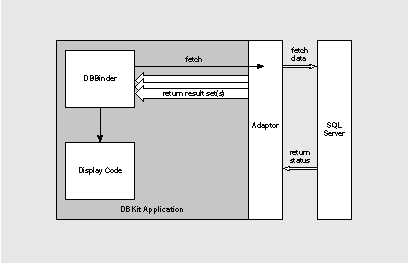
When the DBBinder is sent the evaluateString: message, the Sybase Adaptor forwards the stored procedure command to the Sybase server using the Sybase DB-Library function dbsqlexec(). To get the results back, the DBBinder is sent the fetch message. The adaptor then communicates with the SQL server through a series of DB-Library functions to process all the results. Figure 1 shows how this looks.
Figure 1: Interaction between DBBinder and the Sybase Adaptor
The adaptor first calls the dbresults() function to determine if there are any results from the query. As long as dbresults() returns SUCCEED, the adaptor processes each result set with dbrows() and dbnextrow(). This continues until dbresults() returns the status NO_MORE_RESULTS. If you use the DBBinder class, only a single set of results is returned because DBBinder doesn't recognize the notification from the adaptor that it should process additional results.
Naturally, error handling further complicates the scenario. We'll assume error handling is also going on, but won't illustrate it.
How to use DBBinder
For example, assume there's a stored procedure defined in the Sybase pubs database like this:
create procedure ca_publishers
as select pub_name, pub_id, city from publishers
where state = 'CA'
To try out the examples in this article, you'll need access to a Sybase server and a Sybase demo database called pubs.
The first step in calling the procedure is to initialize the objects you'll use. This initialization has four parts. Start by allocating and initializing a DBBinder instance. Then, allocate a List object to be used as the DBBinder container. This List will hold all the rows of data (records) that the stored procedure will return when you execute it. Next, allocate and initialize a List object to hold all the properties that the stored procedure will also return. In this example, the procedure returns three properties: publisher name, publisher id, and city. Now set up the binder.
DBBinder *binder = [[DBBinder alloc] init];
List *rowsList = [[List alloc] init];
List *propertyList = [[List alloc]init];
[binder setDatabase:pubsDatabase];
[binder setContainer:(id)rowsList];
The second step is to execute the procedure, using the DBBinder method evaluateString:
[binder evaluateString:"ca_publishers"];
The third step is to retrieve the data returned by the stored procedure. To do this, tell the binder to fetch the data. Each element of the row list corresponds to a row of data, and the property list contains the three properties originally specified in the stored procedure's SELECT statement:
int ri, pi;
char buf[512];
 if (![binder fetch])
fprintf(stderr, "fetch failed!\n");
else {
fprintf(stderr, "Got %u record(s).\n", [rowsList count]);
[binder getProperties:propertyList];
[binder setFirst];
for (ri = 0 ; ri < [rowsList count] ; ++ri) {
for (pi = 0 ; pi < [propertyList count] ; ++pi) {
id property = [propertyList objectAt:pi];
sprintf(buf, "%s=<%s> ",
[property name],
[[binder valueForProperty:property] stringValue]);
fprintf(stderr, "%s", buf);
}
fprintf(stderr, "\n");
[binder setNext];
}
}
Finally, free the allocated resources:
[binder free];
[rowsList free];
[propertyList free];
This approach is fine as long as you are executing a stored procedure that returns a single set of results. Otherwise, you'll need to take a different approach.
RETRIEVING MULTIPLE SETS OF DATA
As soon as you want to execute a standard stored procedure such as sp_help with the DBBinder class, you run into problems, because it can only return the first set of results. For example, if you execute the stored procedure sp_help authors with the code described in the previous section to get the description of the authors table, you'll get the following result:
sp_help authors
Got 1 record(s)
Name=<authors> Owner=<dbo> Type=<user table>
In contrast, you'd like to get something closer to what's in Figure 2. The MultiBinder class addresses this problem by recognizing the multiple sets of data returned by the stored procedure. To use MultiBinder, you follow three basic steps: initialize the object, execute the procedure that returns all the results at the same time, and free the allocated resources.
sp_help authors
result set 0
1 record(s) selected
Name=(authors) Owner=(dbo) Type=(user table)
result set 1
1 record(s) selected
Data_located_on_segment=(default) When_created=(Jul 11 1993 5:02:13:303AM)
result set 2
9 record(s) selected
Column_name=(au_id) Type=(id) Length=(11) Nulls=(0) Default_name=((null pointer)) Rule_name=((null pointer))
Column_name=(au_lname) Type=(varchar) Length=(40) Nulls=(0) Default_name=((null pointer)) Rule_name=((null pointer))
Column_name=(au_fname) Type=(varchar) Length=(20) Nulls=(0) Default_name=((null pointer)) Rule_name=((null pointer))
Column_name=(phone) Type=(char) Length=(12) Nulls=(0) Default_name=(phonedflt) Rule_name=((null pointer))
Column_name=(address) Type=(varchar) Length=(40) Nulls=(1) Default_name=((null pointer)) Rule_name=((null pointer))
Column_name=(city) Type=(varchar) Length=(20) Nulls=(1) Default_name=((null pointer)) Rule_name=((null pointer))
Column_name=(state) Type=(char) Length=(2) Nulls=(1) Default_name=((null pointer)) Rule_name=((null pointer))
Column_name=(zip) Type=(char) Length=(5) Nulls=(1) Default_name=((null pointer)) Rule_name=(ziprule)
Column_name=(contract) Type=(bit) Length=(1) Nulls=(0) Default_name=((null pointer)) Rule_name=((null pointer))
result set 3
2 record(s) selected
index_name=(auidind) index_description=(clustered, unique located on default) index_keys=( au_id)
index_name=(aunmind) index_description=(nonclustered located on default) index_keys=( au_lname, au_fname)
Figure 2: Multiple sets of data returned from a stored procedure
Instead of a DBBinder object as shown in Figure 1, your application now uses a MultiBinder object. The main difference is that the MultiBinder object can receive notification from the Sybase adaptor when a new result set is encountered, and it in turn notifies its binder delegate . The binder delegate can then display the results or send them to a display object.
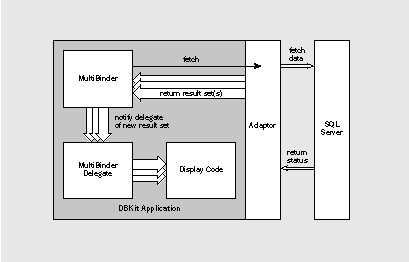
Figure 3: Interaction between MultiBinder and the Sybase Adaptor
A MultiBinder example
This example uses the standard stored procedure sp_help with one parameter, authors. The procedure returns multiple result sets with different properties in each set.
Begin by initializing the objects you'll use. First, allocate and initialize an instance of MultiBinder. In this example, the list of property lists is set to nil, which tells the binder to return all properties from each set of rows or results. Next, allocate a list object to be used as the DBBinder container. This list will hold all the rows of data that the stored procedure returns. Now set up the binder.
MultiBinder *binder;
List *rowsList;
binder = [[MultiBinder alloc] initFromPropertyLists:nil];
rowsList = [[List alloc] init];
[binder setDatabase:database];
[binder setDelegate:self];
[binder setContainer:(id)rowsList];
The second step is to execute the procedure. The MultiBinder instance executes the SQL string once. If the evaluation fails, a fetch message ensures that the internal Database Kit state is restored properly. If the evaluation succeeds, the binder fetches all the result sets up to the last. Every time the binder retrieves a new result set, the binder delegate method binderWillChangeResultSet: displays that result set. You must invoke this delegate method explicitly one last time to show the last set of results.
if (![binder evaluateString:buffer])
[resultsView sprintf:"EVALUATION FAILED\n\n"];
if (![binder fetch])
[resultsView sprintf:"FETCH FAILED\n\n"];
else
/* For the last result set, binderWillChangeResultSet is invoked explicitly. */
[self binderWillChangeResultSet:binder];
Finally, remember to free the allocated resources:
[binder free];
[rowsList free];
A closer look at binderWillChangeResultSet:
The binderWillChangeResultSet: delegate method is invoked every time a new result set is fetched. You can put the code to retrieve all objects returned by the binder fetch from the binder container in this method. Here's how to do this.
First, initialize by allocating a new property list. This list will hold the attributes of each row of data returned from a particular result set.
- binderWillChangeResultSet:(MultiBinder *)binder
{
int rowsIndex;
int rowsCount;
int propIndex;
int propCount;
List *rowsList;
List *propList;
propList = [[List alloc] init];
[binder getCurrentProperties:propList];
To find out how to customize property lists, see the MultiBinder.[hm] files.
Note: The MultiBinder method you invoke to get the properties is getCurrentProperties:, not getProperties:. It's essential to use getCurrentProperties: because the adaptor signals a change in result set by invoking that method. Not using the right method breaks MultiBinder's behavior.
Process the results by accessing the binder container and determining the number of rows of data.
rowsList = [binder container];
rowsCount = [rowsList count];
Cycle through all the rows and print the value of each attribute of every row. Then free the allocated resources:
[binder setFirst];
for (rowsIndex = 0; rowsIndex < rowsCount; ++rowsIndex)
{
propCount = [propList count];
for (propIndex = 0; propIndex < propCount; ++propIndex)
{
id p = [propList objectAt:propIndex];
resultsView sprintf:"%s=(%s) ",
[p name], [[binder valueForProperty:p] stringValue]];
}
[resultsView sprintf:"\n"];
[binder setNext];
}
[propList free];
There are two important things to keep in mind. First, the Sybase adaptor only returns the records buffered in each result set. It doesn't return the status of the procedure execution. Also, the container is flushed every time a new result set is retrieved. So, to reuse the result set for further processing you can disable flushing, which is most efficient. On the other hand, if you want the results in separate containers, you can specify a different container by sending the binder a setContainer: message in the binderWillChangeResultSet: delegate method.
SYBASE INCOMPATIBILITY PROBLEM
In Release 3.2, if an application uses DBBinder to run a stored procedure that returns multiple sets of results, it will get this Sybase server error message when it runs the procedure the second time:
Sybase server error:
Sybase:Attempt to initiate a new SQL Server operation with results pending.
At the second fetch with DBBinder the Sybase Adaptor will be out of sync, and there's no way to clear the pending results.
To avoid this problem, we strongly recommend that you use the MultiBinder class because it provides a more general solution. However, if you need to keep using a DBBinder object, you can add some extra code when initializing the DBBinder to alleviate the problem. The extra code synchronizes the Sybase Adaptor and prevents the error message. In essence, the extra code tells the adaptor to free the connection made to the database server during a select operation even if a fetch has failed.
For instance, in the DBBinder example presented earlier, the extra code is composed of two pieces: a category to DBDatabase and one line of code in the section that sets up the binder:
@interface DBDatabase (SybaseAdaptor)
- setHoldsSelectConnection:(BOOL)yn;
@end
...
[binder setDatabase:pubsDatabase];
[pubsDatabase setHoldsSelectConnection:NO];
[binder setContainer:(id)rowsList];
...
The database variable refers to the database that the binder has been initialized with.
A WORD OF CAUTION FOR THE ORACLE ADAPTOR
You may ask, "Why can't I use evaluateString: only, since I don't care about fetching any data?" The answer is that the current Database Kit implementation keeps track of some internal
states that are properly reset only if you send a fetch message followed by an evaluateString: message to the binder. This problem happens with the ORACLE Adaptor specifically. The memory exception error generated looks like this:
#0 0x5005f36 in objc_msgSend ()
#1 0x401ceac in _zoneRealloc ()
#2 0x500a633 in -[HashTable _insertKeyNoRehash:value:] ()
#3 0x500a760 in -[HashTable insertKey:value:] ()
#4 0x500a845 in -[HashTable insertKey:value:] ()
Adding a fetch message after an evaluateString: message fixes this problem.
CONCLUSION
By letting you send raw SQL commands to your database server, the Database Kit provides
the flexibility of preserving your existing complex stored procedures. Understanding the material
in this article should help you exploit this low-level area to a greater extent. We hope you'll upgrade to Release 3.2 soon to enjoy the many improvements made since the Database Kit's
first release!
Mai Nguyen is a member of the Developer Support Team, and specializes in databases. You can reach her by e-mail at Mai_Nguyen@next.com.
REFERENCES
McGoveran, D., and C. J. Date. A Guide to Sybase and SQL Server. Reading, MA: Addison Wesley, 1992. ISBN 0-201-55710-X.
NeXT Computer, Inc. NEXTSTEP Release 3.2 Release Notes. Redwood City, CA: NeXT Computer, 1993.
PRACTICAL TIPS FOR SETTING UP THE SYBASE ENVIRONMENT
Here are a few useful Sybase Adaptor settings you can use to customize your working environment.
To find out more about these new parameters, see the NEXTSTEP Release 3.2 Release Notes.
Relocating your interfaces file
From Release 3.1 onward, when you run a Database Kit application, the Sybase adaptor checks the default parameter, set with the dwrite command for the location of the interfaces file. If you haven't specified a location with dwrite, the adaptor next searches the Sybase adaptor's bundle, and finally checks the SYBASE environment variable. The SYBASE environment variable is usually defined as /usr/sybase, which is also the default location for an interfaces file.
To specify a new location for your Sybase interfaces file, run this command:
dwrite SybaseAdaptor SybaseInterfacesFile /NewLocation/interfaces
Reducing the number of active connections
In Release 3.0, two Sybase connections were always created when an application connected to a Sybase database: One connection selected and fetched data while the other updated data. Therefore, each user running a single application used two Sybase connections. For any site with a limited Sybase server license, the allowed concurrent connections were often quickly used up.
Release 3.1 included a default setting to address this problem. You can have the application release its connections as soon as a fetch, select, or update operation completes. This allows the number of connections to drop to zero when no transaction is active. For example:
dwrite SybaseAdaptor SybaseLazyConnect YES
The default on Release 3.1 is NO.
In Release 3.2, two more default parameters give even more control over the number of connections:
 |
SybaseHoldsSelectConnection determines whether the select connection is maintained when a select isn't in progress. The default is YES. | |
|
SybaseHoldsUpdateConnection does the same for the update connection. The default is NO. |
If you want to minimize the number of connections at all times, the equivalent to SybaseLazyConnect NO is this:
dwrite SybaseAdaptor SybaseHoldsSelectConnection NO
dwrite SybaseAdaptor SybaseHoldsUpdateConnection NO
Sending messages to the console
Two other adaptor default settings turn the system log on and off. Turning it on causes errors and messages from the server to appear on the system console. SybaseLogErrors controls whether errors are posted, while SybaseLogMessages does the same for messages. The default for each is NO.--MN
__________________________________________________________________________________
| Next Article | NeXTanswer #1508 | appDidInit: |
| Previous article | NeXTanswer #1499 | Automated Testing of NEXTSTEP Applications |
| Table of contents | http://www.next.com/HotNews/Journal/NXapp/Winter1994/ContentsWinter1994.html |