|
OpenStep Journal, Summer 1995 (Volume 1, Issue 2).
Copyright ©1995 by NeXT Computer, Inc. All Rights Reserved.
Realities of Portable Distributed Objects
Written by Brian Raymor and Randy Tidd |
|
Although the design of the Distributed Objects and Portable Distributed ObjectsTM
architectures is elegant and simple, creating working applications with them can be complex.
A thorough understanding of Mach interprocess communication and the details of distributed environments can dramatically improve a developer's ability to use these powerful tools.
This is the second installment of a series of articles on developing real-world distributed applications in the NEXTSTEPTM operating environment. |
|
(Note that sidebars and marginal notes in the printed journal are denoted here by smaller type with bars above and below the item.)
The first article in our series focused on registering and connecting to servers. We also reviewed how to "run" Distributed Object connections, but we didn't discuss the DOEventLoop class that is specific to Portable Distributed Objects (PDO). This article describes the DOEventLoop, both to quickly review running connections and to demonstrate how it works in a non-NEXTSTEP environment.
The next step is to explore how clients and servers send and receive messages. Again, we'll
refer to the Mach IPC implementation to better comprehend the underlying implications of communication between distributed applications. Also, the code fragments are minimal, excluding ancillary details such as error or exception handling for the purposes of clarity.
RUN, RUN, RUN, AS FAST AS YOU CAN
In our first article, we wrote:
 When a server registers its SERVER_NAME using a class method such as registerRoot:withName:, a NXConnection instance is created and returned. To allow the connection to receive and dispatch incoming messages (requests), the server must "run" When a server registers its SERVER_NAME using a class method such as registerRoot:withName:, a NXConnection instance is created and returned. To allow the connection to receive and dispatch incoming messages (requests), the server must "run"
the connection. This is accomplished using one of the variations on the run method: run, runWithTimeout:, runFromAppKit, an runInNewThread.
For obvious reasons, runFromAppKit is not applicable in PDO applications. Instead, the DOEventLoop class is included with PDO to emulate the main event loop in the Application KitTM Application class. In this case, a connection is registered with an instance of DOEventLoop.
When the DOEventLoop instance is "run," it will receive and dispatch incoming messages on
the connection.
Because it's common for applications to receive input from multiple sources, DOEventLoop also defines methods to register object handlers for common events, similar to the functions DPSAddPort() and DPSAddFD() in the Display PostScript® (DPS) client library for NEXTSTEP.
The following fragment demonstrates how to register a connection with an event loop: |
DOEventLoop *eventLoop;
ServerClass *serverObject;
NXConnection *serverConnection;
serverObject = [[ServerClass alloc] init];
serverConnection = [NXConnection registerRoot:serverObject
withName:SERVER_NAME];
/*
* register the connection with the event loop
*/
eventLoop = [DOEventLoop new];
[eventLoop addConnection:serverConnection];
[eventLoop run];
|
The DOEventLoop also permits applications to register objects that are notified when certain events occur, including incoming messages on a Mach port, incoming data on a file descriptor, and timeout events.
When you use DOEventLoop, there's no need to use the NXPort class method worryAboutPortInvalidation to create a new thread to listen for port deaths. This function is implicitly performed by DOEventLoop. If the PDO platform supports threads, then a separate thread is created for this purpose. In this case, the senderIsInvalid: implementation must be thread-safe. If thread support is unavailable, the port death notifications are dispatched from the same thread running the DOEventLoop.
______________________________________________________________________________________________
In the first article, we demonstrated how to increase the message queue length for the Mach ports associated with the connection. This is not required in the PDO implementation. It offers a pleasant (if inconsistent)
change in behavior by setting the port backlog for the Mach inPort managed by the connection to PORT_BACKLOG_MAX.
________________________________________________________________________________________________________________
DOEventLoop and File Descriptors
An object that conforms to the DOFileDescriptorHandling protocol is registered with addFileDescriptor:handler:handlerData:. The method is similar to the DPSAddFD() function in the DPS client library for NEXTSTEP. When data is available to be read on the file descriptor, the registered object is sent the dataOnFileDescriptor:handlerData: notification. The object handler is unregistered using the removeFileDescriptor: method.
In most cases, a file descriptor for a socket or pipe is registered with the event loop. The following example creates a socket. The file descriptor for the socket is registered with the event loop. The socket is connected to the daytime server that implements the DARPA Daytime Protocol (RFC 867). This server returns the current date and time and then closes the connection. When notified, the object handler unregisters from the event loop and prints the value returned from the server. |
#import <foundation/NSObject.h>
#import <remote/DOEventLoop.h>
@interface SocketHandler:NSObject<DOFileDescriptorHandling>
@end
@implementation SocketHandler
- (void)dataOnFileDescriptor:(int)fd handlerData:(void *)data
{
char c;
DOEventLoop *eventLoop = (DOEventLoop *)data;
[eventLoop removeFileDescriptor:fd];
/*
* The daytime server returns a value similar to:
* Wed Jun 21 14:15:20 1995\r\n
*/
while ((read(fd, &c, 1))
printf ("%c", c);
}
@end
void
main()
{
int fd;
struct sockaddr serverAddress;
SocketHandler *socketHandler;
DOEventLoop *eventLoop;
/*
* The setup code for serverAddress has been removed to clarify the example.
*/
fd = socket(AF_INET, SOCK_STREAM, 0);
connect(fd, (struct sockaddr *) &serverAddress, sizeof(serverAddress));
/*
* instantiate a file descriptor handler
*/
socketHandler = [[SocketHandler alloc] init];
/*
* register the file descriptor and its object handler with the event loop
*/
eventLoop = [DOEventLoop new];
eventLoop addFileDescriptor:fd handler:socketHandler
handlerData:(void *)eventLoop];
[eventLoop run];
}
|
DOEventLoop and Mach Messages
An object that conforms to the DOMachMessageHandling protocol is registered with the addPort:handler:handlerData: method. This method is similar to the DPSAddPort() function in the DPS client library for NEXTSTEP. When a Mach message arrives on the port, the registered object receives the machMessageReceived:handlerData: notification.The object handler is unregistered using the removePort: method.
The following example allocates a Mach port. The port is registered with the event loop. A Mach message is then defined and forwarded to the port. When notified, the object handler stops the event loop. |
@interface MachMessageHandler:Object<DOMachMessageHandling>
@end
@implementation MachMessageHandler
- (void)machMessageReceived:(msg_header_t *)msg handlerData:(void *)data
{
DOEventLoop *eventLoop = (DOEventLoop *)data;
[eventLoop stop];
}
@end
void
main()
{
DOEventLoop *eventLoop;
MachMessageHandler *messageHandler;
port_t machPort;
msg_header_t msg;
/*
* allocate a Mach port
*/
port_allocate(task_self(), &machPort);
/*
* setup and send a Mach message
*/
bzero(&msg, sizeof(msg_header_t));
msg.msg_simple = TRUE;
msg.msg_size = sizeof(msg_header_t);
msg.msg_remote_port = machPort;
msg_send(&msg, MSG_OPTION_NONE, 0);
/*
* instantiate a Mach Message Handler
*/
messageHandler = [[MachMessageHandler alloc] init];
/*
* register the Mach port and its object handler with the event loop
*/
eventLoop = [DOEventLoop new];
[eventLoop addPort:machPort handler:messageHandler
handlerData:(void *)eventLoop];
[eventLoop run];
}
|
DOEventLoop and Timeout Handlers
An object that conforms to the DOTimeoutHandling protocol is registered with the DOEventLoop using the addTimeoutEntry:handler:handlerData: method. Do not confuse this method with the DPSAddTimedEntry() function in the DPS client library for NEXTSTEP. A timed entry handler
is called repeatedly at the specified time interval. A timeout handler is called once when the
timer expires.
A timeout is similar to the UNIX® alarm(3) function or setitimer(2) system call. The difference
is that the UNIX operations result in a signal being delivered to the application. In PDO, the registered object receives the timeoutOccurred:handlerData: notification.The handler is unregistered using the removeTimeoutEntry: method.
It's possible to implement timed entries with timeout entries. When notified, the object handler unregisters the previous timeout using the receipt. It then registers a new timeout using the same DOTimeInterval value. |
/*
* Timeout in milliseconds
*/
const DOTimeInterval timeout = 5000;
@interface TimeoutHandler:Object<DOTimeoutHandling>
@end
@implementation TimeoutHandler
- (void)timeoutOccurred:(DOTimeoutReceipt)receipt handlerData:(void *)data;
{
DOEventLoop *eventLoop = (DOEventLoop *)data;
[eventLoop removeTimeoutEntry:receipt];
[eventLoop addTimeoutEntry:timeout handler:self handlerData:data];
}
@end
void
main()
{
DOEventLoop *eventLoop;
TimeoutHandler *timeoutHandler;
/*
* Instantiate a timeout handler to be notified in 5000 milliseconds
*/
timeoutHandler = [[TimeoutHandler alloc] init];
/*
* register the timeout entry and its object handler with the event loop
*/
eventLoop = [DOEventLoop new];
[eventLoop addTimeoutEntry:timeout handler:timeoutHandler
handlerData:(void *)eventLoop];
[eventLoop run];
}
|
_____________________________________________________________________________________________
In our first article, we reviewed some restrictions for senderIsInvalid: implementations. There is an additional restriction for Application Kit-based applications. Their implementation must not cause Display PostScript
client library functions to be executed, because the PostScript stream to the window server could be
corrupted. The safest solutions are to use either the delayedFree: method in the Application class or the perform:with:afterDelay:cancelPrevious: method in the Object class to schedule the operations for a
later time.
_____________________________________________________________________________________________
PROXIES
An NXProxy instance is a local stand-in object for a remote object, where the remote object exists in another process on the same machine or across the network. An application never explicitly instantiates NXProxy objects. Proxies (instances of NXProxy class) are created implicitly when an application receives a reference to an object that does not exist in its address space.
To be completely accurate, one proxy is created implicitly on each side of the connection. In the server application, where the object actually resides, the proxy is known as the local proxy. In the remote application, the proxy is referred to as the remote proxy. The (P)DO implementation uses the local proxy, which is usually concealed from the developer. It is referenced here for completeness. We'll use the term proxy to refer to the remote proxy in all further discussions.
_____________________________________________________________________________________________
For more information on local and remote proxies, see the "Sharing Objects" section of the Distributed Objects Introduction documentation found in GeneralRef/06_DistributedObjects/IntroDistObjects.rtf.
_____________________________________________________________________________________________
Proxies are created whenever a remote connection is made. For example, NXConnection's connectToName: and other similar methods return a proxy to the root object for a server. Proxies are also created implicitly in (P)DO. If an object is passed as an argument to a remote message, (P)DO will create a proxy once in the remote application, unless the object is passed by copy. The same is true for objects returned from remote messages. For example, if an application sends the objectAt: message to a List proxy, then another proxy will be created for the returned list element.
It is essential to minimize the number of proxies created and to minimize the messaging traffic sent over the proxies. This will be discussed in detail later.
NXProxy is a root class, so it inherits from neither Object nor NSObject. A proxy implements a few methods for reference counting and other (P)DO-related functions. If any other messages are sent to the proxy, the messages are forwarded to the remote object that it represents.
Let's take a closer look at the forwarding of the message. The Objective-C® run time includes a mechanism by which an object can be notified when it is sent a message that it doesn't respond to. It sends the object a forward:: message with the selector and its arguments. The default implementation of forward:: (implemented by Object and thus inherited by most NEXTSTEP classes) calls doesNotRecognize:, which in turn calls error:, which prints the familiar "does not recognize selector" message and raises an exception.
_____________________________________________________________________________________________
In the new Foundation classes, the method is forwardInvocation: instead of forward:: and the arguments are expressed as an instance of the NSInvocation class. However, NSInvocation is not public in the EOF 1.1 release and will not be public until NEXTSTEP 4.0, so until then the forwardInvocation: mechanism for NSObject cannot be used.
_____________________________________________________________________________________________
The NXProxy class implements forward:: so unknown messages can be forwarded to the remote object that it represents. First the proxy checks to see if the message has been declared explicitly as part of its protocol (via setProtocolForProxy:). If so, a local method signature is used and the proxy can go ahead and send the message. If not, the first time a message is encountered for a given proxy, (P)DO will have to ask the object on the other side of the connection for the method signature. This causes additional message traffic, but only the first time the method is seen for each proxy (when the signature is received, (P)DO caches it in the proxy, so it can be reused). If the remote object does not respond to the selector, NX_unknownMethodException is raised at this point. See the section below on "Using Protocols for Efficiency" for further details.
If the proxy determines that the remote object responds to the message, the proxy packages the message selector and its arguments into a Mach message and sends it to the remote process. The Mach implementation will be discussed later--for now, let's look closer at this encoding process.
Passing Objects across the Connection
(P)DO encodes each scalar argument (int, float, etc). The Network Message Server resolves byte swapping and other architecture issues. Object arguments are encoded by proxy or by copy. For objects sent by proxy, a proxy for the object will be created in the remote application. For objects sent by copy, the methods from the NXTransport protocol are sent to the object, which allows
the object to decide how it should be encoded across the connection.
The default is to send the object by proxy. To send an object by copy, the object needs to implement the encodeRemotelyFor:freeAfterEncoding:isBycopy: method appropriately. If this method unconditionally returns self, the object will always be sent by copy. This method typically returns self (causing the object to be sent by copy) only if the isBycopy flag is YES; otherwise, a proxy (or other object) is returned.
___________________________________________________________________________________________
Which method you choose depends on the goals for your applications. These issues are discussed in the Distributed Objects Introduction documentation in GeneralRef/06_DistributedObjects/IntroDistObjects.rtf.
_____________________________________________________________________________________________
The application can specify the bycopy qualifier in a protocol that the proxy conforms to. This will cause the isBycopy flag to be YES; otherwise, it will be NO (the default). In this manner the system designer can hint at how the object is encoded, but the decision is finally made according to the implementation of the object's encodeRemotelyFor:freeAfterEncoding:isBycopy: method.
For further details, review the "bycopy Qualifier" section.
Several factors should be considered and balanced when deciding how to send objects over the connection. Passing objects by proxy is convenient because it allows two or more processes to access the same object. However, a message to a remote object takes much longer than a message to a local object, it is much less likely to arrive intact, and there are many more error conditions to account for. Furthermore, proxies to objects can be created implicitly by the (P)DO system, as discussed above.
_____________________________________________________________________________________________
For more information, see the "Determining the Object to Encode" section of the Distributed Objects Introduction documentation in GeneralRef/ 06_DistributedObjects/ IntroDistObjects.rtf.
_____________________________________________________________________________________________
Consider the case of a List object being passed by proxy from one application to another. The receiving application can send this List proxy the objectAt: message to obtain the objects that the List contains. However, the receiving application will actually receive proxies to those objects that will be created implicitly by (P)DO. In a single traversal of the List object, one proxy will be created for each object that the List contains. Because each of these proxies carries a significant performance and complexity penalty, the application can quickly degenerate to the point of
being unusable.
If the number of proxies is tightly controlled and the number of messages sent to the proxy kept to a minimum, these drawbacks can be avoided and proxies can be used to your advantage.
The other option is to pass objects by copy. With this approach, an instance of the object will actually reside in both applications, so changes made to one object will not be reflected in the other. If the object is large, the actual passing of the object may take a considerable amount of time. For relatively small objects that are unlikely to change (such as an NSString identifier), passing it by copy is usually preferable.
When a copy of an object is passed to another application, it cannot be anonymous. The application that receives the object must have the class of the object loaded in its address space. The implementations for the classes need to be identical or strange errors can result. It's recommended that the class(es) be placed in a library that's linked into both applications.
The NXTransport Protocol
The implementation and use of the NXTransport, NXEncoding, and NXDecoding protocols are covered in detail in the Distributed Objects documentation. The NXTransport protocol works in much the way the read: and write: methods work. The most common mistake is the same as when using read: and write:, which is encoding and decoding the parameters in a different order. For example, this: |
- encodeUsing:(id <NXEncoding>)portal
{
[portal encodeData:&foo ofType:"i"];
[portal encodeData:&bar ofType:"i"];
return self;
}
- decodeUsing:(id <NXDecoding>)portal
{
self = [self init];
[portal decodeData:&bar ofType:"i"];
[portal decodeData:&foo ofType:"i"];
return self;
}
|
would not work, because the instance variables foo and bar are not encoded and decoded in the same order. Worse, in this case the application would continue to run, but the values of foo and bar would be switched after the encoding. It's important to implement these routines carefully.
Note also the lack of a call to [super encodeUsing:] and [super decodeUsing:]. The assumption is that this object's superclass is Object (or NSObject). In this case it isn't necessary to call super's implementation of these methods.
Initialization After Decoding
When decoding an object, (P)DO allocates an instance of the class but does not initialize it. It
then sends the object a decodeUsing: message so it can decode the parameters that it encoded. Because the object is not initialized, the decodeUsing: implementation should call the designated initializer for the object. Because the designated initializer often assigns values to instance variables, you should call the initializer at the top of the decodeUsing: implementation, and then decode the values for the instance variables.
For example, the class Foo has instance variables name and value, with the designated initializer init. Here is its interface declaration: |
@interface Foo:Object
{
const char *name;
int value;
}
- init;
@end
|
The implementations of encodeUsing: and decodeUsing: could look like this: |
- encodeUsing:(id <NXEncoding>)portal
{
[portal encodeData:name ofType:"*"];
[portal encodeData:&aValue ofType:"i"];
return self;
}
- decodeUsing:(id <NXDecoding>)portal
{
char *aStr;
int aValue;
self = [self init]; // -init is our designated initializer
[portal decodeData:&aStr ofType:"*"];
[portal decodeData:&aValue ofType:"i"];
/* Assign the decoded values to the ivars */
[self setName:aStr];
[self setValue:aValue];
/* free the decoded string */
NX_FREE(aStr);
return self;
}
|
In the above example, a variable of type (const char *) was decoded in decodeUsing:. The address of the variable &aStr was passed to decodeData:ofType: to store the value. One may ask where the memory for that string was allocated. The answer is that (P)DO allocated the memory with a call to NX_MALLOC(), and the caller is responsible for freeing it with NX_FREE().
FOUNDATION CLASSES AND (P)DO
The NSObject class doesn't implement the NXTransport protocol, because NSObject subclasses usually are not encoded over the connection with (P)DO. The NSString, NSData, and NSNumber classes are exceptions--these are always encoded by copy over the wire. If you want to change this behavior, you need to add a category to all mutable classes.
_____________________________________________________________________________________________
The few limitations are covered in the "Using Distributed Objects with the Enterprise Objects Framework" documentation shipped with EOF 1.1, which can be found in EnterpriseObjects/UsingDistributedObjects.rtf.
_____________________________________________________________________________________________
One approach to encoding other NSObject subclasses over the connection is to implement an Object placeholder that will be encoded in the NSObject's place. When the placeholder is decoded, it is freed and replaced with an object from the appropriate NSObject subclass. This approach is fail-safe and will always work, but it requires additional work beyond merely implementing the NXTransport protocol. Either a separate class must be created for every NSObject subclass to be encoded or a single class must be created that can encode different NSObject subclasses.
_____________________________________________________________________________________________
This approach is detailed in NeXTanswer 1721, "Encoding Foundation Classes with Distributed Objects,"
which includes sample code for encoding NSArray and NSDictionary classes.
_____________________________________________________________________________________________
Another approach to encoding NSObject subclasses over the connection is to simply implement the NXTransport protocol for the class as you would for an Object subclass. This approach did not work in the EOF 1.0 release--it caused an exception during the encoding process--but it does work in the EOF 1.1 release. This approach is discouraged because it can cause unusual problems and has not been thoroughly tested. Nonetheless, we'll review it here.
To have the object encoded by copy, encodeRemotelyFor:freeAfterEncoding:isBycopy: needs to be implemented such that it returns self if the isBycopy flag is YES; otherwise, it should return a proxy. The creation of the proxy is normally handled by the superclass. Although NSObject responds to this method, it is not declared in the public header file, so a category on NSObject must be added for the interface declaration. |
@interface NSObject (NXTransportExtensions)
- encodeRemotelyFor:(NXConnection *)connection
freeAfterEncoding:(BOOL *)flagp isBycopy:(BOOL)isBycopy;
@end
|
Then the object's implementation looks like this: |
- encodeRemotelyFor:(NXConnection *)connection
freeAfterEncoding:(BOOL *)flagp isBycopy:(BOOL)isBycopy
{
if (isBycopy)
return self;
return [super encodeRemotelyFor:connection
freeAfterEncoding:flagp
isBycopy:isBycopy];
}
|
The encoded object is created by (P)DO but is not released, so it must be released after it is decoded. A convenient solution is to send autorelease to the object in its decodeUsing: implementation. The following code fragment illustrates these points: |
- encodeUsing:(id <NXEncoding>)portal
{
[portal encodeData:&foo ofType:"i"];
[portal encodeData:&bar ofType:"i"];
return self;
}
- decodeUsing:(id <NXDecoding>)portal
{
self = [[self init] autorelease]; // -init is our designated initializer
[portal decodeData:&foo ofType:"i"];
[portal decodeData:&bar ofType:"i"];
return self;
}
|
The problems encoding NSObject subclasses will be an issue only until NEXTSTEP 4.0 ships, when the new DO design will replace and supersede the existing release. Some details can be obtained by reviewing the published OpenStepTM specification. For now, implement these changes in such a way that they can be easily backed out when the OpenStep interface becomes available.
Reference Counting
The NXConnection class implements a reference-counting strategy through the NXReference protocol, which is implemented by the NXProxy, NXConnection, and NXInvalidationNotifier classes. When passing objects over the connection by proxy, the object can be shared among many applications. When one application is done with the object, it typically frees the object, but this is a bad idea if the object is being used in other applications. This problem is handled by (P)DO's reference-counting strategy, enabling each application to increase the reference count when it needs the object and decrease the count when it's done with it, so the object won't be freed until all outstanding references are removed.
However, the reference-counting scheme has bugs that still exist in NEXTSTEP 3.3. The reference count of the objects is incorrectly increased and decreased, resulting in objects being leaked or prematurely freed. These problems are prevalent and unfortunately there is no
known workaround.
Note that in the Foundation Kit implementation of the OpenStep specification, the autorelease strategy fixes these problems and makes the process of memory management over (P)DO much cleaner. This is not available with the current NEXTSTEP 3.3 and PDO implementations, but it is something to look forward to in NEXTSTEP 4.0.
The NXAutoreleaseConnection Class
This reference-counting strategy used by NXConnection differs from that of the Foundation Kit classes, which use the NSAutoreleasePool class and NSObject's retain, release, and autorelease methods (which are also part of the NSObject protocol). These two strategies do not share any code, and the bugs present in (P)DO's reference-counting strategy do not exist in Foundation Kit--there are no known reference-counting bugs in Foundation Kit.
Because the NXConnection class was written before Foundation Kit, it doesn't know about Foundation's newer reference-counting strategy. This can lead to memory leaks because NXConnection does not have an autorelease pool in its run loop, so objects autoreleased during the implementation of (P)DO methods won't actually be released in the absence of an
autorelease pool.
In the EOF 1.1 release, NXAutoreleaseConnection, a subclass of NXConnection, provides autorelease pool support. NXAutoreleaseConnection provides no new methods and should always be used in place of NXConnection.
_____________________________________________________________________________________________
The use of this class is covered in the "Establishing a Connection" section of the "Using Distributed Objects with the Enterprise Objects Framework" documentation in EnterpriseObjects/UsingDistributedObjects.rtf.
_____________________________________________________________________________________________
NXAutoreleaseConnection can be used in both Application Kit and non Application Kit applications. For Application Kit processes, autorelease pool support is normally handled by the EOApplication class (part of the EOF interface layer), a subclass of Application that adds autorelease pool support. Calling NXAutoreleaseConnection's runFromAppKit will just call its superclass's (NXConnection) runFromAppKit implementation, and EOApplication's autorelease pool support will be used. For nonApplication Kit processes, NXAutoreleaseConnection's run methods provide their own autorelease pool support, so merely using that class in place of NXConnection will be sufficient. Application Kit applications. For Application Kit processes, autorelease pool support is normally handled by the EOApplication class (part of the EOF interface layer), a subclass of Application that adds autorelease pool support. Calling NXAutoreleaseConnection's runFromAppKit will just call its superclass's (NXConnection) runFromAppKit implementation, and EOApplication's autorelease pool support will be used. For nonApplication Kit processes, NXAutoreleaseConnection's run methods provide their own autorelease pool support, so merely using that class in place of NXConnection will be sufficient.
Generally, the bugs in (P)DO's reference-counting strategy result in part from the lack of a systemwide reference-counting strategy that is used consistently by all classes. The reference- counting scheme in Foundation Kit addresses this problem by providing this capability to all objects in the system. The new DO design that will be available in NEXTSTEP 4.0 will consistently use reference counting, so all of these bugs should be eliminated.
_____________________________________________________________________________________________
For more information on how to add autorelease pool support to your application, see NeXTanswer 1722,
"Using Autorelease Pools without EOF."
_____________________________________________________________________________________________
REMOTE MESSAGES IN THE MACH ENVIRONMENT
In NXConnection, there are methods to set and return the timeout interval for sending and receiving remote messages. The setOutTimeout: method specifies how long an application
will wait when sending remote messages. The setInTimeout: method specifies how long an application will wait when receiving messages. The setDefaultTimeout: class method is defined for convenience. It sets both inTimeout and outTimeout to the same value. These timeout intervals are used with the timeout option for the Mach functions msg_send(), msg_receive(),
and msg_rpc().
After information from the remote message is incorporated into a Mach message, it must be sent across the network connection using Mach IPC calls. The function msg_send() is used to send oneway requests across the connection. It will block the sender until either the message is enqueued on the destination Mach port or the specified timeout interval expires. If a timeout occurs, DO will note the error and raise the NX_sendTimedOut exception.
After a message has been sent, the receiver can use the function msg_receive() to dequeue the message from its Mach inPort. If no messages are pending, the receiver will block until either a message is enqueued or the specified timeout interval expires. If a timeout occurs, DO will note the error and raise the NX_receiveTimedOut exception.
The function msg_rpc() is used to send a synchronous message. Conceptually, msg_rpc() performs a msg_send() followed by a msg_receive(). The sender will block waiting for a response. This case is more complex. Assume that a client is sending a synchronous message to a server. If the msg_send() succeeds, the server will receive and process the request. If the processing exceeds
the timeout for the msg_receive(), then an NX_receiveTimedOut exception will be raised in
the client. At some point, the server will return a response, which will then be discarded because the client is no longer waiting because of the timeout condition. A diagnostic message is printed to the console: "[NXConnection run] - tossing received reply msg."
This behavior is acceptable if the client request does not change state in the server. For example, a client can request a bank balance from an ATM multiple times without ill effects. Other requests such as deposits or withdrawals change the server state (account balance). It would be unfortunate if a withdrawal was deducted multiple times from your account because the client timed out, did not receive an acknowledgment, and then sent another request to the server. Of course, we're also assuming that the server is a bit feeble-minded. Patience.
This has profound implications for distributed application designs. To avoid differences between client and server state, the naive programmer often specifies infinite timeouts (brute force) to simply prevent this scenario. The application users then enter a trance state from watching a spinning cursor for extended periods of time. This approach is reasonable for the prototype stage but too coarse a solution for a production application. The real solution requires transactions. Consider this carefully.
When using infinite timeouts for prototypes, there is an implementation detail to note. When a connection is "run" in an event loop (runFromAppkit or run in DOEventLoop), an invalidation notification cannot be delivered under some conditions.
Using infinite timeouts, a client sends a synchronous message to the server. The server receives the request but crashes while processing the message. The client remains blocked on the msg_rpc(), because there is an infinite timeout. The port death notification cannot be delivered until the next iteration through the event loop; therefore, deadlock occurs.
Network Message Servers and Remote Messages
Mach messages can be transparently exchanged between processes on the same machine (local) or between processes on different machines in a network (remote). Remote messages are possible because of the Network Message Server.
When a (P)DO client performs a name lookup for a server on a remote machine, the local Network Message Server returns a network port that represents the Mach port on the remote machine. If the client sends an Objective-C message to the remote object, then (P)DO encodes the information into a Mach message that is queued on the network port. The local Network Message Server receives the Mach message and prepares it for network transmission to the Network Message Server on the remote machine.
All (P)DO messages exchanged between Network Message Servers are treated equally. A Network Message Server has no knowledge of the higher-level semantics of request and reply. A Network Message Server actively creates a connection on which to "send" (P)DO messages between a host pair when there is a message to be sent and a connection does not already exist. An actively created connection is never used to "receive" a message, and a passively created connection is never used to "send" a message. Either type of connection is subject to deletion by the Network Message Servers as it sees fit.
There are obvious performance implications when only one connection is sending requests between two machines on the network. If a request is being sent, additional requests must be queued or blocked until the current request is complete. In (P)DO, this scenario will occur when large amounts of data are sent as either arguments or return values. The Network Message Server will block other requests until it completely writes the large data set across the connection. This has the potential to disrupt private maintenance messages that are exchanged between Network Message Servers. It might also cause other connections to timeout.
Once the connection(s) are established, the request is written. The remote Network Message Server reads and decodes the message. In addition, it performs all required data conversion to ensure that the data is translated into an appropriate representation for the hardware platform. It then queues the message on the local Mach port. Finally, (P)DO dequeues the Mach message and decodes it into the Objective-C message that is then forwarded to the appropriate object.
Connection Management in the Network Message Server
Each Network Message Server follows some guidelines in connection management, ensuring that open connections are maintained at a reasonable level: |
|
Steady state |
32 connections |
|
Maximum for outgoing messages |
100 connections |
|
Maximum for incoming messages |
128 connections |
|
The steady-state value is the number of connections that the Network Message Server strives
to maintain. Every incoming and outgoing message includes a check on the number of open connections. If this number exceeds the steady-state value, the Network Message Server
attempts to close another connection. This attempt does not succeed if activity is queued for the connection, but the feedback mechanism does rein in the number of open connections over time.
When the Network Message Server needs to open a connection for an outgoing message, it will do so unless the number of connections is already above the outgoing limit. Likewise, when a remote host tries to open a connection to the Network Message Server, it will accept the request and connect if the current number of connections is not above the incoming limit.
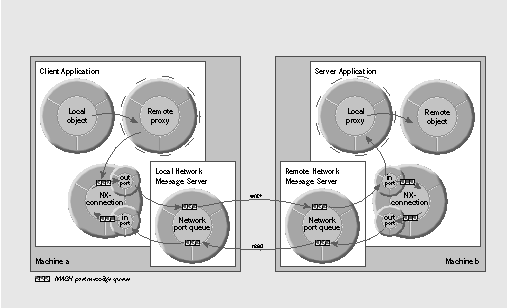
In both cases, the Network Message Server will also attempt to close an old connection when it opens the new one if the number of connections exceeds the steady-state value. Thus, the two upper limits are safety valves that allow the Network Message Server to open more connections than the steady-state value in times of excess traffic, but the number of connections will always shrink back to the steady-state value when traffic is reduced. In NEXTSTEP 3.3, connections that are idle for 2.5 minutes are also closed.
Again, the performance implications are clear. Let's assume that each client application runs on a separate machine in the network. In addition, each client will be active on a constant basis. If the number of clients exceeds the maximum number of available connections, then the Network Message Server on the machine where the server is running will be frantically opening and closing connections (thrashing) to meet the demand. Delays will result.
This scenario can be avoided through careful designs that define an appropriate client and server ratio based on prototypes.
DESIGNING DISTRIBUTED APPLICATION INTERFACES
Up to this point, we've offered templates for common client and server operations such as registration and connection. The next phase is to define the characteristics of the requests (messages) that are sent to the server. Although these are application-dependent, some guidelines can be recommended.
It's possible to write naive or devil-may-care distributed applications that do not discern between local and remote messages. In theory, it should not matter whether the object is local or remote: |
char *hugeReport;
NX_MALLOC(hugeReport, char, HUGE_NUMBER);
// hugeReport is then initialized with a huge string (not shown)
[anObject sendReport:hugeReport];
|
Yet this fragment is neither robust nor efficient because distributed applications offer an education in failure.
Taking Exception(s)
The fragment is not robust because exceptions will be raised if there are communication problems or network delays. Messages to remote objects need to be enclosed in an exception handler. |
char *hugeReport;
NX_MALLOC(hugeReport, char, HUGE_NUMBER);
// hugeReport is then initialized with a huge string (not shown)
NX_DURING
[anObject sendReport:hugeReport];
NX_HANDLER
// Handle exception
NX_ENDHANDLER
|
Another option is to install a custom exception handler using NXSetExceptionRaiser(): |
volatile void
exceptionRaiser(int code, const void *data1, const void *data2)
{
switch (code) {
// handle interesting exceptions
default:
// pass other exceptions to the next exception handler
NXDefaultExceptionRaiser(code,data1,data2);
break;
}
}
NXSetExceptionRaiser(exceptionRaiser);
|
But What Does It All Mean?
Exceptions are raised when (P)DO either cannot or should not determine the appropriate policy
for handling an error condition. This design allows programs to implement application-dependent behavior for exception handling.
Here's a brief explanation for the exceptions raised in (P)DO: |
|
 |
NX_couldntSendException = 11001
If msg_send() or msg_rpc() fails and the returned error is not SEND_INVALID_PORT, |
|
SEND_TIMED_OUT, RCV_INVALID_PORT, or RCV_TIMED_OUT, then this default exception is raised with the message "Cannot send." When diagnostic messages are enabled (see "Debugging and Diagnostic Messages"), the message "finishEncoding: send/receive error <mach error number>:<mach error string>" is printed to the console. |
|
|
NX_couldntReceiveException = 11002
If msg_receive() fails and the returned error is neither RCV_INVALID_PORT nor |
|
RCV_TIMED_OUT, then this default exception is raised with the message "Could not receive." When diagnostic messages are enabled (see the debugging section), the message "startDecoding: receive error <mach error number>:<mach error string>" is printed to
the console. |
|
|
NX_couldntDecodeArgumentsException = 11003 |
|
When a Mach message is received in the remote application, it decodes the method parameters (arguments) that were encoded in the Mach message by the sender. If errors occur during this process, an exception is returned as a response. The exception is not raised in the remote application. When diagnostics are enabled, the message "decodeMethodParamsFrom: incompatible method params <argument types>, nargs <actual argument count>, want <argument count>" is printed to the console. The local application detects this case and then raises the exception with the message "exception during remote execution."
This exception could be raised if you tried to send a bycopy object across a connection to a server that didn't have its class implementation. |
|
|
NX_unknownMethodException = 11004 |
|
|
NX_objectInaccessibleException = 11005 |
|
In the local application, the forward:: method in NXProxy encodes and forwards Objective-C messages across the connection as Mach messages to the related remote object. Before
forwarding, the implementation checks to see whether the connection is valid. If not, this exception is raised. |
|
|
No exception is defined for code 11006
It was mysteriously skipped in the NXRemoteException enumeration. Imagine our surprise. |
|
|
|
NX_objectNotAvailableException = 11007 |
|
|
NX_remoteInternalException = 11008 |
|
This exception is raised in three unusual cases. If a memory allocation fails while encoding a message, the exception is raised with the message "out of memory." The exception is also raised with the message "bad wire type" when a reference is being added to a proxy and its connection is neither remote nor invalid. Finally, if decoding a private version number fails,
the exception is raised with "bad protocol version." |
|
|
NX_multithreadedRecursionDeadlockException = 11009
This exception is never raised in the current implementation. |
|
|
|
NX_destinationInvalid = 11010 |
|
This exception is raised in two cases. If there are errors in accessing an internal buffer for the connection for either encoding or decoding, the exception is raised with the message "target not reachable."
When a msg_send() fails with the error SEND_INVALID_PORT, the exception is also raised with the message "destination invalid." |
|
|
NX_originatorInvalid = 11011 |
|
If either msg_receive() or msg_rpc() fails and the returned error is RCV_INVALID_PORT, this exception is raised with the message "bad origination." When diagnostic messages are enabled, either the message "finishEncoding: send/receive error <mach error number>:<mach error string>" or "startDecoding: receive error <mach error number>:<mach error string>" is printed to the console. |
|
|
NX_sendTimedOut = 11012 |
|
If either msg_send() or msg_rpc() fails and the returned error is SEND_TIMED_OUT, this exception is raised with the message "send timed out." When diagnostic messages are enabled, the message "finishEncoding: send/receive error <mach error number>:<mach error string>" is printed to the console. This can be related to network delays or a receiver that is not running its connection. |
n
|
|
NX_receiveTimedOut = 11013 |
|
If either msg_receive() or msg_rpc() fails and the returned error is RCV_TIMED_OUT, this exception is raised with the message "receive timed out." When diagnostic messages are enabled, either the message "finishEncoding: send/receive error <mach error number>:<mach error string>" or "startDecoding: receive error <mach error number>:<mach error string>" is printed to the console. This can be related to network delays. Another possibility is a client that is not prepared to receive unsolicited messages from its server. Please refer to the "Receiving Unsolicited Messages from the Server (Running Clients)" section in our previous article.
The application must prepare for inevitable failures by determining the appropriate action for timeouts and other exceptions.
Minimal Declarations
The code fragment is also not efficient because it is passing a large data set as an argument. Network bandwidth is a finite resource to be used with care. The return value and arguments for
a remote message need to be examined to minimize the amount of data moving back and forth across the network connection. As we learned earlier, there is also a related limitation in the current implementation of the Network Message Server that is responsible for forwarding Mach messages between machines on the network.
Some design decisions cannot be reached without a prototype. For example, how many clients
can be managed by one server? In part, this depends on how long it takes the server to process a request. Another consideration is the frequency of requests. Will the requests occur at constant intervals or in sporadic bursts? Happy thoughts, such as "It would be jolly if the server supported 100 clients," are not a replacement for a prototype.
Objective-C Protocol Specification
The messages between the client and server should be specified as an Objective-C protocol.
The protocol will define the return value and the data types for the arguments in the message. Qualifiers are also defined for remote messages, allowing applications to be precise regarding data movement across the connection. Arguments can be qualified as in, out, or inout. The bycopy qualifier hints at whether an object argument or return value is copied across the connection, rather than passed by proxy. The oneway qualifier indicates that there is no valid return value for
the message.
Using Protocols for Efficiency
Besides good design practice, there is another excellent reason to define protocols. They will reduce message traffic between your client and server. In many cases that we reviewed, we discovered that customers have disregarded or are unfamiliar with the sage advice found in /GeneralRef/06_DistributedObjects/IntroDistObjects.rtf:
A message sent to a remote object through a proxy may require two round-trip messages. The first round trip is a request to the real object for its method signature, which specifies the types the method requires as arguments. This enables the proxy to encode the data that it has been passed and forward it to the real object. Note that a method signature is not cached; without the use of protocols, it will need to be fetched for every message.
Actually, the documentation is imprecise. As we indicated earlier, the method signature is fetched once and then cached in the proxy. Nonetheless, ensure that a protocol is defined for communication between the client and server by using the setProtocolForProxy: method in NXProxy. The following example illustrates how a client sets the protocol for its proxy to the root (server) object: |
@protocol ServerMethods
- setValue:(in struct value *)aValue;
- getValue:(out struct value *)aValue;
- setAndGetValue:(inout struct value *)aValue;
@end
@interface ServerClass:Object <ServerMethods>
@end
id proxyToServer;
proxyToServer = [NXConnection connectToName:SERVER_NAME onHost:HOST_NAME];
if (proxyToServer){
[server setProtocolForProxy:@protocol(ServerMethods)];
}
|
There is no interface to query an NXProxy instance for its protocol. Furthermore, the setProtocolForProxy: method should be executed once for a proxy. Multiple invocations will replace the current protocol with the new protocol.
in, out, inout Qualifiers
When a remote message includes pointer arguments, it is unclear whether the argument is sending data to the server, returning data from the server, or both. The in qualifier means that the pointer is sending data to the server. The run time must dereference the pointer to access its value. The value is sent across the connection. On the server, the run time then allocates space and stores the value, passing the local address to the server. |
- setValue:(in struct value *)aValue;
|
The out qualifier indicates that the pointer is returning data from the server. The value that the pointer references does not need to be sent across the connection. Instead, a value from the server is returned across the connection and stored in the address referenced by the pointer on the client. |
- getValue:(out struct value *)aValue;
|
The inout qualifier indicates that the pointer both sends and returns data. If unspecified, the default qualifier for pointer arguments is inout, except when const is also declared. A const pointer uses in as the default. |
- getAndSetValue: (inout struct value *)aValue;
|
To review additional constraints, please see "Objective-C Extensions" in /Concepts/ObjectiveC/3_MoreObjC/MoreObjC.rtfd.
oneway Qualifier
Another important consideration is whether a remote message needs to return values. If the request is asynchronous, the client sends the request, pauses until the request is queued on the Mach inPort for the server connection, and then continues its operation. It does not wait for the server to process the request. This style of request operation can be indicated using the oneway qualifier in the protocol declaration: |
-(oneway void) noResponseNeeded;
|
Often, developers are surprised if a client blocks while sending a oneway request to a server. Requests are encapsulated into Mach messages. As we noted in our previous article:
When a process sends a message to a remote port, the message is queued until it is received
by another process. If the queue is full, the send operation blocks until space is available to enqueue the new message. The sending process can choose to wait infinitely or allow the operation to time out after a specified period.
It's possible for the client to receive a timeout exception while waiting for the oneway request to be queued.
A message that returns values is referred to as a synchronous request. The client sends the request and waits for the server to process the request and return a response.
bycopy Qualifier
As we discussed earlier, the bycopy qualifier is specified in the protocol declaration to indicate whether a copy of an object, not a proxy, is intended to be passed as an argument or returned. |
-(bycopy id) remoteMessage:(bycopy in id)anObject;
|
DEBUGGING DISTRIBUTED APPLICATIONS
Debugging distributed applications can be difficult because the timing of many messages is critical. Interrupting the flow of messages in the debugger might cause timeout exceptions to occur, concealing or masking other problems. One solution is to set infinite timeouts on the connection using methods such as SetDefaultTimeout:, setInTimeout:, or setOutTimeout:.
The timeout can be set to 1 for an infinite timeout, allowing unlimited time in the debugger analyzing the application. This approach is inappropriate for production applications, because the infinite timeout might cause the process to block indefinitely if there's a problem sending or receiving messages. We recommend the following convention: |
#ifdef DEBUG
#warning infinite timeouts enabled for debugging
[serverConnection setDefaultTimeout:-1];
#else DEBUG
// set timeouts to acceptable values for production application
#endif DEBUG
|
Debugging and Diagnostic Messages
The debug: class method in NXConnection is another valuable debugging aid. This method is undocumented and private, but we share it with our friends. It can reveal valuable information during the debugging process when used judiciously. A prototype for the method needs to be declared: |
@interface NXConnection (Debug)
+ (void)debug:(const char *)header;
@end
|
The header argument is a string that will precede each line printed by (P)DO. This makes it easier to identify the source of the diagnostic messages. For example, if both a client and a server are being debugged, both applications would execute debug: but would provide different values for header, such as "client" or "server."
Here's some example output. When the server is first run, it produces: |
server[t:377136]adding conn 5cb00 with inPortals 5c9e8 (2560) outPortal 0 (0) root 0
server[t:377136]setting root 5c078 on connection 5cb00
|
We see the connection is created and registered. The client then connects to the server: |
client[t:360752]adding conn 5a4b8 with inPortals 58360 (3072) outPortal 5a3e0
(2816) root 0
client[t:360752]new isRemote proxy 5a640 for 0 on conn 5a4b8
|
The last line indicates the proxy to the server's root object is being created in the client. The client then sends a message containing an object being encoded bycopy: |
client[t:360752]entered forward:: [0x0 send:...]
client[t:360752]methodSignature for send:
client[t:360752]encodeMethodParams:onto: type=Vv12@0:4O@8 nargs 3
client[t:360752]encodeMethodParams:onto: type=O@8 value=0x58cd0
client[t:360752]encodeObjectBycopy: 58cd0 (Foo1)
|
The message is sent to the proxy, which invokes its forward:: implementation. The method is encoded into its method signature, and then (P)DO prepares to encode the object parameter bycopy. |
client[t:360752]encodeObject: 83fc (NXConstantString)
client[t:360752]encodeObject: 588d0 (NSintNumber)
client[t:360752]in forward:: - made packet [5a600 (name 0) send:...] conn:5a478
client[t:360752]finishEncoding: 87 chars 9 ints 0 ports 0 oolds
client[t:360752]msg_sending on 2816
|
We're sending an object with two instance variables, including one NSString and one NSNumber. We see their concrete classes being encoded, and then the encoding is finished.
Over on the server, the message is received and decoded: |
server[t:377136]new isLocal proxy 5f678 for 5c078 on conn 5f520
server[t:377136]adding conn 5f520 with inPortals 5c9e8 (2560) outPortal 5cb50
(4097) root 5c078
server[t:377136]startDecoding: 88 chars 9 ints 0 ports 0 oolds from 4097
server[t:377136]handleRequestOnPortal: [0x5c078 'send:']
server[t:377136]decodeMethodParamsFrom: type=@8 value=0x5f718
|
At this point in our example, the client exits. When it quits, the server is notified of the port death: |
server[t:380216]NXConnection: 5f520 death notification for port 5cb50 (4097)
server[t:377136]msg_receiving on 2560, timeout -1
|
If the server has any objects properly registered for invalidation notification, these objects would be notified of this event.
Diagnostic Messages and Foundation Classes
Using the private debug: method has implications when encoding NSObjects by copy over the connection. In this case, the NSObject subclass that is being encoded needs to implement the +name method since NXConnection references it when printing debugging messages.
NSObject doesn't normally implement +name but it can be done in a category, like this: |
@interface NSObject (NXConnectionDebugFix)
+ (const char *)name;
@end
@implementation NSObject (NXConnectionDebugFix)
+ (const char *)name
{
NSString *str = NSStringFromClass(self);
return [str cString];
}
@end
|
Memory Leaks
A few common mistakes cause memory leaks in DO applications. The most common mistake is
to not free (char *) or (const char *) arguments to remote messages. Consider the following fragment: |
- (oneway void)processDone:(in const char *)processName
{
printf ("Process %s is done.\n", processName);
#ifndef LEAK
NX_FREE(processName);
#endif LEAK
}
|
The processName argument is a string being sent to the server. As described in the "in, out, and inout Qualifier" section, (P)DO must allocate space, store the string value, and then pass the local address to the server. Space is allocated with NX_MALLOC(). The application is responsible for freeing this memory with NX_FREE(). If this method was invoked locally, the memory would not need to be freed. This needs to be considered when a method is invoked both locally and remotely.
_____________________________________________________________________________________________
This is also covered in the Distributed Objects Introduction documentation in GeneralRef/06_DistributedObjects/IntroDistObjects.rtf.
_____________________________________________________________________________________________
A similar mistake is neglecting to free memory for strings allocated by (P)DO for the decodeUsing: method. This is detailed above in the "Initialization After Decoding" section.
These memory leaks have a recognizable "signature" within MallocDebug, which looks like this: |
|
Zone |
Address |
Size |
Function |
|
default |
0x0907de28 |
8 |
_NXDecodeChars, idecodeData,
-[NXMethodSignature decodeMethodParamsFrom:],
+[NXConnection handleRequestOnPortal:],
-[NXConnection runWithTimeout:], -[NXConnection run], main |
|
default |
0x0907d210 |
7 |
_NXDecodeChars, idecodeData,
-[NXPortPortal decodeData:ofType:],
-[NXMethodSignature decodeMethodParamsFrom:],
+[NXConnection handleRequestOnPortal:],
-[NXConnection runWithTimeout:], -[NXConnection run], main |
|
WHO WERE THOSE MASKED MEN?
Your server is registered. Its client is connected. Messages are passing back and forth. Your distributed applications are designed to minimize the number of connections and remote message sends, while structured in such a way that exceptions and errors are caught and dealt with gracefully. Cool. For the moment, our work here is done. We're taking a sabbatical from the next issue of the journal and waiting for those cards and letters to pour in.
Brian Raymor is a member of the Application Kit group. You can reach him by e-mail at Brian_Raymor@next.com. Please feel free to send him comments and suggestions regarding this article.
Randy Tidd specializes in DO, PDO, Foundation Kit, and EOF development. You can reach him at randy@blacksmith.com.
The authors would like to thank Gordie Freedman, Alan Freier, Blaine Garst, and Eric Noyau for reviewing
this article.
_________________________________________________________________________________ |
|
Next Article |
NeXTanswer #2041 |
A NEXTSTEP/OpenStep Interface to the SAP R/3 System |
|
Table of contents |
http://www.next.com/HotNews/Journal/OSJ/SummerContents95.html |