 PROJECT OBJECTIVES
OpenStep Journal, Summer 1995 (Volume 1, Issue 2).
Copyright ©1995 by NeXT Computer, Inc. All Rights Reserved.
A NEXTSTEP/OpenStep Interface
to the SAP R/3 System
Written by Sabine Walter, Martin Polzer, and Morris Meyer
About two years ago, a BIW/NeXT partnership began after an extensive BIW search for the future strategic development platforms for their products. BIW chose NEXTSTEP/OpenStep because of its unique object-oriented development platform, its availability, and its stability and maturity. Since then, BIW has developed various NEXTSTEP/OpenStep products and prototypes. This article describes BIW's development of a NEXTSTEP/OpenStep interface
to the SAP R/3 system.
BIW CORPORATE BACKGROUND
BIW Consulting and Information Systems GmbH is a medium-sized system house with headquarters in Weinstadt, Germany. BIW has more than 20 years of experience in developing business and production planning software as well as consulting in company strategy and operations. With a revenue of 56 million German marks in 1994, BIW is one of the top 30 German software companies. BIW also has cooperated with SAP AG in development and consulting projects over the past 20 years. Since January 1995, BIW has been one of 19 R/3 system houses in a partnership program with SAP. The SAP system house concept aims at the development of
the medium-sized market for the R/3 system with the help of the know-how of the system house partners in sales and distribution, consulting, and development of additional modules and add-ons for the R/3 system.
_________________________________________________________________________________
The R/3 system is an integrated client/server system for business processes.
_________________________________________________________________________________
BIW PRODUCT FAMILIES
BIW's products and services emphasize business solutions for medium-sized manufacturing firms. BIW's BRAIN product family is a complete suite of business and production planning software
as well as an integration tool for CIM (computer-integrated manufacturing) solutions. BIW's integration tool--BRAIN-RPC (remote program call)--was developed for this purpose. It achieves communication within a CIM network via computer platforms. The BRAIN product family will be further developed on the basis of an R/3-Kernel--consisting of encapsulated
R/3 function modules--into a new product called R/3-BRAIN, an application suitable for medium-sized firms.
THE PROJECT
The SAP R/3 system is a commercial client/server software framework, with extensive functionality for all aspects of running a business. Because of its broad functionality, installing and configuring R/3 is a time-consuming process. As a result, R/3 projects require relatively long introductory periods and extensive consulting.
The BIW project focuses on reducing the complexity of the R/3 system by "hiding" unused information. Reducing the system's complexity results in a simple and intuitive user interface. BIW is creating a ModuleViewer that gives the user an individually configurable workspace for
the R/3 system.
Additionally, BIW is developing a tool for customizing the user interfaces of R/3-BRAIN
modules. With this tool, users will be able to tailor the user interface to the workflow of their business processes.
A key part of the BIW project is an EOF-Adaptor to the R/3 system. This adaptor uses SAP's proprietary RFC (remote function call) interface. The adaptor allows rapid and flexible development of additional modules and add-ons for the R/3 system.
PROJECT OBJECTIVES
Because of the broad functionality of the R/3 system, the application user interface is often complex. The R/3 user interface displays numerous attributes and forms for functionality that correspond to the different parts of an organization. Additionally, these organizational forms
often are not present in small and medium-sized firms.
The strict hierarchical menus of the R/3 system make navigation more difficult. Because of the system's broad functionality, several menu points often must be selected to accomplish a certain task. In addition, the menus are always assigned to a window. To jump to another function, the user must retrace the entire menu path. The menus are static--that is, the user cannot configure them.
The goal of the BIW project is to reduce the complexity for individual users and to make the user's R/3 menu (workspace) individually configurable. First, access to menu items corresponding to functional areas of the R/3 system must be simplified. Second, the user interface for the R/3-BRAIN modules will be customizable so that display and entry fields that are not required can be moved off the screen.
Because the R/3 system contains functionality for a wide range of industry types (manufacturing, pharmaceuticals, chemicals, banking, and so on), the user is confronted with a large number of attributes and fields. For example, the material master application might contain all of the attributes describing the various items that must be present to manufacture a specific product on a production line for every type of industry. A filter for specifically required attributes does not currently exist in the R/3 system, so the user is always confronted with all the attributes. Typically, the work process of most users is specialized to their area of the organization, and they do not require all the attributes to complete their part of the workflow.
With BIW's configuration and customization software, the R/3 interface can be tailored to the characteristics of the particular organization. The SAP R/3 data can be displayed and edited with fewer screens and attributes that reflect the features of the enterprise. Additionally, the workflow of entry fields can be customized by grouping frequently accessed fields in the upper portion of the screen and moving less-used fields to another part of the screen or moving them off the screen to a view hidden from the user's interface. Each user can create his/her own screens to help make individual workflow more efficient.
THE MODULEVIEWER USER INTERFACE
Just as the NEXTSTEP/OpenStep Workspace ManagerTM application is the central interface to the NEXTSTEP/OpenStep system, the ModuleViewer is a user's primary interface to the R/3 system. The ModuleViewer consists of a hierarchical menu of R/3-BRAIN modules displayed at the bottom of the window in a browser. In a workspace shelf at the top of the ModuleViewer, single menu items--represented as icons--can be individually arranged by the user. The ModuleViewer browser gives the user a clear representation of the modules and hierarchy of the R/3 system. Additionally, the ModuleViewer menu path gives the user feedback on where he or she is relative to the R/3 system.
The ModuleViewer shelf is a shortcut for navigating through the R/3 system. The ModuleViewer shelf can be configured by the user to contain frequently used R/3-BRAIN modules. Modules can be dragged from the ModuleViewer menu path onto the shelf.
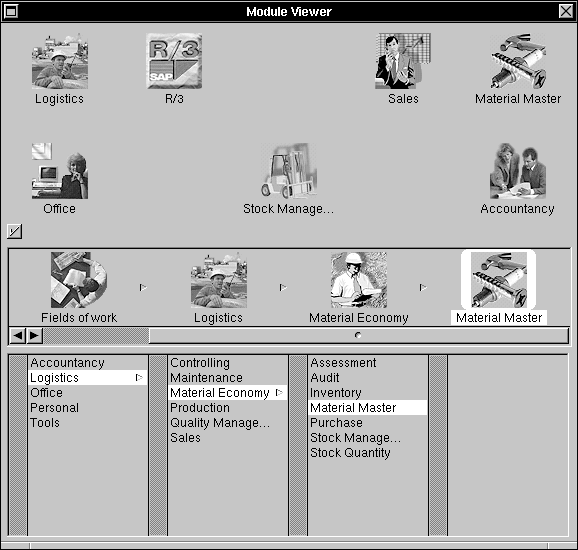 The ModuleViewer
The ModuleViewer browser and menu path can be shown or hidden by clicking a button. When hidden, the entire window is condensed to the ModuleViewer shelf.
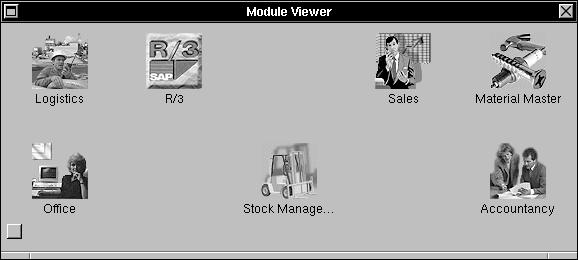 The ModuleViewer with hidden browser
The user can change the daily view of the R/3 system by adding and removing modules using the drag and drop features of the NEXTSTEP/OpenStep system. ModuleViewer shelf and window preferences are saved from session to session, so the ModuleViewer retains the most recent view of the user's work process.
CUSTOMIZING THE MATERIAL MASTER USER INTERFACE
One of the key components of the R/3 system is the material master application. The list of materials used by manufacturing organizations is crucial to the operation of production lines, inventories, distribution, invoicing, and so on.
BIW has created a material master application to enter and edit the material master. To simplify the complexity of the material master, the user can dynamically customize the interface of the material master application. The material master application has two operating modes, one in which the user processes data for entry of material master data and one in which the user can customize the user interface.
The customization of the user interface is quite similar to a developer's interactions with the Interface BuilderTM application, but the BIW customization allows modification of only user interface components. All of the connections to underlying EOF schema are retained, so the user interface can be customized easily without opening up the entire module using Interface Builder.
Because the material master functionality of R/3 supports a wide range of industry types, the number of the attributes that the material master application needs to handle quickly expands beyond a single window. So the data is divided into several groups according to organizational functionality, which is displayed in a SwitchView.
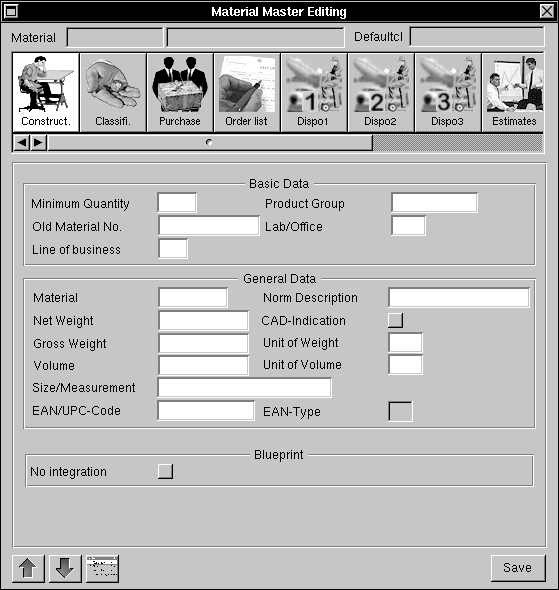
The material master editing prototype
To customize the user's workflow with the material master application, the user can adjust the ordering of functional modules as needed. All attributes can be moved freely between the individual views.
When not needed, interface attributes can be moved to an additional SwitchView called "Unused Attributes." The interface attributes and their connection to data-bearing elements of the R/3 system are stored in this temporary view. With this feature, mandatory attributes cannot be deleted accidentally and can be easily restored to the application. The user interface can easily be reverted to the original default settings.
EOF ADAPTOR TO THE SAP R/3 SYSTEM
The R/3 system has a proprietary RFC interface to application data resident on the R/3 system. The BIW R/3 adaptor that is being developed offers an object-oriented view of RFC functionality for programmers of additional R/3 functionality on NEXTSTEP.
Developer Scenarios
Developers using the BIW R/3 adaptor will be able to create EOF applications in much the same manner as when using an SQL-based EOF adaptor. Because the BIW R/3 adaptor provides only an EODataSource interface, database-level SQL functionality will not be available through the BIW R/3 adaptor.
Application developers will build their interfaces to the EOModels exported by the BIW R/3 adaptor, connecting user interface elements to attributes of the EOEntities. The mechanism
that translates the EOEntities to the R/3 system is hidden from developers.
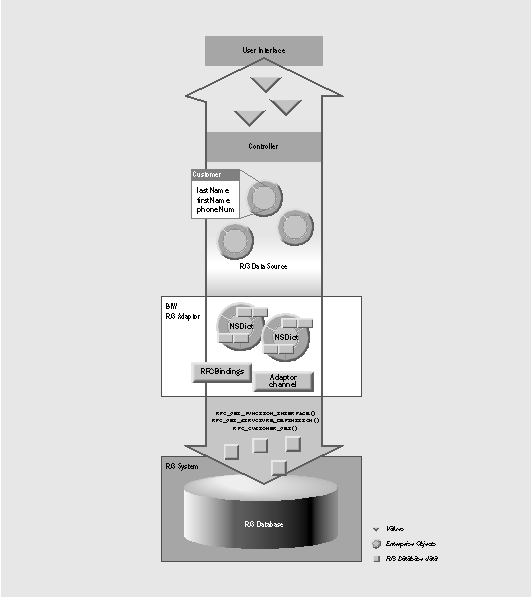
Adaptor Architecture
BIW chose the approach of writing the adaptor to the RFC interface, because bypassing the R/3 system and writing an adaptor directly to its underlying database engine wouldn't allow the R/3 system to resolve intermodule data dependencies. Because the underlying database schema of the R/3 system is not exported to developers, the RFC mechanism provides programmatic access to the data.
The BIW R/3 adaptor dynamically maps EOEntities to the corresponding RFC calls and data structures of the R/3 system, allowing the adaptor to evolve as the RFC interface matures and more of the R/3 system is exposed through the RFC interface.
Adaptor Internals
The R3DataSource maps EOEntities to the set of RFC calls that represent the EOEntity on
the R/3 system. The R3DataSource uses the RFCBindings table to extract the proper RFCInvocation to access the SAP system and then converts the NSDictionary representing
the Enterprise Object into the proper argument structure for the RFC call.
On the EOF side there may exist an EOEntity called Customers that corresponds to the customers module of the R/3 system. This Customers table contains attributes such as the customer's name, address, phone number, and so on.The BIW R/3 adaptor automatically handles the conversion of the EOAttributes of the Customers EOEntity to R/3 system data types and formats. The R3DataSource uses the RFCBindings table to resolve an EODataSource selector (for instance, fetchObject:) into an RFCInvocation that would use a function such as RFC_CUSTOMER_GET to fetch the personal data of a customer.
The RFCBindings table will contain all the necessary information needed to convert a data
insert, update, or delete request from the EOF side of the R3DataSource into a number of RFC function calls.
A developer using the BIW R/3 adaptor will not have to deal with functions called on the RFC R/3 side. The developer will work only with EOModels containing all available entities (tables) and EOControllers to connect user interface objects to entity attributes.
The RFCBindings table is designed as to be easily maintained in the future without tedious parameter editing at source-code level. The RFCAdmin application is used to add new RFCInvocations to the RFCBindings table as new EOEntities are added to the adaptor. The adaptor is designed to hide the internal interface to the R/3 system, while allowing NEXTSTEP/OpenStep modules to be built for the functionality of the R/3 system.
For RFC calls that don't map onto EODataSource operations, the BIW R/3 palette provides an RFCConnector class. The RFCConnector allows the developer to connect import and export parameters of a specific RFC function to NEXTSTEP/OpenStep user-interface elements with little or no programming effort.
SUMMARY
The advantages for the user of the BIW NEXTSTEP/OpenStep framework for the R/3 system can be summarized as follows:
 A user's workflow is streamlined by using the ModuleViewer to personalize his or her view of the R/3 system. Because of the individualized screens, users accept the software much more readily, which increases the efficiency of their daily work.
|
User interface customization of any R/3-BRAIN module is possible without breaking the connections to the underlying R/3 system. |
|
The complexity of R/3 is significantly reduced for the user, and introduction and training periods can be drastically decreased. |
|
The work environment can adapt to the tasks the user has to carry out as well as his or her individual style of work. |
The advantage for the entire company is that the corresponding branch-specific or company- specific business processes can be displayed and easily adjusted to modified framework
conditions by customizing the R/3 application. The company can react much more quickly
and accurately to accelerating changes in demand-oriented markets--and this without adjustment programming or a staff of consultants.
Sabine Walter and Martin Polzer are members of BIW's NEXTSTEP developer team. You can reach Sabine by e-mail at walter@biw-ag.de. Please feel free to send her questions regarding this article. Martin can be reached at polzerj@biw-ag.de. You can send general questions regarding BIW and further product information to info@biw-ag.de. Morris Meyer is an independent consultant with NeXT's Object Expert program. You can reach him by e-mail at soliton@netcom.com.
__________________________________________________________________________________
| Next Article | NeXTanswer #2044 | Two Heads Are Better Than One |
| Previous article | NeXTanswer #2040 | Realities of Portable Distributed Objects |
| Table of contents | http://www.next.com/HotNews/Journal/OSJ/SummerContents95.html |