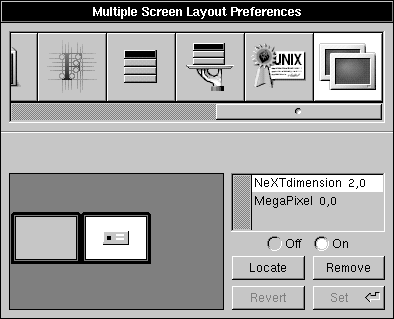
Here's the Preferences panel that will magically appear
OpenStep Journal, Summer 1995 (Volume 1, Issue 2).
Copyright ©1995 by NeXT Computer, Inc. All Rights Reserved.
MAKING IT WORK
Two Heads Are Better Than One
Written by Chad Hoffman
| Once only the elite few enjoyed the benefits of multiple displays under NEXTSTEP. Now anyone can have multiple displays on a wide choice of systems. After you try two displays, you'll never go back to one by choice. |
(Note that sidebars and marginal notes in the printed journal are denoted here by smaller type with bars above and below the item.)
ELBOW ROOM
Raise your hand if you've ever had so many windows on the screen that you could see only tiny squares of the background.
Maybe you're a graphic artist with all kinds of tools and inspectors piled on top of each other and your document, or maybe you're a busy programmer with several Terminal windows and the Digital LibrarianTM, Project BuilderTM, and Interface BuilderTM applications all fighting for enough space to be seen. Perhaps you're a project manager with mail, a spreadsheet, and your word processor overlapping or hiding each other, and you need to see information from one application to work in another.
Now imagine having two displays to work on and think how much sweeter life could be. As a graphic artist, you could use one display for your document and the other for all the tools and inspector panels you need to work on it. A programmer could work on the interface for an application on one display and still have plenty of room on the other one for viewing documentation and writing code. Best of all, a manager could finally see all three months of
a timeline at once by spreading it across both displays.
Whatever you're doing, chances are you could find a use for the room provided by an additional display. Now with NEXTSTEP 3.3, if you have the money and the right NEXTSTEP system, you can spread windows and panels across more than one screen.
Of course, you'll need a second monitor and video card combination.
CHOICES
NEXTSTEP 3.3 for PA-RISC and SPARC includes support for multiple displays on HP and
Sun systems. Additional video cards are fully supported on these platforms, just as the NeXTdimensionTM board was for the NeXTcubeTM computer. Although multiple displays are
not fully supported for Intel systems in NEXTSTEP 3.3, two new device drivers for PCI video cards now support multiple cards in one system.
With multiple displays, one display is primary, displaying the workspace and the dock. Any other displays are secondary real estate for windows and panels. SPARC systems will support up to
three displays, and Intel-based PCs may support even more. HP and NeXT computers support only one primary and one secondary display.
Here's the Preferences panel that will magically appear
NeXTdimension
Back when NeXT made hardware, it developed a 32-bit color solution called the NeXTdimension board. This add-on board for the NeXTcube computer gave users the benefit of two full MegaPixel DisplaysTM to play in, freeing them from the space constraints of single displays.
Intel-Based PCs
With video resolutions up to 1600x1280, you can get more windows and panels on a single display--although you get more things, everything is smaller.
With the proper device drivers and hardware, you can get multiple displays to work, although you won't be able to use Preferences.app to configure the screen layout. This means the first card detected on the PCI bus is the primary display and additional screens appear directly to its right.
Two solutions are now available for NEXTSTEP running multiple displays on Intel-based systems with PCI buses:
 |
NeXT recently released a driver for the Number Nine Imagine128 video card with support for more than one card enabling multiple displays. ___________________________________________________________________________________________________ |
 See NeXTanswer 1742.
___________________________________________________________________________________
|
Also, a German manufacturer of video cards, ELSA Gmbh, provides a driver for its ELSA WINNER 2000PRO IX video card with support for multiple cards and displays. ___________________________________________________________________________________________________ |
See NeXTanswer 1935.
___________________________________________________________________________________
SPARC
Any SPARCstation that has a free SBus slot can become a multiheaded system. All that is required is a GX 8-bit card and another monitor. Also, the 24-bit solutions for the SPARCstations5 and 20, S24 and SX respectively, will work in a multiheaded system. For the truly space-hungry and rich, a SPARCstation5 will work with three displays.
PA-RISC
All the HP model 712, 715, and 725 workstations have the capacity to add one video card to their built-in video support.
An add-on card for the HP 712s provides similar functionality to that of the built-in video.
The HP 715s and 725s offer a little more choice, 8-bit or 24-bit. The 8-bit cards offer the same functionality as the built-in video support and the 24-bit obviously provides better color depth.
However, NEXTSTEP 3.3 for PA-RISC did not contain support for the HCRX video cards used in newer 715 and 725 systems. This support will be added in an upcoming patch.
________________________________________________________________________________
MAKING IT WORK
Setting up a system with multiple displays is very simple. Install the additional card and monitor. Launch
Configure.app in /NextAdmin and install the appropriate additional display driver. Reboot the system. For Intel systems, check Configure.app before you install the additional card to get the device number of the first card.
You'll need this number to choose the correct display device after adding another card.
On SPARC and PA-RISC systems, Preferences.app has a Multiple Screen Layout Preferences module when more
that one display device is present. This can be used to designate which monitor is the primary display (that is, contains the login window and the dock) and position the other displays relative to it. Unfortunately, this module is not available for Intel systems.
______________________________________________________________________________________________
THE DOWNSIDE
For the most part, it can be said that multiple displays on a NEXTSTEP system just work. But there are a few problems and some drawbacks that everyone should be aware of before spending money on display cards and monitors. A good rule of thumb is always save your receipts.
The Memory Monster
NeXT recommends the following memory configurations for NEXTSTEP 3.3:
|
24-bit color 16 MB RAM minimum, 32 MB RAM recommended |
|
8-bit color/grayscale 16 MB RAM minimum, 24 MB RAM recommended |
If you're adding a second display to your system and do not have at least 32 MB RAM, plan on buying some more RAM. Doubling the screen space will definitely increase the memory needs of the WindowServer. With two displays, an extra 8 MB RAM for 24-bit or 4 MB RAM for 8-bit is
a very good idea.
Intel Inside
Not all Intel systems with PCI are capable of having multiple displays. Installing two video cards in some systems causes BIOS errors on the PCI bus. There's no guarantee that your PC will work, so proceed with caution.
Monitors
With Intel systems there are no monitor restrictions. Any monitor than can work with the video cards is all that's needed.
PA-RISC systems require only that both monitors be capable of displaying the same resolution and frequency, because this is set in hardware for both displays.
SPARC systems require the use of Sun monitors. You can mix the monitor sizes, however, such as one 17-inch and one 19-inch monitor.
Configurations Known to Work
SPARC
| SPARCstation4 | on-board FSV, 1 GX card |
| SPARCstation5 | 1 GX card,1 S24 card 2 GX cards 2 GX cards, 1 S24 card 3 GX cards |
| SPARCstation10 | 2 GX cards |
| SPARCstation20 | 2 GX cards 1 GX card, 1 SX card |
PA-RISC
| HP 712 | on-board add-on card |
| HP 715(/33, /50, /75) and HP 725/50 | on-board CRX card on-board CRX-24 card |
| HP 715(/64, /80, /100) and HP 725/100* | on-board HCRX-8 card on-board HCRX-24 card |
i486
| PCI Systems** | 2 or 3 Number Nine Imagine128 cards 2 or 3 ELSA WINNER 2000PRO IX cards |
*HCRX cards were not supported in NEXTSTEP 3.3 for PA-RISC and SPARC.
**Not all PCI systems support multiple displays because of BIOS conflicts on the PCI bus.
Chad Hoffman is a technical support engineer at NeXT. His e-mail address is Chad_Hoffman@next.com.
__________________________________________________________________________________
| Next Article | NeXTanswer #2043 | Fast, Enhanced: The New ATA and ATAPI Standards |
| Previous article | NeXTanswer #2041 | A NEXTSTEP/OpenStep Interface to the SAP R/3 System |
| Table of contents | http://www.next.com/HotNews/Journal/OSJ/SummerContents95.html |