1336
1336NEXTSTEP for Intel Processors
Title: SCSI Setup
Entry Number: 1109
Last Updated: <<Date June 17, 1997>>
Product Vendors:
Adaptec Inc.
691 South Milpitas Blvd.
Milpitas, CA 95035
USA
+1 (408) 945 8600 international phone number
+1 (800) 959 7274 USA toll-free (customer support) phone
+1 (408) 945 7727 bulletin board system
+1 (408) 957 7150 faxback system
+1 (408) 262 2533 fax
Bus Logic, Inc.
4151 Burton Drive
Santa Clara, CA 95054
USA
+1 (408) 492 9090 phone
+1 (408) 492 1542 fax
+1 (408) 492 1984 bulletin board system
Distributed Processing Technology
140 Candace Drive
Maitland, FL 32751
USA
+1 (407) 830 5522 phone
+1 (407) 831 6432 bulletin board system
+1 (407) 260 5366 fax
Keywords: SCSI, setup
Usage Commentary:
The SCSI interface provides a high speed bus for up to seven peripherals.
Setup and Installation:
SCSI ID
Each device on the SCSI bus must be assigned a unique SCSI ID number. SCSI interface cards commonly occupy SCSI ID number seven, so treat this as reserved unless your card's documentation says otherwise.
SCSI ID numbers are generally set on the rear a device if external and with jumpers (usually a block of three labeled A0, A1, A2) if the device is mounted internally. Refer to the documentation provided with your SCSI devices to determine the correct method for setting SCSI ID numbers. SCSI implementations in the PC world seem to be sensitive to gaps in the SCSI bus. Thus, devices on the bus should be numbered sequentially starting at zero (usually the boot device).
SCSI Device Number
The SCSI device number is assigned based on the SCSI ID number, but is not the same thing. You sometimes need to know the device number when accessing SCSI devices from the command line. SCSI devices are assigned numbers starting with 0 and incrementing by one as they are encountered in order of SCSI id. That is, the SCSI device with the lowest SCSI ID (whether that be 0, 1, or some other number) is assigned device number 0. The next device encountered on the SCSI chain, again in order of SCSI ID, is assigned device 1. And so on. A number of examples may help clarify:
| SCSI ID | SCSI Device Number |
| Example 1 0 | 0 |
| 1 |
1 |
| Example 2 0 | 0 |
| 3 |
1 |
| Example 3 1 | 0 |
| 3 |
1 |
| 6 |
2 |
Termination
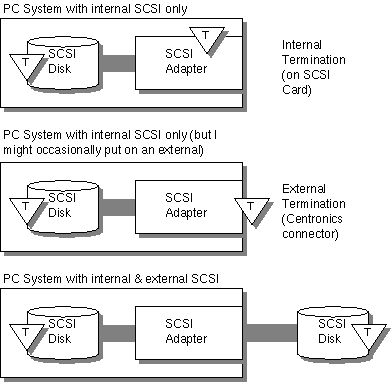
The SCSI bus should be terminated at both ends, but nowhere else. An incorrectly terminated SCSI bus may work, but it may also corrupt hard disks. The SCSI bus is like an antenna and must operate at a correct electrical impedance to pass signals at maximum strength. An extra set of terminators on the bus will attenuate the signals on the bus and corrupt transmission.
Most of the 486 systems we have deployed have terminations installed on the hard drive itself and on the SCSI card. When you add a cable from the back of your PC to an external SCSI device like a CD-ROM drive, you are extending the SCSI bus, so that the terminations on the card which used to be at the end of the bus (correct) are now at the middle of the bus (wrong). Remove them before powering-up, and replace them when you detach the CD-ROM drive. A slightly easier alternative is to not use the on-card termination at all, but when there is no cable attached to the back of the PC, leave a SCSI terminator attached to the SCSI card's backpanel connector, and remove that terminator when running with an external SCSI device (like a CD-ROM drive).