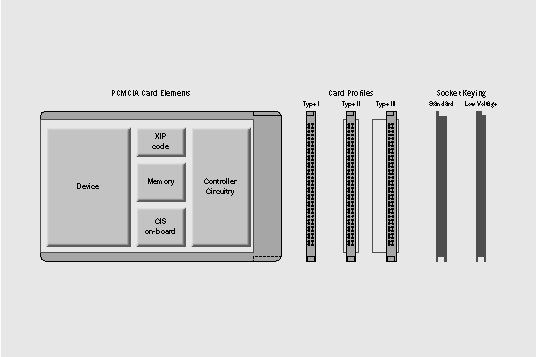
Figure 1: PCMCIA cards vary in thickness and allow low and standard voltages
NEXTSTEP In Focus, Summer/Fall 1994 (Volume 4, Issues 3 and 4).
Copyright ©1994 by NeXT Computer, Inc. All Rights Reserved.
Flexibility in a Tiny Package: PCMCIA
Curtis Galloway
The PCMCIA specification focuses on small, low-power peripherals, ideal for portable computers and other small systems. Although it's currently still in flux, it has generated wide interest in the industry.
Where Portability Is a Priority
When folks talk about running NEXTSTEP on a portable computer, you often notice heightened interest. Although not everyone wants NEXTSTEP with them every minute, many seem to like the idea of running around the house or to the beach with the NEXTSTEP environment under
their arms.
Of course, portable computers with 16 megabytes of RAM and half-gigabyte hard disks aren't cheap, and somehow they seem more at odds with compatibility standards than their desktop cousins. But prices are dropping. Imagine: Workspace on your lap!
But how to connect the portable to the corporate network or to an external SCSI chain? Well, surely any self-respecting portable will have a PCMCIA slot.
A Standard for Smaller Computers
PCMCIA stands for Personal Computer Memory Card International Association. The PCMCIA specification describes a standard way to expand portable computers and other small computing equipment. It defines variations of package size and sockets for peripherals that integrate a controller with a device in a very small, low-power package.
PCMCIA devices are small--about the size of a credit card--and consume very little power. Better yet, they don't involve long cables or external power supplies. What's more, current PCMCIA systems offer automatic configuration capabilities. And soon PCMCIA devices
will allow automatic device detection and insertion notification, as well as support for
multiple platforms.
Bus-at-a-Glance: PCMCIA
Summary Bus that allows small, low-power devices with modern configuration features, promises hot-swapping in the near future. Its incorporation into a system with other buses depends on the manufacturer's design-most computers now build the PCMCIA socket into an ISA bus topology. The specification is currently in Revision 2.1.
Highlights Software support includes socket services providing a standard interface for the socket chipset, card services providing a standard interface for device drivers, and the Card Information Structure (CIS) containing configuration information for the card. The PCMCIA socket is driven by
a chipset.
Statistics 16-bit wide data path.
Supporting organizations Personal Computer Memory Card International Association (PCMCIA); Japanese Electronics Industry Development Association (JEIDA).
NEXTSTEP support Release 3.3 supports only the 82365 chipset.
Available kinds of cards
Originally, PCMCIA cards provided 128 or 256 kilobytes of extra non-volatile flash RAM memory, intended for backups and semipermanent data storage. Modern PCMCIA flash memory cards provide several megabytes of RAM.
But the real need PCMCIA cards have evolved to meet is connectivity. The two most popular types of PCMCIA format devices are modems and Ethernet adapters--some card manufacturers combine the two functions in a single card. These can be used, for example, by someone who needs a PCMCIA wireless modem to provide network benefits in a building with concrete walls that can't be drilled for cables.
Other popular cards include IDE hard disks, SCSI adapters, and sound adapters.
There are also PCMCIA cards with more specialized purposes. One of the more interesting supports Global Positioning Systems (GPS) that can tell your computer's location within a
meter anywhere on the planet. A variety of custom applications have been developed for GPS, including one that combines GPS with data acquisition and a modem to gather data from a
farm tractor.
Many computer manufacturers provide two PCMCIA sockets, typically with a modem card in one and an Ethernet card in the other.
What the specification defines
The PCMCIA specification, currently in Revision 2.1, covers the physical, electrical, and software characteristics of the expansion cards and the sockets in which they fit. It also covers software features in the BIOS, the operating system, and the device drivers.
Expansion cards include the device (such as a modem or hard disk), controller circuitry that's a miniaturization of what might be found on an ISA expansion card for example, and registers that store configuration data. PCMCIA sockets provide 68 pins with a 5-volt and a 3.3-volt
electrical interface and a 16-bit data path.
Each PCMCIA card can support up to 64 megabytes of main memory as well as an I/O memory area, with configuration space supported in nonvolatile RAM.
Card types
There are three categories of sockets--Types I, II, and III--distinguished by thickness. Type I is a thin card of 3.3 millimeters used for memory only. Type II is 5.0 millimeters thick and typically used for modems and Ethernet devices. Type III is 10.5 millimeters thick and most often contains a rotating hard disk.
Type II is the most common socket in portable computers. Conveniently, some computers have two Type II slots stacked so that they can also hold a single Type III card.
Card and socket services
The specification dictates protocols known as socket services and card services. Socket services describe a software interface for controlling chipset that drives the socket on the computer. Card services, on the other hand, provide the software interface for configuration and status details. The on-board configuration memory area, called the Card Information Structure (CIS), stores information about the card, its function (flashcard, modem, or whatever), its status, and its resource requirements.
Other features
The specification also spells out details for automatic configuration--thanks to the on-board configuration data--and multiple types of file system support. And it provides details for XIP (eXecute-In-Place), a specification for executing code on the card without first transferring the code to the host's main system memory. Because cards don't use fixed resources, the software can tell from the card what kinds of resources to use and allocate appropriate unused resources.
Although the specification also includes on-the-fly insertion and removal notification-- hot-swapping--not all hardware vendors support this feature.
Intel has promoted a subset of the standard called Exchangeable Card Architecture (EXCA) that describes a match between a slot and a card by standardizing electrical characteristics such as voltage and current (see Figure 1).
Figure 1: PCMCIA cards vary in thickness and allow low and standard voltages
Pros and cons
On the upside, the PCMCIA socket lets you easily swap devices. If you're on the road, slip in the modem. At the office, slip in the Ethernet or SCSI adapter. Unfortunately, in today's systems you have to reconfigure your system for the new device when you do this, then reboot. But there's an industry trend toward autoconfiguration and hot-swapping, with the promise that users will be
able to pop modems, hard disks, SCSI, Ethernet, and sound cards in and out with no worries and no rebooting.
On the downside, PCMCIA configuration isn't easy. You have to identify the pieces to the PCMCIA puzzle, including the chipset that drives the socket and a device driver for the PCMCIA device. For example, the Cirrus Logic PCMCIA chipset that controls the PCMCIA socket is compatible with the Intel chipset--but computer manufacturers rarely advertise such details. A device driver designed for the Intel chipset will probably work with a computer that uses the Cirrus Logic chipset.
One more thing: PCMCIA devices are small, so be careful you don't lose them.
As industry support for the PCMCIA standard evolves, you may be able to use the same device
in different systems. For instance, if you have a PCMCIA card for a Newton or Macintosh computer, you may be able to use the same card in your NEXTSTEP computer.
PCMCIA History
In the late 1980s, the Japanese Electronics Industry Development Association (JEIDA) and the Personal Computer Memory Card International Association (PCMCIA) were separately working on a standard for memory cards, with the goal of compatible memory storage interchange among various computer equipment.
It became clear that compatibility standards could govern not just DRAM but also flash memory and even on-board I/O devices.
In 1989, the two groups formed a joint committee, adopting the JEIDA 68-pin form factor, and collaborating to produce version 1.0 of the PCMCIA card specification in 1990.
In subsequent years, the group has revised the card specification and introduced new versions
revising specifications for socket services, card services, and other aspects of PCMCIA.
PCMCIA confusion
In a nutshell, the problems with PCMCIA implementation stem from confusion. The market is populated with implementation variations, even at the electrical level, making vendor-to-vendor compatibility effectively a guessing game.
This confusion is most evident during installation and configuration. The factory-supplied software has to match the manufacturer's card and work with the PCMCIA features in the host operating system and hardware, notably the chipset driving the socket. In some cases, the configuration information on the card isn't complete, often depending on patches in a particular version of the factory-supplied DOS driver.
Autoconfiguration specifications don't always help, and users sometimes have to configure by hand, keeping an eye out for resource conflicts.
Platform independence
Although the PCMCIA specification claims platform independence, in reality the software implementations are built around PC- and DOS-specific assumptions by manufacturers creating PCMCIA products for the DOS and Windows market. The CIS of a particular card may, for instance, store incomplete as well as DOS-specific configuration information. Manufacturers may also develop customized enabler software for the card to function.
As an example, a PCMCIA card with a modem device also has serial port circuitry. On non-DOS systems, the card may appear simply as a serial port, with its resource requirements generically satisfied by any four ports and any two IRQs. Generic enabler software contains built-in tables with resource requirements for a target set of cards, a software supplement for the device drivers.
But on a DOS system, COM1 and COM2 resource information--IRQ and port ranges--is rigidly assigned. Thinking only of the DOS market, the manufacturer may include only the DOS-specific resource information in the CIS on-board, relying on a customized enabler to accommodate the DOS-specific data. Such a card presents unnecessary restrictions to engineers developing device drivers for non-DOS systems.
Gotcha!
What looks like a PCMCIA slot may not be one. Because the physical characteristics of the PCMCIA socket are well-thought-out, some computer manufacturers are including the socket as a connector
for IDE hard disk drives. Check your computer's owner's guide to be sure that a socket really is a PCMCIA socket.
As users report difficulties, manufacturers recognize problems and adhere more strictly to the specification (see Figure 2).
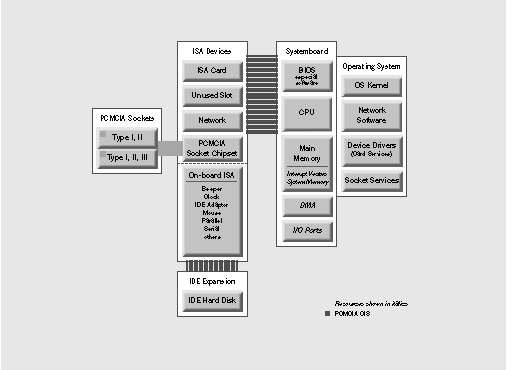
Figure 2: PCMCIA typically blends with an ISA bus
The socket chipset
The chipset that drives the PCMCIA socket, the host bus adapter chipset, is not defined by the specification. So, manufacturers are free to choose from whatever seems best on the market. The specification defines socket services--a kind of software interface for the PCMCIA socket--but the software implementing socket services may exist either in ROM BIOS or in the operating system. Engineers developing device drivers must anticipate these possibilities in their designs.
NEXTSTEP and PCMCIA
As long as you stick to certified systems and software, NEXTSTEP support for PCMCIA is relatively trouble-free. NeXT plans to offer drivers for PCMCIA modems and network adapters in NEXTSTEP Release 3.3. Beyond that, NeXT engineers have devised some slick architecture and software tools to use internally, and we've made these tools available to developers, too.
How the software works together
Generally, if you want to use a PCMCIA device in a NEXTSTEP computer, you need a PCMCIA device driver to control that device. You also need the PCMCIA bus driver. The device driver manages card services, controlling the device itself. In contrast, the PCMCIA bus driver manages socket services, controlling the PCMCIA socket on the computer.
The Configure application lets you load and configure both the PCMCIA bus driver and the PCMCIA device driver. You can use Configure to set up multiple device drivers. No matter which card is in the socket, the appropriate device driver will work, and the other will fail harmlessly.
Configure doesn't automatically detect resource conflicts, nor does it support card insertion and removal detection. Support for these features will be in a future release of NEXTSTEP.
Check the Hardware Compatibility Guide (available from NeXTanswers) for the kinds of PCMCIA equipment you want to use. You can expect NEXTSTEP support for modems (including wireless modems) and network adapters first, with hard disks, SCSI adapters, and other devices later.
Support for driver developers
To develop a PCMCIA device driver for NEXTSTEP, a programmer needs access to socket services and card services, especially pertaining to configuration issues. These have been incorporated into the Driver Kit and are largely transparent to developers. The NEXTSTEP kernel supports a PCMCIA bus object that represents the system to the device driver.
PCMCIA software support is divided into separate layers, each of which can be updated without disturbing the others, easing the process of upgrading NEXTSTEP software and developing device drivers. For instance, the Driver Kit provides support for PCMCIA device drivers, and the PCMCIA bus object supports the PCMCIA socket chipset--currently it supports only the 82365 chipset. Engineers can safely upgrade the PCMCIA bus object for additional chipsets knowing that existing device drivers will work because the chipset details are entirely addressed in the PCMCIA bus object layer.
For a technical overview of PCMCIA, refer to PCMCIA System Architecture, by Don Anderson (MindShare Press; Richardson, TX).
Future PCMCIA Prospects
Work in the immediate future will focus on reducing confusion, software mismatches, and incompatibilities between vendors. As compatibility becomes dependable, manufacturers will implement further configuration features.
Also for the future: Toshiba provides a 16 mm socket (unofficially dubbed Type IV) that no other manufacturer has adopted yet. This may herald a larger standard size than Type III.
Even though implementations are currently rife with incompatibilities, there's little doubt that the PCMCIA socket will become ubiquitous in time, appearing not only on laptops, but on other kinds of portable equipment, and on desktop computers to allow sharing of equipment and interchange of data.
You Can Take It with You
It's likely that the NEXTSTEP system of the very near future will include a PCI bus, an ISA or EISA bus for backward compatibility, and at least one PCMCIA socket for small-system compatibility. Keep your eyes peeled!
Curtis Galloway is a software engineer in the Operating Systems group at NeXT Computer. You can reach him by e-mail at Curtis_Galloway@next.com.
_________________________________________________________________________________
| Next Article | NeXTanswer #1953 The Need for Speed: PCI |
| Previous article | NeXTanswer #1954 Simple Configuration: Plug and Play |
| Table of contents |  http://www.next.com/HotNews/Journal/InFocus/Summer1994/ContentsSummer1994.html http://www.next.com/HotNews/Journal/InFocus/Summer1994/ContentsSummer1994.html |