NXApp, Summer 1994. Volume 1, Issue 3. Copyright ©1994 by NeXT Computer, Inc. All Rights Reserved.
An Introduction to the Enterprise Objects Framework
written by Mai Nguyen
| The Enterprise Objects Framework is a new NEXTSTEP product that will be available in Fall 1994. It provides a new and better means of accessing RDBMS data with object-oriented applications. This article provides a general overview of the framework's components, along with a code example to highlight some of its innovative features. |
WHAT IS THE ENTERPRISE OBJECTS FRAMEWORK?
One of the most significant problems developers face when using object-oriented programming languages with SQL databases is the difficulty of matching static, two-dimensional data structures with the extensive flexibility afforded by objects. The features of object-oriented programming--such as encapsulation and polymorphism--and their benefits--like fewer lines of code and greater code reusability--are quickly negated by the programming restrictions that come in accessing SQL databases within an object-oriented application.
Enterprise Objects Framework (EOF) provides the framework and infrastructure for defining both the object model and the entity-relationship model (data model) for the business. Using these two models, developers can build custom objects that encapsulate both data and business processes, while the framework itself provides the data access services that make these objects persist in a relational database. This approach addresses the problems created by both fourth-generation language tools and the Database Kit TM in NEXTSTEP.
The Enterprise Objects Framework is still under development at the time of this writing; the version available at NEXTSTEP EXPO in June 1994 is an early access version. Thus, there might be slight differences between the software as it's described in this article and later releases you may use.
The Enterprise Objects Framework package
The Enterprise Objects Framework package can be installed on any computer that's running NEXTSTEP Developer Release 3.2. The package is composed of these main parts:
| · | The Foundation Kit which defines a new base layer of Objective C classes, including strings and collections. This kit also provides a new memory allocation paradigm that's used throughout the Enterprise Objects Framework. A basic understanding of the Foundation classes is required for using the Enterprise Objects Framework effectively. (Please see "Sneak Preview: The New Foundation Kit" in this issue and the technical documentation for Foundation Kit for further details.) |
| · | A new Interface Builder TM(IB) with three objects in the enterprise objects palette: EOController, NXTableView, and NXImageView. EOController configures data-bearing objects by reading database model files. It also defines action methods that fetch and save data. NXTableView displays two-dimensional tables of data, while NXImageView displays images. |
| · | A new modeling tool called EOModeler that is used to create entity-relationship models from the database schema. These models are in turn mapped to enterprise objects. |
| · | A collection of classes that form a framework for database applications. |
| · | A documentation set for the Foundation Kit and for the Enterprise Objects Framework itself. |
Architecture components of the Enterprise Objects Framework
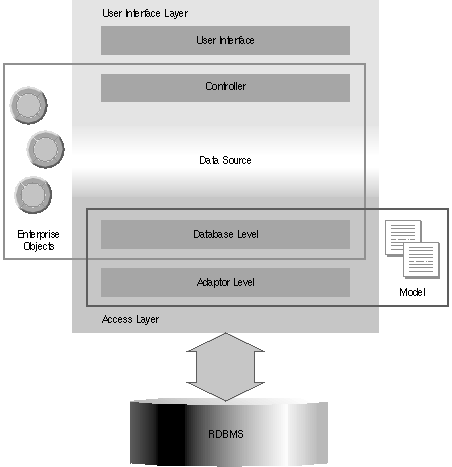
Figure 1 shows the major architecture components of EOF. Each component plays a specific role.
Figure 1: The architecture of EOF
The model and the access layer
The model, which corresponds to the EOModel class in the framework, is an ASCII file that defines, in entity-relationship terms, how data in a database server is mapped to an enterprise object. The model interacts only with the access layer.
The access layer is responsible for all database access operations. Some of its tasks are these:
| · | Retrieve information from the database |
| · | Manipulate database records (inserting, updating, and deleting data) |
| · | Qualify a retrieval |
| · | Create and use enterprise objects |
| · | Implement uniquing, snapshots, and update strategies |
At this layer, you can either access the server data through the model or directly communicate with the relational database (RDBMS).
The enterprise objects
The enterprise objects are instances of Objective C classes supplied by NEXTSTEP developers. These objects are responsible for coupling the business information with the business process. In Figure 1, the framework uses enterprise objects from the database level up to the controller.
In Database Kit, your objects belong to a private record class of a DBRecordList, and their
properties must match all the properties of an entity defined in either your model or its subset. In contrast, with this framework you can define the class of your objects and customize them so
that they contain all the data needed for your business process in addition to the data supplied by the EOModel. In other words, you aren't restricted by the properties defined in the database alone. (To find out how to use EOModeler and Interface Builder to configure enterprise objects, see "Developing an Enterprise Objects Framework Application.") For convenience, a default enterprise object called EOGenericRecord is also provided in the framework.
The data source
The data source serves as a bridge between the user interface layer and the access layer. The data source is responsible for retrieving, inserting, updating, and deleting the custom enterprise objects. The data source can be any object that conforms to the EODataSources protocol. For database applications, the source is of type EODatabaseDataSource. The database data source
can specify a fetch order, limit the objects retrieved with a qualifier, revert changes made since the last save, and so on.
The user interface layer
The user interface layer can be used independently from the access layer for other types of data sources, such as a data source based on a flat file system or a newsfeed. The user interface layer has two main functions:
| · | Mapping the enterprise object properties to the user interface objects |
| · | Maintaining the consistency of the data displayed in the user interface and the enterprise object data |
The main actor in the user interface layer is the controller, which corresponds to the EOController class in the framework. The controller manages the data flow from the enterprise objects to the user interface objects through the intermediary of the data source. It uses associations to direct the movement of data between the user interface and the data source. In particular, it provides an undo mechanism and buffering options to control when to update data in the enterprise objects or an external data store, like a database data source. This is the main difference from Database Kit, where it's possible only to direct changes to the underlying database. Also, there is no more guessing about the behavior of associations when you make a connection in IB from a property of a data-bearing object to a user interface object--all the API on the EOAssociation class is public and well-documented.
Note In the user interface layer, you can find classes whose names are similar to Database Kit classes--for example, NXTableView, NXImageView, NXTableVector, and NXFormatter. However, in an application you can't mix Database Kit palette objects like DBTableView and DBImageView with objects from the Enterprise Objects Framework, because they aren't compatible.
Please see the Enterprise Objects Framework documentation for more details on each layer and its classes.
The flow of data through an Enterprise Objects Framework application
It's important to understand how data is passed through each major component of the EOF
architecture, so that you can decide which building blocks to use when you design an application. Data flows through the application in several stages, as shown in Figure 2:
| 1 | Data comes from the RDBMS into the access layer. At this stage, the adaptor level packages these rows into dictionaries, or collections of key-value pairs, where the key represents the attribute name as defined in the .eomodel file, and the value corresponds to the attribute's value in the row. The class NSDictionary is defined in the Foundation Kit. |
| 2 | The access layer creates enterprise objects from these dictionaries. The enterprise objects can either be your custom enterprise objects or instances of EOGenericRecord. |
| 3 | The enterprise objects are passed from the access layer into the user interface layer through a data source. |
| 4 | The controller transports data from the enterprise objects to the user interface, where data is represented as values. |
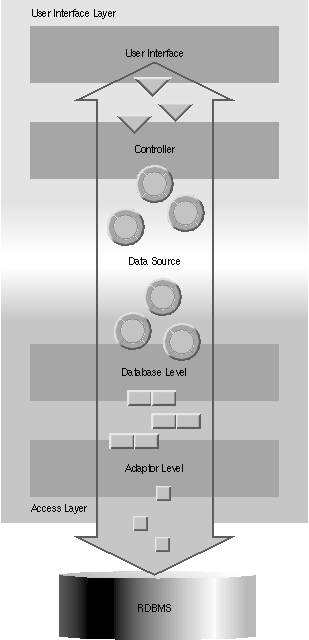
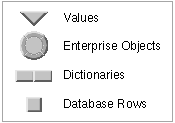
Figure 2: The flow of data through an EOF application
DEVELOPING AN ENTERPRISE OBJECTS FRAMEWORK APPLICATION
The Enterprise Objects Framework allows you to design the architecture of an application at different layers depending on your application requirements. The task of designing the enterprise objects is relatively independent from that of working with the rest of the framework. However, you might decide to work on objects in the lower layers to gain more control over the particular operations of the database you're using, such as update strategy or transaction management; on the other hand, working in the higher layers provides more power in data manipulation.
For example, to create an application that works in a Portable Distributed Objects environment and doesn't have a user interface, you might use the EODatabase and its associated classes, since the application only needs to communicate with the server. Alternatively, you might want to
use the EOController and its associated data source, so that you have two levels of data manipulation--through enterprise objects and through the data source--as well as an undo mechanism,
but still remain removed from many of the internal operations. For example, doing a fetch using the controller hides from you the need to establish a connection to the database or to set up a
qualifier, because it's equivalent to doing a fetch for all objects.
In a complex application you can make use of all layers. However, you should understand the functionality of each layer so you don't implement redundant operations. Please see the NEXTSTEP documentation for further details.
The following sections concentrate on the EOF user interface layer, to show how to manipulate records using the EOController class.
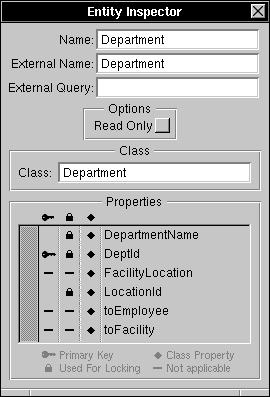
Figure 3: A simple enterprise object that corresponds to the Department table
Two examples are provided with this article, one for use with SYBASE® and another for ORACLE®. The examples will be available as MiniExamples via NeXTanswersTM by the end of June; you can use them with the early access version of the Enterprise Objects Framework. Both examples are based on a demo database called People. The database is available for ORACLE and SYBASE in the form of SQL scripts and model files and will be included with the examples.
Building a model with EOModeler
EOModeler has two main functions:
| Capturing the database schema EOModeler creates a default database schema containing information about entities and attributes--tables and columns in the RDBMS world--that's automatically loaded by the database adaptors. This functionality is very similar to the functionality provided by DBModeler in Database Kit.
Configuring enterprise objects In addition, EOModeler allows you to define properties for either a custom class or an EOGenericRecord. You can now customize the model file to fit your needs, such as by defining which properties are retrieved from the database at run time. This feature is discussed more in detail in the next section. |
The EOModeler has many more capabilities, such as applying a SQL statement to each SELECT operation and "browsing the model," which is equivalent to fetching all records.
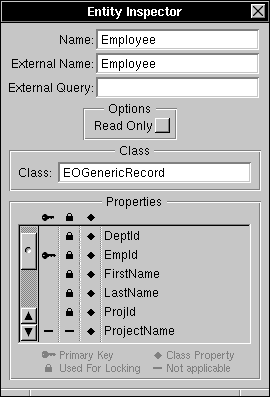
Figure 4: An EOGenericRecord that corresponds to the Employee table
How the EOModel maps to an enterprise object
You use the EOModeler application to define the class name of an enterprise object as well as
the properties included in each class. In the example, we have two types of enterprise object classes: a custom class called Department that's defined programmatically, and a generic class called EOGenericRecord whose API is supplied by the Enterprise Objects Framework. The Department class maps to the Department table and is joined through a one-to-many relationship to the Employee table.
There are three basic steps to map an entity to an enterprise object class:
| 1 | Define the class name of your enterprise object. To do so, select an entity in the model editor and bring up the entity inspector panel. Type the new class name in the Class textfield. As shown in Figure 3, the Department entity Inspector panel shows Department as the new class name. In general, you may want to define your own enterprise object class if you need to specify additional properties that are not defined in the database. For the Employee entity, the default enterprise object class EOGenericRecord is used because only a subset of the properties as defined in the database is needed in the example--see Figure 4. |
| 2 | Define a unique primary key for each entity that is used in the application so that operations such as Fetch, Update, and Delete can take effect. In the example, both Department (the master table) and Employee (the detail table) need to be assigned primary keys. The primary key serves to uniquely identify an enterprise object within an application and to locate a corresponding database row to perform database operations. To build a compound primary key, assign the key icon to more than one property. |
| 3 | By default, all properties defined in the entity are marked as class properties with the diamond icon--see Figure 3 and Figure 4. You may want to remove the properties you don't need by clicking the diamond icon. A SELECT statement will include only the properties that are marked as class properties. In the example, the Department class needs these class properties: DeptID (defined as primary key), DepartmentName, LocationId, FacilityLocation (derived from the one-to-one relationship toFacility), the one-to-one relationship toFacility, and the one-to-many relationship toEmployee. |
How the .eomodel file is used in Interface Builder
IB uses the model file to extract the information about the properties defined for each entity. The model file is transformed into an EOController object when you drag the model file into the
File window. Interface Builder asks if you want to include this model file in your project directory, and asks you that you specify the root entity for this model. The model becomes an EOController with an associated EODatabaseDatasource. The connections from the controller to the user
interface objects are made through associations. In Figure 5, the sybasePeople.eomodel becomes an EOController with an EODatabaseDatasource associated with the Department entity.
The outline view also shows an association between the master EOController (Department) and the detail EOController (Employee) through the one-to-many relationship toEmployee.
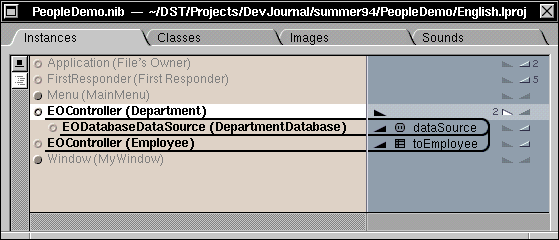
Figure 5: People.eomodel transformed into the Department EOController
You can also use IB to add instance variables that don't correspond to real columns of a table in the database. To do this, select the entity controller. In the PeopleDemo example, the Department controller is selected because its entity corresponds to the Department table. Another instance variable, averageSalary, is added to represent the average salary paid to all employees in the selected department--see Figure 6.
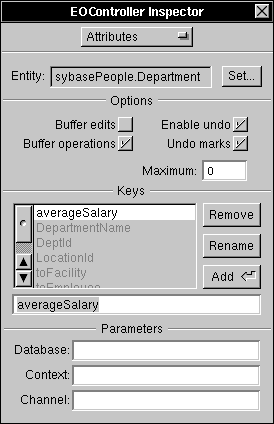
Figure 6:
Adding an instance variable to a custom enterprise object
Warning Don't use EOModeler to include instance variable names that don't map to real column names in the database--the server will complain about unknown column names. Instead, use Interface Builder to add these new keys.
USING THE PEOPLEDEMO EXAMPLE
You can use either of the PeopleDemo examples, one for SYBASE and one for ORACLE, to build a master-detail view of two tables, write a simple enterprise object, and use delegation methods for data validation and debugging. This section highlights only a few interesting points.
Getting connected
If you perform a fetch with the EOController, the connection is established for you automatically with the connection dictionary supplied in the EOModel. Alternatively, if you work at the database level or the adaptor level, you must explicitly establish a connection to the database by using an EOModel or a connection dictionary defined with EODatabase.
In the example, appDidInit: contains a fetch message sent to the controller to establish the connection and display the data.
Data manipulation at the object level or the database level
There are two kinds of bufferings at the controller level, buffer edits and buffer operations. If the NXTableView is made editable and both kinds of buffering are turned off, you can directly update the property defined in your NXTableView column: Just edit that field in the NXTableView and signal that you're done editing by pressing Return. Having both settings turned off immediately sends every edit to the server. When you look at the debugging statements, you'll see that each operation corresponds to a SQL Update statement. Similarly, when you click the Undo button, a new Update statement is generated to return the row to its original value.
If both kinds of buffering are turned on, you must explicitly send a saveToObjects message to the EOController to save changes to your enterprise objects, and you must send a saveToDataSource message to save changes to the database. Note that you can control these bufferings within Interface Builder and with the EOController API.
In the PeopleDemo example, Buffer edits is turned off and Buffer operations is turned on, so that you can control the save operation to the database with a button whose action is saveToDataSource and whose target is the EOController of the Department table.
Reading and writing data to enterprise objects
Data in the enterprise objects are stored in key-value pairs, where the key is the name of the
property as defined in the object, and the value is the data associated with that property. The EOKeyValueCoding protocol is used to read and write data to the enterprise objects; both
NSObject and Object provide categories that implement this protocol.
The protocol method takeValuesFromDictionary: accesses the values of those keys. If an enterprise object class doesn't provide an implementation of this method, the default implementation of takeValuesFromDictionary: of NSObject or Object performs the following tasks:
| · | Search for the selector setIvarName; for example, the setAverageSalary: method accesses the value for the key averageSalary in the PeopleDemo example. |
| · | If there is no such selector, read the value from the instance variable. Note that the instance variable must be of type id. |
The rules are similar for writing values to those keys: The protocol method valuesForKeys: is sent to the enterprise object. If the object class doesn't provide an implementation of this method, the default implementation of valuesForKeys: of NSObject or Object performs these tasks:
| · | Search for the selector ivarName; for example, the averageSalary method is used in the PeopleDemo example. |
| · | If there is no such selector, use the instance variable. Note that the instance variable must be of type id. |
Here's the EOKeyValueCoding protocol; please see the documentation for further details:
@interface Object (EOKeyValueCoding)
- (NSDictionary *)valuesForKeys:(NSArray *)keys;
 // Returns a dictionary providing values for the keys. The default
// implementation searches first for a selector with the same name as the
// key, and then for an instance variable with the same name as the key.
- (BOOL)takeValuesFromDictionary:(NSDictionary *)dictionary;
// Sets properties of the receiver with values from the dictionary.
// Returns YES if the receiver read all values from the dictionary, NO if
// it couldn't take all values. The default implementation searches first
// for a selector named setKey: (where "Key" is replaced by the key in the
// dictionary), and then for an instance variable with the same name as
// the key.
@end
In the PeopleDemo example, an instance variable called averageSalary is added to the Department class to compute the average salary of all employees in a particular department. Since this instance variable doesn't match an internal attribute in the Department entity, this key was manually added in IB. In addition, accessor methods setAverageSalary and averageSalary compute the value and write it back to the enterprise object.
Using delegate methods
The Enterprise Objects Framework provides a rich assortment of delegate methods for all
important classes. The delegation mechanism allows you to either approve or veto an impending action such as UPDATE, INSERT, or DELETE. Delegate methods can also serve as a tool for tracing the chain of events.
In the PeopleDemo example, the following EOController delegate methods validate the DeptId before an actual INSERT or UPDATE operation is performed:
- (BOOL)controller:controller willUpdateObject:object inDataSource:dataSource;
- (BOOL)controller:controller willInsertObject:object inDataSource:dataSource;
Also, this EOAdapterChannel delegate method traces the SQL queries sent to the adaptor:
- (void)adaptorChannel:channel didEvaluateExpression:(NSString *)expression;
MUCH MORE TO LEARN
The material in this article is greatly condensed and can give you only a preview of the Enterprise Objects Framework. To explore the full power of the Enterprise Objects Framework, you can attend a NEXTSTEP training class on the Enterprise Objects Framework or buy a copy of the software when it's available. Have a fun time programming with the new framework.
ENTERPRISE OBJECTS FRAMEWORK TOOLS AND PROGRAMMING TIPS
| · | With Database Kit, when you have made changes to a .dbmodel file, you need to quit IB and restart it so that the changes can become effective. With Enterprise Objects Framework, you no longer have to quit IB. If you need to make changes to the model file, just double-click the model icon inside the IB File window. This in turn launches EOModeler, so you can make changes to your model. All changes to the model are automatically reflected in IB. |
| In the PeopleDemo example, changes made to the Department table in EOModeler are reflected in the nib file because the master EOController is associated with a model file that has been assigned Department as its root entity. However, the detail EOController associated with the Employee entity doesn't pick up the changes--you have to do the editing yourself. | |
| · | When you drop an .eomodel file inside a nib file using Interface Builder, you are asked whether you want to include the file in your project directory. If you do, the model file is installed in the project directory when you build your application. At run time, EOF tries to locate your .eomodel first in your project directory, then in ~/Library/Models, then in /LocalLibrary/Models, and finally in /NextLibrary/Models. |
| · | To load the adaptor dynamically, add this option to your Makefile.preamble: |
OTHER_LDFLAGS = -all_load
| · | If you want to hardlink your adaptor, add one of these options--use the first one if you're accessing a SYBASE database and the second if you're accessing an ORACLE database: |
OTHER_OFILES = /NextLibrary/Adaptors/Sybase.dbadaptor/Sybase
OTHER_OFILES = /NextLibrary/Adaptors/Oracle.dbadaptor/Oracle
| · | To turn debugging on, send the following method to the adaptor channel: |
[adaptorChannel setDebugEnabled:YES];
| This method traces SQL statements sent to the database as well as other adaptor operations like BEGIN/COMMIT TRANSACTION, count of rows fetched, and so on. Note that there are different ways to find the adaptor channel, depending on the level in which you are working. In the example, the adaptor channel is derived from the EOController data source.
Note This debugging mode is pretty verbose, so you might want to selectively turn it on or off inside your application depending on your debugging needs.--MN |
Mai Nguyen is the Developer Support Team's database specialist. You can reach her by e-mail at Mai_Nguyen@next.com.
__________________________________________________________________________________
| Next Article | NeXTanswer #1995 Sneak Preview: The New Foundation Kit |
| Table of contents | http://www.next.com/HotNews/Journal/NXapp/Summer1994/ContentsSummer1994.html |