OpenStep Journal, Spring 1995 (Volume 1, Issue 1).
Copyright ©1995 by NeXT Computer, Inc. All Rights Reserved.
Realities of Distributed Objects
Written by Brian Raymor and Randy Tidd
|
Although the design of the Distributed Objects and Portable Distributed Objects architectures is elegant and simple, creating working applications with them can be complex. A thorough understanding of Mach interprocess communication and the details of distributed environments can drastically improve a developer's ability to use these powerful tools. This is the first installment of a series of articles on developing real-world distributed applications in NEXTSTEP. It focuses on registering and connecting to servers. |
SHAKE OFF THE ENCHANTMENT
The Distributed Objects (DO) interface offers the means to seamlessly add distributed capabilities to an application. Its simplicity is startling and deceptive. Often, developers rush to write their first DO application and are perplexed by obscure failures. They are vaguely troubled by differences in performance between local and remote method invocations.
We have reviewed many distributed applications written by customers. In doing so, we've discovered implementations where message size, message frequency, and number of clients per server weren't considered in the design phase. Immense data sets were blithely sent across networks, creating congestion. For a time, we were deeply puzzled by such behavior, until we realized that DO enchants and seduces the unwary. Developers seem to forget that distributed applications can fail or degrade in so many creative ways. A server application can disappear as its host machine is rebooted. A machine can become inaccessible because its network connection is severed. Designing a distributed application can offer a valuable education in failure.
As developers, we appreciate that the behavior of DO is not always intuitive. We also realize
that many developers have limited experience with the Mach kernel and its interprocess communication (IPC) model. To address these issues, we're presenting a series of articles to explore Distributed Objects, Portable Distributed Objects (PDO), and distributed application design. This series is not intended to be an introduction to distributed architectures, but some basics will be reviewed to provide a foundation for our discussions. Later in the series, we will go beyond the basics and look at the realities of distributed environments.
This first article focuses on registering and connecting to servers. The key to understanding the topic is knowing the behavior of the system based on one reference implementation--Mach IPC. To begin, we'll examine the Network Name Service.
NETWORK NAME SERVICE
In distributed applications, a client process needs to locate and establish a connection with one or more server processes. The client code could contain static information to find the appropriate server, but this approach is limited. What would happen if a server process were not available on a particular host? The client needs to look up server information in a more dynamic fashion.
Network Name Servers offer this capability by maintaining a list of available servers on a particular host. When a server process launches, it registers its name and some connection information with the local Name Server. If the client knows the registered name for a particular server, it can query the Name Server on that host for the associated connection information. The client then uses this information to establish a connection with the server process.
Server Registration
A Distributed Objects server registers its name and a root object using the class method registerRoot:withName:. For example, the following code fragment instantiates a root object known as serverObject and registers it with the name SERVER_NAME:
#define SERVER_NAME "myServer"
id serverConnection;
ServerClass *serverObject = [[ServerClass alloc] init];
serverConnection = [NXConnection registerRoot:serverObject withName:SERVER_NAME];
To send messages to the server, a client needs to have access to serverObject, the root object. It contacts the Network Name Server and requests the root object associated with the advertised SERVER_NAME. If this request is successful, a proxy (or placeholder) to serverObject is returned to the client. The client then communicates with the server by sending messages to the proxy, which forwards the message to the real object in the server process.
We will discuss proxies in more detail in our next article. For now, the following definition from the NEXTSTEP General Reference will suffice:
 The NXProxy class defines objects that are used to stand in for real objects (descendants of the Object class), where the real objects may exist within another process, even across a network.
To the application, the NXProxy appears to be the real object, though the real object may not be directly accessible. The real object is known as the proxy's correspondent, indicating both that
the objects are counterparts and that the real object is required to respond to messages sent to
the proxy.
The server can also restrict access to its root object by not advertising its availability with the Network Message Server. It establishes its root object with the class methods registerRoot: or registerRoot:FromZone: and then vends connection information to private clients.
Our next article will demonstrate establishing root objects and vending information to private clients.
You might think, "What could be easier than registration?" However, there are multiple possibilities for failure that aren't apparent from the documentation. To understand potential conflicts, an introduction to interprocess communication in Mach is helpful.
Mach Interprocess Communication
The Network Message Server actually has many responsibilities in addition to naming services that are beyond the scope of this article. To find out more, see Programming Under Mach and the Mach web page (noted in the References for this article).
The Network Message Server (also known as netmsgserver or nmserver) acts as a Network Name Server in Mach. Mach interprocess communication is accomplished using ports. A port is a communication channel, logically a message queue protected by the kernel. It is important to
note that the message queue has a finite length. This feature will prove important in understanding later articles in the series. When a process sends a message to a remote port, the message is queued until it is received by another process. If the queue is full, the send operation blocks until space is available to enqueue the new message. The sending process can choose to wait infinitely or allow the operation to time out after a specified period.
In addition, access to ports is restricted. Only one process can have receive rights for a port; it's
the only process that can receive messages on that port. Multiple processes can have send rights for a port; each can send messages to a port.
When a server process launches, it allocates a port for receiving messages (requests) from clients and registers send rights to this port with the Network Message Server. A client process can
look up the server based on its name and acquire a copy of these send rights. The client can then send messages to the server.
In PDO, the Mach IPC primitives are implemented in the Mach daemon (machd).
The function netname_check_in() registers send rights for the port named by SERVER_NAME with the local Network Message Server. For clarity, error checking has been eliminated from the code fragments:
/*
* The server allocates and registers a port with the Network Message Server.
*/
#import <mach/mach.h>
#import <servers/netname.h>
#define SERVER_NAME "myServer"
port_t a_port;
port_allocate(task_self(), &a_port);
netname_check_in(name_server_port, SERVER_NAME, PORT_NULL, a_port);
The function netname_look_up() returns send rights to the port named by SERVER_NAME
by questioning the Network Message server on the host named by the HOST_NAME parameter. Thus this call is a directed name lookup. The HOST_NAME may be any of the host's official nicknames. If it's an empty string, the local host is assumed. If HOST_NAME is "*", a broadcast lookup is performed.
/*
* The client queries the Network Message Server for the port associated with
the registered server name.
*/
#import <mach/mach.h>
#import <servers/netname.h>
#define HOST_NAME "myHost"
#define SERVER_NAME "myServer"
port_t a_port;
netname_look_up(name_server_port, HOST_NAME, SERVER_NAME, &a_port);
You may have seen stern warnings in the NEXTSTEP documentation like this:
Important: Use NXPortNameLookup() instead of netname_look_up() in all
NEXTSTEP applications.
Despite these notes, we continue to use the original functions netname_check_in and netname_look_up because the convenience functions don't return valuable error conditions
that assist with diagnostics.
Common Problems in Registration
Now that we've reviewed Mach IPC, we can return to how errors might occur during registration and connection.
Server name length is limited
The declaration for the function netname_check_in specifies that the SERVER_NAME must be a netname_name_t. This typedef is found in <servers/netname_defs.h>:
typedef char netname_name_t[80];
The SERVER_NAME is limited to 80 characters, including a terminating NULL character.
Server names must differ from application names
When a server is a NEXTSTEP application, the application name shouldn't be used to register the server with the Network Message Server. For example, RemoteSpot.app should not use
"RemoteSpot" as its name. Furthermore, no mixed-case or lowercase variation of the application name should be registered, since the Network Message Server is case-insensitive.
If you don't observe these guidelines, your application will fail under certain circumstances. Current NEXTSTEP applications use the Speaker-Listener model for interapplication communication. If your application doesn't instantiate them, a default Listener and Speaker are automatically created at startup before the Application's run method receives the first event.
When the Listener is created under these circumstances, a port is allocated and checked in under the name returned by the appListenerPortName method in the Application class. When the PublicWindowServer preference is enabled, the default name is the application name.
If you examine the information from a debugging session in Figure 4, you can see that "RemoteSpot" is registered with the Network Message Server.
Breakpoint 1, -[Thinker appDidInit:] (self=0xe0ea8, _cmd=0x618a152, sender=0xd738c) at Thinker.m:32
(gdb) p *(Listener *) [NXApp appListener]
$7 = {
isa = 0x61623e8,
portName = 0xda5e4 "RemoteSpot",
listenPort = 24,
signaturePort = 23,
delegate = 0xd738c,
timeout = 60000,
priority = 1,
_delegate2 = 0xe0ea8,
_requestDelegate = 0x0,
_reservedListener2 = 0
}
(gdb) p *(NXPort *) [NXNetNameServer lookUpPortWithName: [NXApp appName]]
$8 = {
isa = 0x40183e8,
refcount = 1,
isValid = 1 '\001',
listGate = 0x0,
funeralList = 0x0,
machPort = 24,
deallocate = 0 '\000',
_enableCount = 0,
_enableProc = 0x0,
_enablePriority = 0x0,
_expansion = 0x0
}
Figure 4: Finding the registered port name while debugging
When the PublicWindowServer preference is disabled, problems seem to disappear. This is rather mysterious. The difference occurs due to the use of secure ports. When this preference is disabled, the ports of Listener objects are securely registered under modified names with the Network Message Server. In this case, there is no conflict due to the modified name. As Figure 5 shows, the port has been registered under RemoteSpotWorkspace$148650491:
Breakpoint 1, -[Thinker appDidInit:] (self=0xe0ebc, _cmd=0x618a152, sender=0xd738c) at Thinker.m:32
(gdb) p *(Listener *) [NXApp appListener]
Reading in symbols for appkit_globals.m...done.
$1 = {
isa = 0x61623e8,
portName = 0xd78e8 "RemoteSpotWorkspace$148650491",
listenPort = 24,
signaturePort = 23,
delegate = 0xd738c,
timeout = 60000,
priority = 1,
_delegate2 = 0xe0ebc,
_requestDelegate = 0x0,
_reservedListener2 = 0
}
Figure 5: With the PublicWindowServer preference disabled
Note that the application name hasn't been used to register the port with the Network
Message Server:
(gdb) p (NXPort *) [NXNetNameServer lookUpPortWithName: [NXApp appName]]
$3 = (struct NXPort *) 0x0
CONNECTING TO THE SERVER
A Distributed Object client returns a proxy to the server object registered with the Network
Name Server using the connectToName:onHost: class method. For example, the following code fragment returns the root object for the server that registered its name as SERVER_NAME:
#define HOST_NAME "myHost"
#define SERVER_NAME "myServer"
id server = [NXConnection connectToName:SERVER_NAME onHost:HOST_NAME];
The HOST_NAME parameter determines which Network Message Server to query for information on SERVER_NAME. If HOST_NAME is explicitly specified, this method queries the Network Message Server on HOST_NAME for the object registered under SERVER_NAME.
If HOST_NAME is NULL, this method queries the Network Message Server on the local host. If HOST_NAME is "*", this method queries the Network Message Server on each machine on the subnet until it finds an object registered under SERVER_NAME.
If this operation fails, nil is returned. It's helpful to use the function netname_look_up() to determine the cause of the failure:
#define HOST_NAME "myHost"
#define SERVER_NAME "myServer"
port_t a_port;
kern_return_t error;
error = netname_look_up(name_server_port, HOST_NAME, SERVER_NAME, &a_port);
if (error != NETNAME_SUCCESS)
mach_error("connection failed", error);
Sometimes, the errors are simple. The SERVER_NAME or HOST_NAME is incorrect. In
other cases, there are underlying errors in the network configuration that require the assistance of system administrators.
Using Broadcast Lookups to Find a Server
Both the function netname_look_up and the class method connectToName:withHost: allow a client application to specify a broadcast lookup for a server. We encourage you to limit or avoid this feature.
A broadcast lookup is not optimal. To locate the server name, many Network Message Servers might be queried while your application waits. Developers, unlike system administrators, are not always certain about the boundaries of their subnet. It is also possible for unrelated server applications to register the same server name with different Network Message Servers. If a broadcast lookup is specified, the first Network Message Server to respond determines which server will be used by the client. In this scenario, the client might connect to the wrong server.
Using NetInfo and the defaults database to locate servers and hosts
Experienced developers often search for the equivalent of getrpcent(3N) or getservent(3N). However, there is no interface to return the list of available server names to a client process. The client and server must agree on the registered name in advance for the rendezvous to succeed.
It is possible to store server information in either the defaults database or as properties in a NetInfo directory. For example, the name of the server, the name of the host machine, and the default timeout value for the connection might be stored in the root level of your NetInfo hierarchy:
niutil -read / /locations/myServer
name: myServer
server: myHost
timeout: 5
When the client application is launched, it obtains this information from NetInfo and uses it to initialize its connection parameters.
Mach Ports and NXConnection
Each connection manages two NXPort instances that can be accessed through the inPort and outPort methods. NXPort is a convenience class that defines an object-oriented interface to Mach ports. The connection receives incoming messages on its inPort. The outPort identifies the remote port (the server) where messages are sent. See Figure 6.
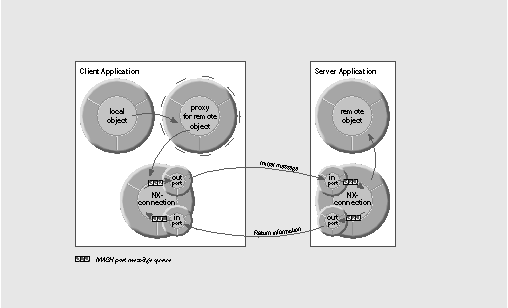
Figure 6: Communication through Mach ports
In NXPort, the machPort method allows access to the actual Mach port. Here's a code fragment that demonstrates how to access a Mach port associated with a connection:
port_name_t in_port;
in_port = [[[serverConnection] inPort] machPort];
Using this returned Mach port, the application can query the port for status information such as the length of the queue and the number of waiting messages. For example, the following fragment returns information for the inPort on the connection:
int messages_queued;
int backlog;
boolean_t owner, receiver;
port_set_name_t port_set_name;
port_status(task_self(),
in_port,
&port_set_name,
&messages_queued,
&backlog,
&owner,
&receiver);
In this example, messages_queued returns the number of messages queued on the port. backlog returns the message queue length, the number of messages that can be queued to this
port without causing the sender to block. When the port was allocated, its backlog was set to PORT_BACKLOG_DEFAULT. The maximum backlog can be set to PORT_BACKLOG_MAX. These definitions are found in <mach/port.h>:
#define PORT_BACKLOG_DEFAULT 5
#define PORT_BACKLOG_MAX16
The port_set_backlog() function can be used to increase the message queue length (backlog). For example:
port_set_backlog(task_self(), in_port, PORT_BACKLOG_MAX);
Using port_status(), an application can compare messages_queued and backlog to determine whether the server is taking too much time in processing requests from its message queue.
RUNNING THE CONNECTION
When a server registers its SERVER_NAME using a class method such as registerRoot:withName:, a NXConnection instance is created and returned. To allow the connection to receive and dispatch incoming messages (requests), the server must "run"
the connection. This is accomplished using one of the variations on the run method: run, runWithTimeout:, runFromAppKit, and runInNewThread. We will cover DO programming with multiple threads in a future article, so we'll talk about runInNewThread later. run is just a cover for runWithTimeout: with an infinite timeout (-1).
Running a connection allows it to process incoming messages on its Mach inPort.
Calling runInNewThread makes your application multithreaded but doesn't call
objc_setMultiThreaded(). You must call it yourself or your Objective C runtime may be corrupted by the multiple threads. See the documentation on objc_setMultiThreaded() for more details. We'll discuss this and other multithreaded issues in a future article.
Running Non-Application Kit Servers
You may need a process that isn't Application Kit-based--that is, a UNIX server or daemon process for which there's no Application instance and no windows, nibs, or UI. For example, all PDO processes are non-Application Kit UNIX processes. For these, you should run your connection with NXConnection's run or runWithTimeout: methods. This actually initiates an event loop to wait for and process incoming DO messages (but not port death notification messages, as we'll explain later). Since these methods block, the process can't do anything except wait for incoming DO messages. They don't normally return unless an uncaught exception is raised. You would usually call one near the end of the main() routine in your server process, as demonstrated below:
#import <remote/NXConnection.h>
#define SERVER_NAME "myServer"
void main(int argc, char *argv[]) {
ServerClass *server = [[ServerClass alloc] init];
id serverConnection;
serverConnection = [NXConnection registerRoot:server withName:SERVER_NAME];
[serverConnection run]; // shouldn't return
exit(0);
}
In this example the process will never exit unless an uncaught exception is raised during the run method. Typically your server process will have an exception handler surrounding the call to run, and you can catch UNIX signals to gracefully exit the process. A more robust example of a server process with these features will be provided in a future article.
Running Application Kit-Based Servers
See the Events chapter of the NEXTSTEP Concepts manual for more information on different
kinds of events, and see the Application class specification for more on the Application class and its event loop.
If your application is Application Kit-based--that is, if your application has at least an Application instance that is sent a run message and maybe also has windows, nibs, an app wrapper, and so on--you should instead use runFromAppKit. This registers a port handler for the registered inPort with the Application's event loop. Incoming DO messages that arrive will be added to the event queue as a DPS event, and this event loop will process and dispatch them. Using runFromAppKit allows the process to receive both regular DO messages and port
death notification.
For example, in this case a client is connecting to a server at appDidInit: time and then running the connection so that it can receive messages from the server.
#import <remote/NXConnection.h>
#define SERVER_NAME "myServer"
- appDidInit:sender
{
ServerClass server = [[ServerClass alloc] init];
id serverConnection;
serverConnection = [NXConnection registerRoot:server withName:SERVER_NAME];
[serverConnection runFromAppKit]; // doesn't block
/* processing continues */
return self;
)
A common misconception regarding runFromAppKit is that this method forks a new thread to listen for incoming DO messages. Not true: This is actually what runInNewThread does. Instead, runFromAppKit only registers a port handler with the DPS server. Thus, incoming DO messages are placed on the event queue and processed serially in order with all other
application events.
Receiving Unsolicited Messages from the Server
(Running Clients)
We will discuss sending and receiving messages in more detail in a future article.
According to the NXConnection class reference:
If this connection will be used to receive remote messages (as is the common case), you will need to run it by sending it a variation of the run message. A connection that isn't run
will dispatch incoming messages only while it awaits a callback in response to a locally
initiated message, so unsolicited remote messages will not be handled in a timely manner.
To get the connection of the returned proxy (in order to run it), use NXProxy's
connectionForProxy method.
In the default case, clients receive unsolicited (or asynchronous) messages from the server only while waiting for a response from the server. Such unsolicited messages could remain in the queue for some time, which is not the desired behavior for some designs. Consider the talk(1) program in UNIX. It copies lines from your terminal to that of another user. If this program were implemented with Distributed Objects, the server would send messages to its clients as characters were typed into a window. The client didn't initiate the request for this information, so it must be prepared to receive the unsolicited messages; otherwise, the messages would languish in its queue until the client sent a message that required a response to the server.
The following code fragment allows a client to receive such messages by sending the runFromAppKit message to the connection of the returned proxy:
id proxyToServer;
proxyToServer = [NXConnection connectToName: SERVER_NAME onHost: HOST_NAME];
[[proxyToServer connectionForProxy] runFromAppKit];
One of the other run methods can be used to run the connection, as described earlier.
Writing Your Own Event Loop
Let's look closer at NXConnection's run and runWithTimeout: methods. They essentially loop while the connection is valid, and they check the NXConnection's Mach inPort for pending messages. When they see a pending message, they decode it and dispatch it to the application objects. However, this mechanism is limited because it allows you to receive messages from
only a single Mach port; messages coming from other sources, such as file descriptors or DPS timed entries, are ignored.
For more on processing events, see the description of DPSGetEvent() and its related functions in the ClientLibFunctions section of the NEXTSTEP documentation.
PDO provides the DOEventLoop class to handle this exact situation. However, DO on NEXTSTEP doesn't provide such a class, so you may need to write your own event loop. The steps you need to go through are these:
| 1 |
Establish DO connections to remote processes with connectToName or one of its derivatives. |
|
| 2 |
Establish the DPS timed entry, socket connections, or any other event sources that you want to handle. For file descriptors, call DPSAddFD(). |
|
| 3 |
Call runFromAppKit to register the port handler created by the NXConnection with the DPS system. runFromAppKit actually has no Window Server or Application Kit dependencies that prohibit its use in a non-Application Kit process. All it does in this case is register the Mach inPorts with the DPS system. |
|
| 4 |
Loop around NXGetOrPeekNextEvent() or an equivalent, handling events and processing them. |
For example, Figure 7 shows a custom event loop. The simple main() routine connects to a remote object, registers a DPS timed entry, and listens on a socket FD, processing events from these sources.
#import <remote/NXConnection.h>
void main(int argc, char *argv[]) {
id serverProxy, serverConnection;
DPSTimedEntry timedEntry;
int socketHandler;
/* Establish connection to remote process */
serverProxy = [NXConnection connectToName:SERVER_NAME];
serverConnection = [serverProxy connectionForProxy];
/* Call runFromAppKit even though we don't have an Application. This */
/* doesn't start an event loop, just registers our inPort */
[serverConnection runFromAppKit];
/* Establish our DPS timed entry, assume that timedEntryFunc exists */
timedEntry = DPSAddTimedEntry(1.0, &timedEntryFunc, NULL, NX_BASETHRESHOLD);
/* Start listening on a file descriptor */
/* Assume that socketHandler is established for the sake of this example */
/* Also assume that socketFunc exists */
DPSAddFD(socketHandler, &socketFunc, NULL, NX_BASETHRESHOLD);
/* Receive invalidation notifications */
[NXPort worryAboutPortInvalidation];
/* Loop infinitely, though a robust example would check a status flag */
while(1) {
NX_DURING
DPSGetEvent(DPS_ALLCONTEXTS, &event, NX_ALLEVENTS, NX_FOREVER,0);
NX_HANDLER
/* handle exceptions ... */
NX_ENDHANDLER
/* process the event ... */
}
exit(0);
}
Figure 7: A custom event loop
Registering for Invalidation Notification
DO provides a mechanism whereby you can be notified when an NXConnection instance becomes invalid.This lets a client process know that its server has died or lets a server know that one of its clients has died. Notification is accomplished by passing an object that conforms to the NXSenderIsInvalid protocol to NXConnection's registerForInvalidationNotification: message (inherited from NXInvalidationNotifier).
When a remote app exits, its connections become invalid, which in turn causes its mach ports to be deallocated, which in turn triggers the senderIsInvalid: mechanism. Normally an application registers a root object with the name server, and the object stays registered until the process exits; "unregistering" an object is not strictly supported. This is discussed below in "Unregistering the Server." (For more information on registering a root object, see "Server Registration" in the early part of this article.
There must be a mechanism for the senderIsInvalid: message to get to the registered object.
If you run your connection with runFromAppKit, then the senderIsInvalid: message is received via the Application Kit event loop and this is not an issue. However, if you are using run or runInNewThread or if you aren't running the connection at all (if the process doesn't need to receive unsolicited messages), you need to use NXPortPortal's worryAboutPortInvalidation. This forks a separate thread that does nothing but wait for port death notification, a special kind
of Mach message. The additional thread is very lightweight since it does no other work, so you don't need to worry about any potential performance impacts of this. However, because of the separate thread, the object that receives the invalidation notification must be thread safe.
There are a few gotchas with the senderIsInvalid: mechanism:
 |
When the DO system goes to send your object the senderIsInvalid: message, it checks that your object responds to the NXSenderIsInvalid protocol with conformsTo:. It doesn't use respondsTo:@selector(senderIsInvalid:). Because of this, the object that you use to register for invalidation notification must have the protocol listed after its interface declaration--merely implementing the method isn't enough. Here's a sample @interface declaration: |
@interface MyObject : Object <NXSenderIsInvalid>
The compiler will then check and make sure that this object implements the
senderIsInvalid: method, the only method in the NXSenderIsInvalid protocol.
|
For clients, normally you would connect to the server with connectToName: or one of its derivatives. However, this method actually returns an NXProxy instance--therefore the following code is incorrect because connectionToServer will be an NXProxy instance: |
id connectionToServer = [NXConnection connectToName:"Foo"];
[connectionToServer registerForInvalidationNotification:self];
Instead, the correct way to call this is:
id proxyToServer = [NXConnection connectToName:"Foo"];
id connectionToServer = [proxyToServer connectionForProxy];
[connectionToServer registerForInvalidationNotification:self];
|
In some circumstances (to be discussed in a future article), NXConnection objects can be created for your application implicitly by the DO system as objects are vended to processes other than the one that you originally connected to. If this happens, you won't be notified |
automatically of port deaths for the new NXConnection instances. Your application must become the delegate of the first NXConnection instance that you create and respond to the connection:didConnect: delegate message. The new NXConnection is passed to this routine, which gives you an opportunity to register for invalidation notification with
that connection.
Implementing senderIsInvalid:
It's important to realize that the senderIsInvalid: message is sent to registered objects while the DO system is cleaning up after a connection has become invalid. The sender of this message (passed in as the sender parameter) is an NXConnection instance. Its invalidation method looks something like this:
- invalidate
{
if([self isValid]) {
...
send senderIsInvalid: to every object that has registered
... do some more processing ...
}
return self;
}
The intent is for the DO system to give you a hook to do application-specific cleanup as a
result of a connection becoming invalid, and the sender parameter is intended to give you a way
of determining which connection became invalid. It's not intended as a way for you to modify the internals of DO, since the system is in a very delicate state while it is invalidating connections.
It's essential that you don't attempt to message or free the sender of senderIsInvalid:,
which would cause unidentified errors and a possible crash when a message is sent to a freed object, because the sender will be busy processing after it sends all objects their senderIsInvalid: messages.
If a client process that depends on a server process receives senderIsInvalid:, indicating that the server process has quit, the client really has only two options: Quit or attempt to reconnect. It's best not to reuse the sender of senderIsInvalid: to reconnect to the server. Instead, try to establish a new connection and let the old one finish the process of invalidating itself. Again this is because the connection is in an uncertain state when it sends the senderIsInvalid: message.
A good way to make use of senderIsInvalid: is to keep a list of objects (that is, clients) that you communicate with and, when a senderIsInvalid: message is received, determine which object's connection became invalid and remove the appropriate client from the list. You can do this by going through the sender's local object list, obtained with NXConnection's localObjects method. Because each process has one NXConnection for each other process that it communicates with, the sender of senderIsInvalid: lets you determine which process's connection became invalid, and the localObjects array is a list of all the proxies to that process.
When calling localObjects, remember to free the List object that's returned by that method but not the objects it contains.
The code fragment below demonstrates how to iterate through the localObjects List and discover which client's connection became invalid. For example, assume clientList is a list of NXProxys that represent the clients:
- senderIsInvalid:sender
{
/* clientList is our own list of NXProxys that we communicate with */
/* simply go through
List *localObjects = [sender localObjects]; /* sender is an NXConnection */
int i;
for(i=0; i<[localObjects count]; i++) {
unsigned int index;
id localObject = [localObjects objectAt:i];
if( (index = [clientList indexOf:localObject]) != NX_NOT_IN_LIST) {
[clientList removeObjectAt:index];
}
}
return self;
}
Because the senderIsInvalid: mechanism is best used solely for error recovery, it is often beneficial to implement a system whereby processes check in and out with one another and to use senderIsInvalid: only for recovering from errors. A simple protocol consisting of "hello" and "goodbye" messages, with each process keeping a list of remote objects that it communicates with, is a good start. We'll provide an example of this as well as address some other DO system design issues in a future article.
Unregistering the Server
Distributed Objects does not include an interface to explicitly unregister a SERVER_NAME from the Network Message Server. To prevent new clients from locating and connecting to the server, you can remove the server's name from the Network Message Server using this category:
@implementation NXConnection(unregister)
+unregisterRootWithName: (const char *)name
{
return [NXNetNameServer checkOutPortWithName: name];
}
@end
Existing clients will still be able to send and receive requests from the server. This code fragment will terminate connections with existing clients:
port_deallocate(task_self(), [[serverConnection inPort] machPort]);
In this case, clients will receive the senderIsInvalid: notification in response to the
port deallocation.
SAME BAT TIME, SAME BAT CHANNEL
Your server is registered. Its client is connected. What do you do now? With any luck, you'll impatiently wait for the next installment in our series.
The next article will demonstrate how to send and receive messages. We'll discuss the differences between asynchronous and synchronous messages, and again we'll reference the Mach IPC implementation. In addition, we'll reveal more details about the Network Message Server. We might even explain the mystifying "tossing received reply" message.
Brian Raymor is a member of NeXT's Premium Developer Support team. You can reach him by e-mail at Brian_Raymor@next.com. Please feel free to send him comments and suggestions regarding this article.
Randy Tidd is a member of NeXT's Premium Developer Support team as well. He specializes in DO, PDO, Foundation Kit, and EOF support. You can reach him at randy@blacksmith.com.
The authors would like to thank David Bohman, Alan Freier, and Blaine Garst for reviewing this article. In addition, they'd like to thank Allan Nathanson and Joe Keenan for their patience in answering naive questions about NetInfo and other systems-related issues.
References
Boykin, Joseph, David Kirschen, Alan Langerman, and Susan LoVerso. Programming Under Mach. New York: Addison-Wesley, 1993. ISBN020152739-1.
Corbin, John R. The Art of Distributed Applications: Programming Techniques for Remote Procedure Calls. New York: Springer-Verlag, 1991. ISBN0-387-97247-1.
Gamma, Erich, Richard Helm, Ralph Johnson, and John Vlissides. Design Patterns: Elements of Reusable Object-Oriented Software. New York: Addison-Wesley, 1995. ISBN 0-201-63361-2.
Goscinski, Andrzej. Distributed Operating Systems: The Logical Design. New York: Addison-Wesley, 1991. ISBN 0-201-41704-9.
Mach web page, located at:
http://www.cs.cmu.edu:8001/afs/cs.cmu.edu/project/mach/public/www/mach.html
Pittsburgh, PA: Carnegie Mellon University.
Waldo, Jim, Geoff Wyant, Ann Wollrath, and Sam Kendall. A Note on Distributed Computing. SMLI TR-94-29, November 1994.
__________________________________________________________________________________
| Next Article |
NeXTanswer #1987 |
The Village Smithy |
| Previous article |
NeXTanswer #1991 |
Writing Device Drivers in an Object-Oriented World |
| Table of contents |
http://www.next.com/HotNews/Journal/OSJ/SpringContents95.html |