 __________________ Pin Signal
( 1 2 3 4 5 ) --- ------
\ o o o o o / 2 Receive Data\ 6 7 8 9 / 3 Transmit Data\ o o o o/\_________/
TTY Connections Through the Serial Port
Q: How do I use the serial port as a tty connection?
A: It is pretty much a plug-n-play operation once you have enabled the serial port to be accessed as a tty. You will need a terminal or a communications program which will run on whatever machine you plug into the serial port.
1) As root, edit the file "/etc/ttys" and set a terminal type and baud rate. Be sure to change the "off" to "on". (See "/etc/gettytab" for help in assigning a baud rate. Read the "man" page on "gettytab" and "getty" for more help.) Save the changes and power down.
Default entries in "/etc/ttys" shown below.
ttya "/usr/etc/getty std.9600" unknown off secure
ttyb "/usr/etc/getty std.9600" unknown off secure
2) You will need a null-modem serial cable. This cable switches the transmit and receive wires between the two plugs. Turn both systems off and plug this cable into the serial ports of the two machines.
PC serial port:
__________________ Pin Signal
( 1 2 3 4 5 ) --- ------
\ o o o o o / 2 Receive Data
\ 6 7 8 9 / 3 Transmit Data
\ o o o o/
\_________/
NeXT serial port:
(see "man zs" located online). Serial ports A and B use 8-pin miniature DIN (MiniDIN-8) connectors. Both ports on a 68040-based NeXT computer are RS-423 compatible; the ports on a 68030-based NeXT computer are RS-422 compatible (though different). The following diagram and table describe the pin configuration of each port: Pin 3 is Transmit Data and pin 5 is Receive Data. (see Appendix B:Cabling in the System Administration Guide located online)
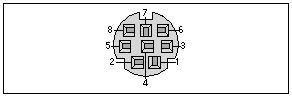
Mini-din signals on 68030 systems
Pin Signal
1 DTR Data Terminal Ready
2 DCD Data Carrier Detect
3 TXD- Transmit Data Minus
4 GND Signal Ground
5 RXD- Receive Data Minus
6 TXD+ Transmit Data Plus
7 A: RTXC Receive Clock
B: +5v +5 volts
8 RXD+ Receive Data Plus
NOTE: Previous NeXT documentation incorrectly referred to
pin 2 as CTS.
Mini-din signals on 68040 systems
Pin Signal
1 DTR Data Terminal Ready
2 DCD Data Carrier Detect
3 TXD Transmit Data
4 GND Signal Ground
5 RXD Receive Data
6 RTS Request To Send
7 RTXC Receive Clock
8 CTS Clear To Send
3) Match the settings of your terminal or terminal emulator with those you have selected in "/etc/ttys". The default setting specified in "/etc/gettytab" will accept tty connections with even parity, 7 bits and 1 stop bit ;(E71). PC users will need to specify which com port the terminal program is to use and make sure that the port is enabled in their system's BIOS.