NEXTSTEP for Intel Processors
Title: Intel Token Express Token Ring Adapter
Entry Number: 1519
Last Updated: <<Date June 17, 1997>>
Product Vendor:
Intel
+1 (800) 628 8686 USA toll-free (customer service) phone
+1 (916) 356 3600 bulletin board system (OEM components)
+1 (800) 897 2536 USA toll-free bulletin board system
 (OEM components), viewing only
+1 (800) 628 2283 faxback system (OEM components)
+1 (503) 645 6275 bulletin board system (reseller information)
+1 (800) 525 3019 USA toll-free bulletin board system
(reseller information), viewing only
+1 (916) 356 3105 faxback system (reseller information)
+1 (916) 356 6100 fax (customer support)
WWW: http://www.intel.com/
Keywords: Intel, TokenExpress, IBM, Token-Ring
Usage Commentary:
The Intel TokenExpress ISA/16s LAN adapter provides networking at 4 and 16 Mbs in compliance with the Token Ring 802.5 spec.
The TokenRing driver included with NEXTSTEP also contains support for the16Mbs Early Token Release (ETR) protocol.
Setup and Installation:
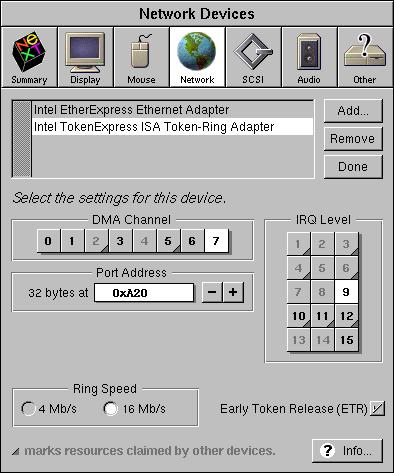
Once physically installed, use Configure to create an entry for the adapter. No special jumper settings are required. Then, run the MS-DOS based utility, "TOKENSET", provided on the configuration diskettes provided with the adapter. Use "TOKENSET" to set the configuration to match that in Configure. Below are the default settings for the card as shipped from the factory. The graphic that follows is a snapshot taken from an Epson Progression system running NEXTSTEP 3.2, with an Intel TokenExpress adapter installed. (For ASCII email requests the IRQ is set to 9, DMA channel 7, and port address 0xA20 in this example.)
Intel TokenExpress default TOKENSET settings:
Ring Speed: 4Mbs
Interrupt Level: 2 (for 8-bit slots) 9 (for 16-bit slots)
Cable Type: UTP or STP detected automatically
I/O Address: A20-A23 & A30-A3F
DMA Channel 5 (in 16-bit slots) I/O (in 8-bit slots)
RPL ROM: none
Configure Snapshot from working Epson Progression with TokenExpress Adapter:
Known Problems:
Release 3.3
|
See NeXTanswers document 1793_Intel_TokenExpress_Driver_Overview.rtf |
Release 3.2 and 3.1
 |
Problem: TokenExpress inspector does not correctly display the IO ports used by the card |
|
|
Reference: 40507 |
|
|
Description: The TokenExpress inspector always shows an IO port mapping of 32 bytes starting at the specified address. In fact,
the card uses only 20 ports mapped in two discontiguous locations. There are 4 possible mappings for the card: |
|
|
0xa20-0xa23 and 0xa30-0xa3f
0xa24-0xa27 and 0xa40-0xa4f
0xa50-0xa53 and 0xa60-0xa6f
0xa54-0xa57 and 0xa70-0xa7f |
|
|
Since one can only specify a single range of ports with Configure's UI, the original attempt was to include the range of 0xa20-0xa3f, which is 32 bytes. |
|
|
Workaround: When configuring the TokenExpress driver simply edit the IO ports field to contain the proper starting address of the first port range, either 0xa20, 0xa24, 0xa50, or 0xa54. The number of bytes mapped will be incorrect so conflict checking will be unreliable, but the driver will properly find a card mapped at the specified location. |
|
|
Problem: TokenExpress prints 'bad eerom checksum' and aborts |
|
|
Reference: 38332 |
|
|
Description: The 3.2 TokenExpress driver does not have a robust probe mechanism and often does properly locate the card's IO ports, causing the driver to abort. |
|
|
Workaround: None. |